


New Participant
May 26, 2021
Answered

Text in text field moves when selected

  • May 26, 2021
  • 6 replies
  • 16225 views

So I just spent an age creating a pdf with editable text fields.

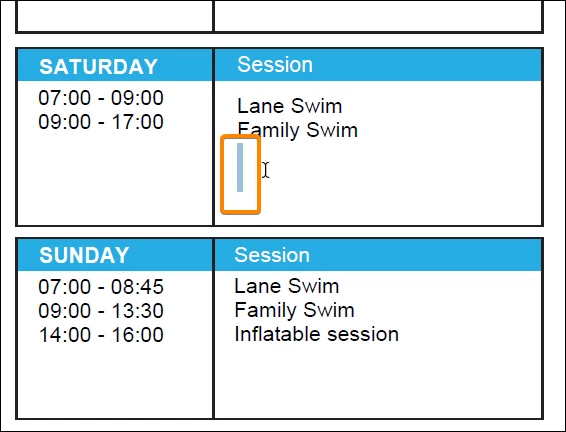
Whenever I select a field with text in it, the text moves! It drops down by about 2 millimeters and then pops back into position when I click away from it. However, if I enter *new* text in the field it stays in the shifted position, resulting in a doc with text all out of line. Is this a setting I can turn off?

When I look at the bounding boxes of the text field, they haven't moved, it is only the text inside the boxes that is shifting.
Correct answer JR Boulay

This is because there are some line returns at the end of the text.

Removing them solves the problem.


6 replies

JR Boulay
Braniac
July 13, 2023

Can you share (part of) this PDF form?

Acrobate du PDF, InDesigner et Photoshopographe
JR Boulay
JR BoulayCorrect answer
Braniac
July 20, 2022

This is because there are some line returns at the end of the text.

Removing them solves the problem.


Acrobate du PDF, InDesigner et Photoshopographe
Known Participant
July 20, 2022

Thank you, that partly solves the issue. The text doesn't move back to its original position for me, even with the returns removed, the text stays further down in the affected fields

Known Participant
May 10, 2023

I have the same problem. All my PDFs used to work fine and now they don't. Did you find a solution?


Yes I did, through pure trial and error. In the text box properties, under Options, make sure the Allow Rich Text Formatting option is selected. Doing this seemed to slightly adjust the text within the fields, so the text always stays in the starting position. Also, as the other users have stated, make sure there are no blank returns at the end of the text box. Hope that helps!

JR Boulay
Braniac
July 20, 2022

Can you share (part of) this PDF form?

Acrobate du PDF, InDesigner et Photoshopographe
Known Participant
July 20, 2022

Sure, find the form attached. It looks to me as something strange is happening with the formatting of the fields when they are clicked into. I've checked the formatting but can't see why this text movement is happening. Or perhaps a setting is doing this. Worth noting that when I created this form (pre sending to the client) the fields worked fine as expected, text did not move around. Thanks, Jay.

New Participant
May 27, 2021

Reseting the preferences made no difference. I might try a reinstall but I don't think that will fix the problem. Acrobat is clearly doing something wrong here. I tested in other pdf views and the text doesn't move.


Known Participant
July 18, 2022

Did you ever find a solution to this? I'm having the exact same frustrating problem..

Amal.
Community Manager
Community Manager
July 19, 2022

Hi there


Hope you are doing well and am sorry to hear that the issue still exists. 


Please share the version of Acrobat and the OS you are using? To check the version go to Help > About Acrobat and make sure you have the recent version 22.1.20169 installed. go to Help > Check for updates and reboot the computer once.

Also a small video recording of the steps you are doing and the issue you are getting will be very helpful.

Pplease try to reset the Acrobat preferences to default as described in the help page: https://community.adobe.com/t5/acrobat/how-to-reset-acrobat-preference-settings-to-default/td-p/4792...


You may also try to create a new test user profile with full admin rights in Windows or enable the root account in Mac and try using the application there and check.


Regards

Amal

Inspiring
May 27, 2021

Which font are you using for the field? Was the form ever opened in something other than Adobe Acrobat/Reader?

New Participant
May 27, 2021

The font is Calibri. Pretty standard. I have a mix of Calibri standard and Calibri Bold. To test the doc out I opened it in several other pdf readers. The text boxes do not move in those. However, if I open it in Acrobat first, any position shifts are carried over to other pdf viewers.


I will try to reset preferences as suggested by Amal.

Inspiring
May 27, 2021

That font be the source of the problem. I'll do some checking, but in the mean time, as a test you might want to try other fonts to see if you get the same behavior.

Amal.
Community Manager
Community Manager
May 27, 2021

Hi there


Hope you are doing well and sorry for the trouble. As described the text in the text box moves when selected.


Is this a behavior with a particular PDF file or with all the PDFs? Please try with a different PDF file and check.


What is the version of the Adobe Acrobat DC you are using? To check the version go to Help  >About Acrobat  and make sure you have the latest version installed. Go to Help > Check for updates and reboot the computer once.


If it still doesn't work, please try to reset the Acrobat preferences to default as described in the help page: https://community.adobe.com/t5/acrobat/how-to-reset-acrobat-preference-settings-to-default/td-p/4792082


You may also try to create a new test user profile with full admin rights in Windows or enable the root account in Mac and try using the application there and check.


Regards

Amal