



santhoshr29800103
Known Participant
December 25, 2019
Answered

Unable to delete comments in PDF

  • December 25, 2019
  • 6 replies
  • 37615 views

Hi,


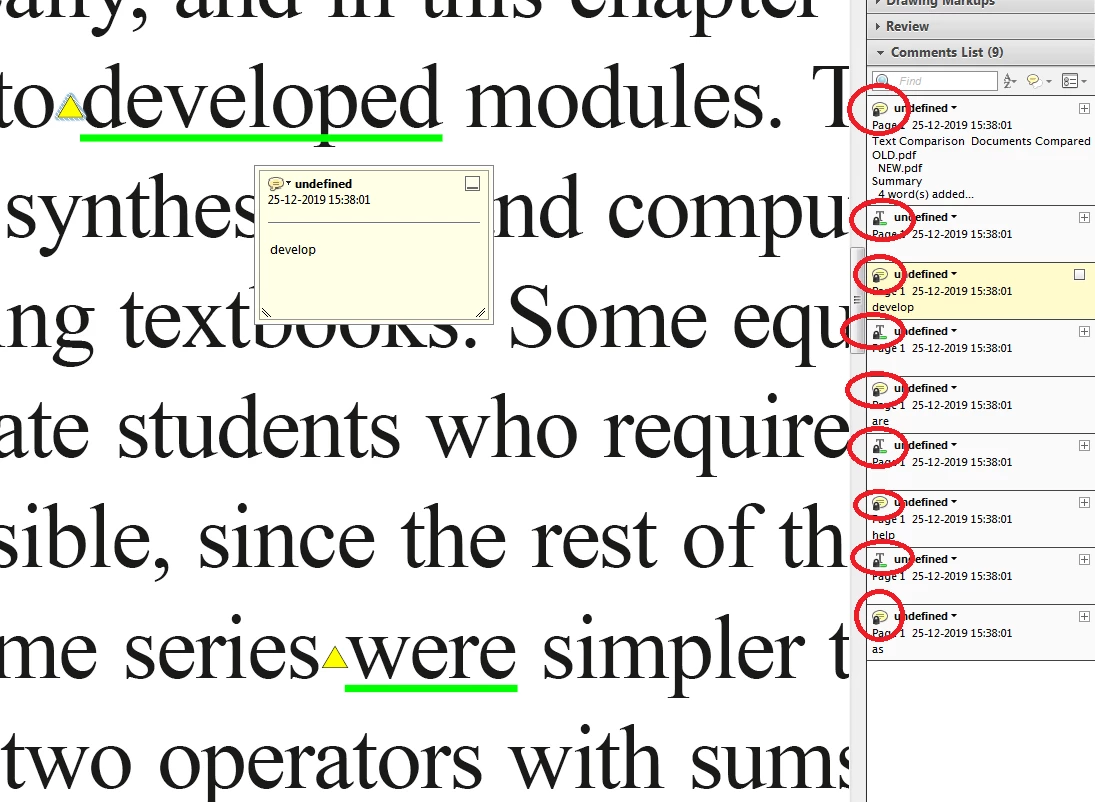
I have run " Compare Documents" in Acrobat 8.0 with Consolidated report type. After getting compare report all the comments are get locked. I am unable to unlock the lock in comments.


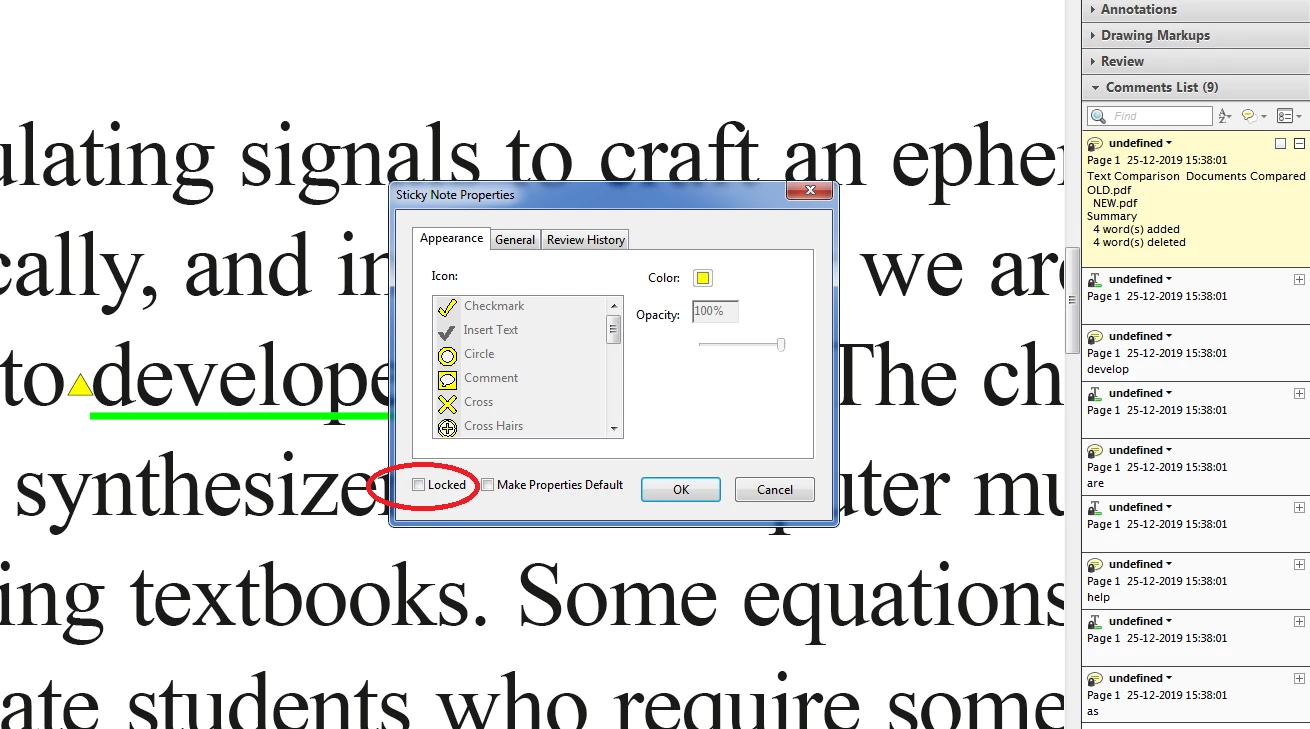
I have checked the properties there is no lock enabled.


Please help.


Thanks,

Santhosh

This topic has been closed for replies.
Correct answer Thom Parker

I'm not sure forEach will work in Acrobat 8...


Arrg 😞  I missed that bit. No, forEach won't work in Acrobat 8. 

Here's the same script the old way. 


var aAnts = this.getAnnots();

for(var i=0;i<aAnts.length;i++)

{aAnts[i].readOnly = false;}


6 replies

New Participant
November 11, 2024

Try File - Save as other - Optimized PDF, then select only Discard user data - (Check only "Discard all comments, forms and multimedia)

ls_rbls
Community Expert
December 26, 2019

Hi Santhosh,


Please disregard the guidance that I posted earlier.


None of the suggestions offered in this thread applies to your case.


I went ahead and downloaded your shared file. For some reason your comments were added in a way that I yet don't fully understand. I am assuming that the source document, which initially had those annotations,  was refried and then converted back to PDF.


The reason I'm saying this, is because using any of the methods offered here in this post doesn't resolves the issue; not even the script.


You will be able, however, to get rid of all of these comments if you go to Edit, and select "Edit Text & Images".


When you do this, you will noticie that if you right-click on each  comment it will be treated as a note and not a comment field per se. 


If you right-click on the annotation it will popup a context menu with two options" Open Note or Delete Sticky Note.


Chose "Delete Sticky Note" and you will be good to go.  See slide below:


So in the end, there was no need to apply a script.

santhoshr29800103
Known Participant
December 30, 2019

Hi,

There is no comments in the source PDF. We have just run the Compare in Acrobat 8.0 and comes with comments in locked mode by default. We are unable to unlock those comments which i mentioned earlier forum. Please advise how to break those locks. 


Thanks,

Santhosh

Thom Parker
Community Expert
December 30, 2019

Please see my comments above. I've already solved your issue. 

Thom Parker - Software Developer at PDFScriptingUse the Acrobat JavaScript Reference early and often
ls_rbls
Community Expert
December 26, 2019

You're welcome

New Participant
December 26, 2019

Hola pues es la misma proble k yo tenjo 

ls_rbls
Community Expert
December 26, 2019

Hi,


Here are a few suggestions :


  • With the document opened right-click on any area of the page displayed in your screen. Select "Document Properties" from the context menu, and select the Security tab from the dialogue window that will popup. Take a look at the section below  labeled Document Security , see what version of Acrobat can open this document and also to the right, click on the button that is labeled "Show Details " . You will get another  dialogue box " Document Security" which will list the security method applied followed by permissions and restrictions that are allowed. If commenting is allowed amongst other options. If commenting is allowed you may be able to work around it by creating a new comment, set defaults as new properties, save and close the document, and reopen. And see if you are now able to delete comments with the method you were trying before.
  • If that didn't work see if you can have the creator of such document unlock it or provide you with the password to remove the current security restrictions and then save, close and reopen, and try agai .
  • If that is not possible, your next best shot would be to refry the PDF document either by saving as postscript file or print to PDF directly (this method is highly discouraged though)
  • If that is not a relevant work around for your particular case you can try to add an custom action script using the Quick Tools.  This was a suggestion made by Document_Geek back in May 2019 in another thread. The following script was provided by Try67, to complement Document_Geeks's suggestion:


this.syncAnnot();

var annots = this.getAnnots();

if (annots!=null){

    for (var i=annots.length-1; i>=0; i--) {

    annots.destroy();

   }

}


However, I believe that you should be able to   expand the comment pane , to the right margin of the Acrobat work space.


You should see a list of comments listed in there; select all comments and delete them


I hope this help.


NOTE: some of these suggestions were taken from here:


https://community.adobe.com/t5/acrobat/can-i-delete-all-comments-on-a-pdf-with-one-click/td-p/10472171 

santhoshr29800103
Known Participant
December 26, 2019

Hi,


Supplied javascript is not working for my file. Can you please check the file in below link and remove the comments lock in your end.


https://documentcloud.adobe.com/link/track?uri=urn%3Aaaid%3Ascds%3AUS%3A8bfdfeef-e741-4993-9c78-cd3213b3f960 


Thanks,

Santhosh

try67
Community Expert
December 30, 2019

It contains some errors. Use this:


this.syncAnnotScan();

var annots = this.getAnnots();

if (annots!=null){

for (var i=annots.length-1; i>=0; i--) {

annots[i].destroy();

}

}

Amal.
Community Manager
Community Manager
December 26, 2019

Hi Santosh


We are sorry for the trouble. As described, after comparing the PDFs the comments get locked and you are unable to unlock them using Acrobat 8.


Acrobat 8 is an old application and no longer supported. The updates and security patches are no longer available. Adobe strongly recommends that customers update to the latest versions of Adobe Reader and Adobe Acrobat. By updating installations to the latest versions, customers benefit from the latest functional enhancements and improved security measures.

For more information please use the help articles below:

https://helpx.adobe.com/acrobat/kb/end-support-acrobat-8-reader.html

https://helpx.adobe.com/support/programs/adobe-support-policies-supported-product-versions.html


You may please try the steps provided in the help links below and see if that works:

https://answers.acrobatusers.com/How-I-unlock-Comments-Annotations-T-typewritten-text-q208175.aspx

https://helpx.adobe.com/in/acrobat/using/comments.html#delete_comments

Note: The steps suggested may or may not work.


Regards,

Amal


Thom Parker
Community Expert
December 27, 2019

All of the Annots on this PDF have the readOnly property set to true. 

This property cannot be set from the user interface. Run this code in the console window to reset this property, so the annots can be selected and manipulated with the mouse:


this.getAnnots().forEach(function(a){a.readOnly = false;});


However, If all you want to do is remove the annots, then use this code;


this.getAnnots().forEach(function(a){a.destroy();});


This code performs exactly the same function as that provided by ls_rbls. 

I'm sure that code didn't work for you because you didn't run it from the Console Window.

You'll find a tutorial on the Console Window here:

https://www.pdfscripting.com/public/Free_Videos.cfm#JSIntro


Thom Parker - Software Developer at PDFScriptingUse the Acrobat JavaScript Reference early and often
try67
Community Expert
December 30, 2019

I'm not sure forEach will work in Acrobat 8...