


Participating Frequently
August 13, 2020
Answered

Unable to sign in/connect to Document Cloud in Acrobat Pro 2020

  • August 13, 2020
  • 2 replies
  • 6944 views

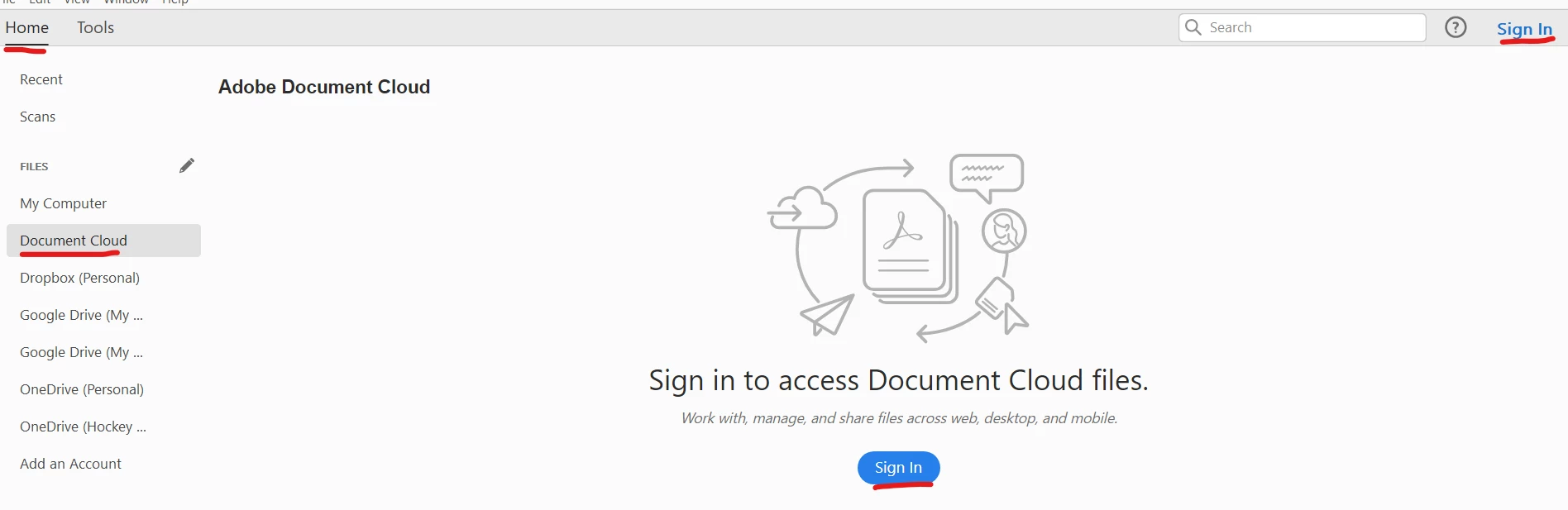
I just upgraded from Acrobat Pro 2017 to 2020 and am unable to login to Document Cloud. I was able to connect my Adobe account to Acrobat, and was able to log in to multiple other cloud accounts (Dropbox, Google Drive, One Drive), but can't sign in in the top right corner (where it says "Sign In") or via the Home screen Document Cloud sign in button. Does anybody know if this is a bug and/or if there's a way to resolve this?

Thanks!
 

Correct answer sumitash1

@sumitash1

Thanks for letting us know that this issue has been reported.

Will look forward to hear about a solution.


Hi All,


Some changes have been made to fix this issue, could you please check after clicking at sign-in, in Acrobat 2017/ 2020, if that fixes the issue?

If that doesn’t work, sign-out from Help menu in product and sign-in again. Please feel free to let us know, if that works.


Thanks,

Sumita

2 replies

sumitash1
Adobe Employee
Adobe Employee
August 14, 2020

Hi,


Thanks for reporting the issue. From the screenshot, it seems that your Adobe-id does Not has access to services. Could you  please try sign-in with this id at https://documentcloud.adobe.com/ with the same id and share the observation?


Thanks,

Sumita

Participant
August 15, 2020

Sumita, the same is happening to me. I opened this thread about it:


https://community.adobe.com/t5/acrobat/sign-in-in-acrobat-std-2017-no-longer-working/m-p/11361650?page=1#M271116


can you please help me too?


thank you

sumitash1
Adobe Employee
Adobe Employee
August 16, 2020

I am having the same issue. Please help.


Hi All,


Sorry for the inconvenience. We are investigating the issue, will share the updates on this thread.


Thanks,

Sumita

ls_rbls
Community Expert
Community Expert
August 13, 2020

Adobe Acrobat Pro 2017 and 2020 doesn't work with the Document Cloud; only  free Document Cloud services.


Verify if the Adobe Cloud service that you're trying to access is paid for. Also , the first time that you run Acrobat Pro 2020 you have to be online for activation.


If you already took care of this part, and nothing has worked, can you confirm if this still happens after you click on HELP--->"Repair Installation"  ?

ls_rbls
Community Expert
Community Expert
August 15, 2020

++ Adding to the discussion,


I forgot to ask  (and clarify ) if you purchased a subscription for Acrobat Standard DC when you had the 2017 version or were you using the free Document Cloud services and purchased a Document Cloud Subscription when you upgraded to 2020? 


surelipAuthor
Participating Frequently
August 15, 2020

I don't think I'm paying for the Document Cloud services, just the free one. I paid for my Acrobat Pro 2020 of course, but that's it. I don't think I paid for Document Cloud when I was using 2017 either, yet I recall having access to it. I was also about to login to my document cloud online, just not within Acrobat Pro 2020. Repair installation had no impact, neither did signing out and back in, restarting the program, restarting the computer.