


New Participant
April 8, 2022
Answered

Actual Size printing issue in Windows 11

  • April 8, 2022
  • 4 replies
  • 9544 views

I  work for a small sewing patterns company that sells downloadable PDF sewing patterns. Our customers download their file, open with Acrobat Reader and print at 100% Actual Size, no scaling.


This week our team have started receiving support requests from customers whose PDF sewing patterns are now printing 1/8" too small where they previously printed at the correct size. This may not seem like a large amount, but it can sometimes make a big difference when it comes to sewing.


So far, we've only had reports from customers using Windows 11, and so far only from customers in north America. Those who have a device using a different operating system have been able to print correctly using their other device, but not everyone has this option.


For each report, we've run through everything that we can think of in terms of troubleshooting, including making sure that their Reader is up to date, checking through each individual person's Reader print settings, and checking their printer settings.


We don't have the resources to offer any sort of support for Acrobat Reader beyond signposting them as to which options to select in the print screen, and how to make sure their Reader is up-to-date, but this new flurry of support requests has us thinking that there may be some sort of issue connected to a recent update - either a Reader update or a Windows 11 update. If so, this means that we're probably going to start receiving a lot more requests for support as others update their devices, requests that we're going to have to refer here.


So, before we start referring people here for support, we wanted to check:

  • Has anyone else had issues with printing at Actual Size on Windows 11?
    • If so, were you able to find a solution? What was it?
  • What might we have missed? What else can we suggest that our customers try?
 

This topic has been closed for replies.
Correct answer willem34045883z3gj

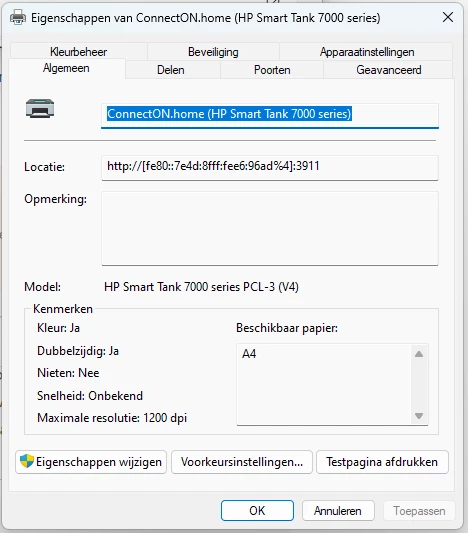
Hi, I had a similar issue which I blamed on my new printer, but it turned out to be buggy behaviour of win11. For me it kept cropping everything to letter size. No matter what I tried. Settings in Word/Acrobat etc where all A4. Even in the printer itself it was set correctly. What I did to solve it. Search for printers and Scanners/ select the printer you want/ go to printer properties. For me it showed letter format in the below screen. By clicking on the change properties setting it fixed it suddenly showed a4. Since then all is fine, no more issues with resizing of images. My win10 machines did not have this issue.


4 replies

New Participant
March 5, 2024

I realize this was asked 2 years ago but I found this site because I was having the same problem and banging my head against the wall because I couldn't understand why my pdfs were printing ever so slightly smaller that actual size. (In addition to printing sewing pdfs I also like to print downloaded punch cards for machine knitting and these, like the sewing patterns, MUST print at actual size in order to be usable.)


For the record I am running a PC with Windows 10 and have an Epson printer.


After reading through the discussion here I went to the Epson website and downloaded the driver and utilities for my specific printer, then used that to reinstall the printer. Now everything is printing perfectly.


I figured I would post this here just in case anyone else is having the same issue and stumbles across this page.

New Participant
September 21, 2023

I am still having this issue. I have verified that my printer drivers are correct on my ET2650; I am using Windows 11 on a new Lenovo laptop. Previously with Windows 10 on an HP Pavilion, I had no issues printing these PDF sewing patterns. This is incredibly frustrating.

Amal.
Community Manager
Community Manager
September 21, 2023

Hi @m_m972 


What is the version of the Acrobat DC you are using? To check the version, go to Help > About Acrobat and ensure you installed the recent version 23.06.20320. Go to Help > Check for updates and reboot the computer once.

Also, try to repair the installation from the help menu (Win Only) and see if that works.


Also go through the help page https://helpx.adobe.com/acrobat/kb/troubleshoot-pdf-printing-acrobat-reader.html and see if that works.


~Amal

Brainiac
December 17, 2022

If this were my problem, I would be asking each customer for a screen shot of the Print dialog. This will allow you to double check their options, but also to look at the exact printer name. Then, I would collate a list of the printers. You might find it's a problem with a specific brand of printer, for example. You could ask them to look for a new download of printer driver. It isn't very likely to be an Acrobat Reader fault (though nothing is impossible).

Amal.
Community Manager
Community Manager
April 12, 2022

Hi there


Hope you are doing well and am sorry for the delay in response.


Is this an issue with a particular sewing patterns PDF file or with all the PDFs that they try to print? Please try with a different PDF file and check. Also, please share the sample PDF file so that we can check it at our end.


Make sure that the printer driver and firmware is up to date and try to update the printer driver and firmware and reboot the computer once. You may also try to remove the printer driver/firmware and reboot the computer and then reinstall it from the manufacturer's website and see if that helps.


Please try to reset the Acrobat preferences as described here https://community.adobe.com/t5/acrobat-discussions/how-to-reset-acrobat-preference-settings-to-default/td-p/4792082 


You may also try to create a new test user profile with full admin rights in Win and try using the application there and check.


Regards

Amal


ElBMHAuthor
New Participant
April 12, 2022

Hi Amal,


Thank you for your reply. I appreciate you coming back to me.


I do not know whether each customer has been able to print other similar files successfully. That's something we can check - thank you.


We currently know of two different sewing patterns that several customers have had difficulties printing to Actual Size - one is an old file, created back in 2015; the other was created just a few months ago. There may be a third file - again, an older one - but we've not had enough information from the reporting person for us to consider that it might be connected. I am sorry but I am not able to share those files here.


However, since writing my original post, we have confirmed that the problem is not with the files and we've also ruled out the recent Windows 11 update being the possible cause. Our team and many of our extended network have checked both files across multiple different devices and operating systems, including an up-to-date version of Windows 11, and we've successfully printed both files at Actual Size.


Thank you for your other suggestions for things these customers can try. We'll start by recommending that they check their printer drivers next. That's a great logical next step.


We all really appreciate your help with this - thank you! We would not ordinarily go any further than PICNIC troubleshooting for Adobe Reader / Windows / printing as our 'technical support' is sewing-focused. Instead, we would ordinarily recommend each person seek their own advice from the application provider or device manufacturer. Fixing application / printer issues is well outside both the scope of our business and our team's knowledge, and so we are grateful for your support and advice on other possible troubleshooting steps.


Thank you for your advice. I will come back here to update either way on whether your suggestions resolved the issue.


Regards,

El

Amal.
Community Manager
Community Manager
April 13, 2022

Hi there


Do keep us posted and feel free to contact us for any assistance required in the future.


Regards

Amal