


Participant
July 22, 2021
Question

Adobe Reader DC crashing when printing A0 drawings

  • July 22, 2021
  • 1 reply
  • 1756 views

Hi All

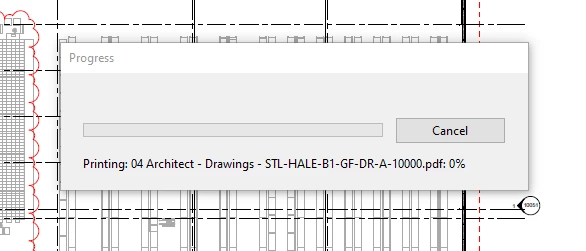
When attempting to print architectural A0 layouts the program freezes and then crashes

The files are noormaly around 10mb + so are large files.

The program is slow to load the drawings anyway, and struggles to pan with a good refresh rate so if anyone has solutions for that as well it would be appreciated.

I've attached a photo showing the progress bar, after this if you click on the drawing it freezes and then needs to be force closed.

The only other thing to not is sometimes it progress to 'Flattening' and then crashes.


Any help would be appreciated.

Thanks


This topic has been closed for replies.

1 reply

Amal.
Community Manager
Community Manager
July 23, 2021

Hi Toby


Hope you are doing well and sorry to hear that.


Is this a behavior with a particular PDF file or with all the PDFs that you try to print? Please try to print a small size PDF file and check. If the file is stored on a shared network,drive please download it to your computer first and then try to print again and check.


What is the version of the Adobe Acrobat Reader DC you are using? To check the version go to Help About Acrobat and make sure you have the latest version 21.05.20058 installed. Go to Help > Check for Updates and reboot the computer once.


Also check for any missing/pending update for the printer driver and firmware and try updating it. You may also try to remove the printer driver, reboot the computer and reinstall the driver from the manufacturer web site and check.


For more information please check the help page https://helpx.adobe.com/acrobat/kb/troubleshoot-pdf-printing-acrobat-reader.html


Regards
Amal

Participant
July 28, 2021

Hi Amal


This is the original psoter, I entered by email address incorectly and there doesn't seem to be any way to get that updated so just made a new account!


I've followed the steps and they do not seem to work, this is for large files failry consistantly as discribed in:


https://community.adobe.com/t5/acrobat/large-pdf-prints-from-adobe-pro-but-not-adobe-reader/m-p/9732393


The solution described in this post is a quick fix but  running a software package in a non-protected mode should not be a final soltuion due to the potential security risks.


The printer works, is fully updated and can print all smaller drawings, it can print these same drawing when imported to AutoCAD, again this is not a permanent solution as it takes time to import these larger drawings. I've tried from network and c drive locations.


My installation infoamtion can be foudn in attached picture.


Any help is appreciated.


Thanks


Toby

Amal.
Community Manager
Community Manager
July 29, 2021

Hi there


We are sorryto hear that. As its working when turning off the protected mode. Please check the help page - https://helpx.adobe.com/acrobat/kb/protected-mode-troubleshooting-reader.html


Regards

Amal