


New Participant
July 19, 2021
Answered

AppContainer cannot run due to an incompatibility

  • July 19, 2021
  • 2 replies
  • 49784 views

Over the weekend, we updated to the newest version of Adobe Reader DC MUI (21.005.20058) in our offices. This morning, everyone was getting the following popup:
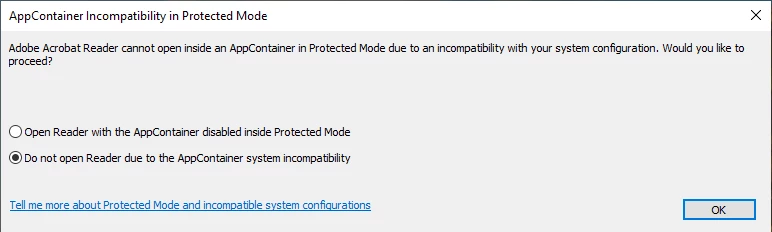
 

Selecting "Open Reader with the AppContainer disabled inside Protected Mode" and clicking OK allows us to open Adobe, but as soon as you re-enable AppContainer then restart Adobe Reader, the popup returns. This happens opening the app directly or opening PDFs both on machine and in network shares.


We haven't changed anything in our policies recently so we're not sure what the cause could be, and searching online, this seems to be an on-and-off issue with no clear fix and not necessarily related to this updated.


Any suggestions of solutions to try would be appreciated.

This topic has been closed for replies.
Correct answer Evron

Hi Sean... please check my answer over here. I believe I got this all sorted out...

https://community.adobe.com/t5/acrobat-discussions/acrobat-no-longer-working-in-windows-10/m-p/13597677#M400354


I was able to resolve the error today by installing acrobat 64 bit using the installer.  Reinstalling with Creative Cloud Desktop would NOT work. 


https://helpx.adobe.com/in/acrobat/kb/acrobat-dc-downloads.html


I obtained the attached logs before I found the resolution.

2 replies

New Participant
January 10, 2024

Hello. I noticed that this error can run parallel to error 0x80070643 in WIndows. This error is present in the Windows Update Center, after solving the update problem with this error, the problem with the "AppContainer" disappeared from me.

AkanchhaS8194121
Brainiac
July 20, 2021

Hi Sean,


Thank you for reporting this to us.

Please refer to this community thread https://community.adobe.com/t5/acrobat-reader/run-in-appcontainer/td-p/12178342 where similar issue has been discussed and resolved.


Try the troubleshooting steps given in the correct answer and let us know if that helps.


Thanks,

Akanchha 

Sean_C547Author
New Participant
July 21, 2021

Hi Akanchha,


I tried the troubleshooting steps in the thread you provided but none of them worked.


Protected mode was already turned on within the app, but I added the registry key just to see if it would make a difference. When I opened Adobe Reader, I received a new error:


I'm currently using Windows 10, but I tried switching to compatability mode for earlier versions (Windows 7 and Windows 8). For both, I didn't receive any errors when opening it, but I also could not find the option to enable AppContainer within Protected Mode.


Sean

EvronCorrect answer
New Participant
April 12, 2023

Hi Sean... please check my answer over here. I believe I got this all sorted out...

https://community.adobe.com/t5/acrobat-discussions/acrobat-no-longer-working-in-windows-10/m-p/13597677#M400354


I was able to resolve the error today by installing acrobat 64 bit using the installer.  Reinstalling with Creative Cloud Desktop would NOT work. 


https://helpx.adobe.com/in/acrobat/kb/acrobat-dc-downloads.html


I obtained the attached logs before I found the resolution.