


New Participant
September 16, 2019
Answered

ArialMT font missing

  • September 16, 2019
  • 16 replies
  • 228212 views

I have a customer that's on Adobe Acrobat Reader 2019.012.20040, with Windows 10 Pro x64 Version 1809, and when he tries to open a certain document, he gets the following error:


"Cannot find or create the font 'ArialMT'. Some characters may not display or print correctly."

So far, the user has uninstalled and reinstalled Adobe Acrobat Reader, his computer was wiped and re-imaged with a new Windows 10 baseline, we've added the ArialMT TrueType font file to Windows 10, and he's installed the DC Font Pack (my suggestion):


Adobe Acrobat Reader DC Font Pack (Continuous) - For Acrobat Reader DC version 19.x


But he's still getting the error.  Are there any suggestions as to resolve his issue?  Thanks.
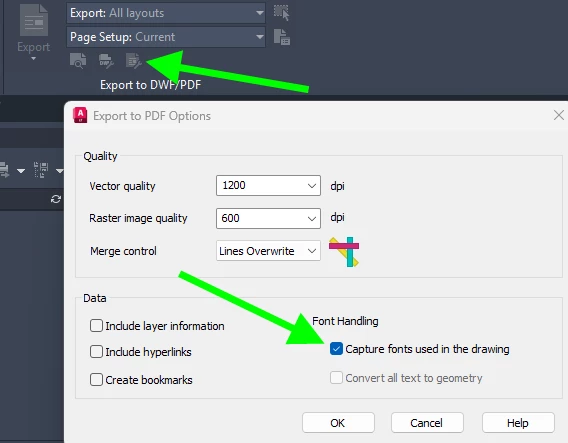
    Correct answer Randy-OptimumPCB

    This setting adjustment fixed the problem when exporting from AutoCad LT 2025.


    16 replies

    Randy-OptimumPCBCorrect answer
    New Participant
    October 24, 2025

    This setting adjustment fixed the problem when exporting from AutoCad LT 2025.


    New Participant
    December 19, 2024

    Ran into this same issue, After a machine was upgraded to win11 and latest office, so clean setup. After doing a bit digging down the Rabbit whole. Arial MT is not included with windows anymore and Microsoft has moved to cloud fonts in MS Office/Windows. Cloud fonts in Office - Microsoft Support 

    Found that if you open any MS Office app and select some text and go to the font list you will see the Font with a Cloud Download Icon. After selecting the font once it seems to get downloaded and the pdf files are now working in Adobe Reader.

    Hope this helps at least one other person 🙂

    New Participant
    December 1, 2024

    Like everyone else in this thread, I am encountering this error trying to open a document sent to me.  Every other PDF reader has no problem rendering the document; it's just Adobe that seemingly cannot correctly handle the document format that they invented!  (I find that generally Acrobat Reader is a lousy application that freezes and crashes regularly...)

    Stop making excuses, stop telling us to change how the documents are produced (which we mostly will obviously have no control over), tell the devs to pull their fingers out and just fix it already!

    New Participant
    November 13, 2024

    I had test and fixed just follow below :-

    Section Plot

    -properties, go to section device & documents setting

    -custom properties, under section font handling select capture all & tick "as geometry" 

    Last step, click on OK

    Should be fix the issue

    New Participant
    May 22, 2024

    I'm also getting the same issue. Was this ever fixed?

    New Participant
    June 23, 2025

    I have the same problem. Opening the document in Firefox or some other PDF reader solves the problem. 

    burgeida
    New Participant
    July 2, 2025

    Hi @balanced_Whisper2405,


    Sorry for the trouble with viewing PDF files.


    Let's understand why this happens:


    • DocuSign PDFs sometimes use fonts like Arial MT without fully embedding them.

    • Acrobat Reader strictly follows the PDF spec, and if a font is not embedded, it tries to substitute it—but if the font isn't installed on your system, it renders blank spaces or missing text.


    Now, for the fix, you can check:

    • Make sure Arial MT is installed. If you're on Windows, this font might be available through older Office installations or system fonts.

    • If it is not available, try copying Arial MT from another machine that has it installed or downloading it from Google Search.

    Let us know how it goes.


    Regards,
    Souvik.


    Hey Souvik,


    Thank you for the breakdown on the issue, I think it helps with understanding the root causes.   


    You mention that when the font is not embedded, Acrobat ties to substitute it.   Is there a programing rule Adobe can put on the back end to make Arial (opentype) an acceptable substitute when a file calls for Arial MT?  I understand initating a fix like this can start a game of whack-a-mole with similar issues, but I would raise two points as to why it should be considered for this case.

    1. As far as I can tell (and I am not a graphic designer, nor proficient in code), the two fonts are formally identical, so it shouldn't mess up a document too terribly if they are substituted.

    2.  Based on the traction this 6 year old thread continues to have, this still seems to be a reletively pervassive issue.


    Thank you for looking into this, and I hope the team at Adobe will consider this in their roadmap for future updates!

    Ondřej Topolánek
    New Participant
    April 8, 2024

    Hello,
    I had a similar problem and solved it using Affinity Designer v2.4. Opened the PDF in it and then re-saved as a PDF. After that Acrobat opened it with no problem with missing fonts.

    burgeida
    New Participant
    March 5, 2024

    Hey everyone,

    This issue has been persisting in our office still in 2024, but we were able to find a fix. The issue was only visible in Acrobat Reader, and was not present in Foxit Reader, Bluebeam Revu, Edge, or Chrome (did not test Acrobat Pro).  I was using Adobe Acrobat Reader v.2023.008.20533 64-bit.  See my error example attached.


    The issue seems to stem from Autocad generated pdfs created on a seat of Autocad that has migrated settings from an older version of the program.   Stan5CD2's is mostly correct, but newer version of Autocad have a slightly different workflow.  See my attached ArialMT Fix Steps.    Even if the "Capture fonts used in the drawing" box is checked, it is important to uncheck the box and check it again to properly edit he .pc3 file.

    New Participant
    March 7, 2024

    You're assuming that this is only apparent in AudoCad generated PDF's.  For me this is not the case.  I often have this issue with PDF's from other sources.


    To be clear, I do have CAD software on my computer, but I experience this issue with PDF's from many sources.

    burgeida
    New Participant
    March 7, 2024

    Yeah, you are correct. Based on how we fixed it, I dont think it is a program specific issue, but an issue with pdf printers/exporters, possibly older ones that dont differentiate between Arial and Arial MT.


    Try creating the effected pdfs with different methods and see if the issue persists.   Use "print to pdf" if you were exporting to pdf, or vice versa.   See if you can play with the options in your pdf printer to capture fonts or select a different pdf printer entirely.   If you dont have a second PDF printer on your computer, you could download Cute PDF Writer, it is not my favorite, but it is free.  I know this is a lot of messing around, but it could help localize the problem.


    Although this issue originates outside of Acrobat, I by no means think this lets Adobe off the hook.  The most basic requirement of a PDF reader is to read PDfs easily, and no other reader I tried had this issue.   Other programs have figured this out, so I think Adobe can as well.

    New Participant
    December 18, 2023

    I seriously can not believe this has been an issue since 2019 and there is not a fix for it yet.  I just received a file from a vendor created in AutoCAD and I can't read some of it and am getting the same error message as stated in the original post.  We can't fix the problem on our side so I will be forced to use a competing product other than Adobe.  Adobe needs to do better and find a fix for this.  As others have stated, the competitors to Adobe don't seem to have this problem...

    New Participant
    December 18, 2023

    First picture is the file opened in Adobe.  Second is the file opened in PDF-XChange Editor.  The issue seems to be with lines that have symbols if that helps.


    Amal.
    Community Manager
    Community Manager
    December 21, 2023

    Hi there


    Please go to Preferences (Ctrl,CMD+K) > Page Display, Under Rendering , select 'Use local font' > Click Ok and reboot the computer once and see if that works.


    ~Amal

    New Participant
    October 5, 2023

    This is occuring for me in files that other people have generated.  I have to view them through my web browser to see the contents but I can't digitally sign as Adobe Acrobat Standard wont display most of the characters on the screen.  So essentially I've paid for software that is faulty and have been this way since 2019 without a fix.  I've tried all the suggested 'fixes'.

    Amal.
    Community Manager
    Community Manager
    October 5, 2023

    Hi there,


    Is this an issue with the files generated by other people or with all the PDFs?


    What is the version of the Acrobat Std DC you are using? To check the version go to Help > About Acrobat and make sure you have the recent version 23.06.20320 installed. Go to Help > Check for updates and reboot the computer once.


    If its a specific file issue please share the file with us for further checking.

    Also try to repair the installation from the help menu (Win Only) and see if that works.

    Please try to reset the Acrobat preferences as described here https://community.adobe.com/t5/acrobat-discussions/how-to-reset-acrobat-preference-settings-to-default/td-p/4792082

    You may also try to create a new test user profile with full admin rights in Win or enable the root account in MAC and try using the application there and check.


    ~Amal

    New Participant
    October 6, 2023

    Hi,  

    I can confirm there are no updates for my computer, microsoft office or Adobe.  My abobe is version 23.06.20320.

    I've also done the repair installation.  

    I've got 'use local fonts' ticked.


    It's not every file, it seems to be only some peoples files.  I can't share the contents of the files that aren't working due to confidentiality.


    It seems that the manual reset of preferences made a change.  All I did was rename and move this folder: C:\Users[username]\AppData\Roaming\Adobe\Acrobat\DC\Preferences


    New Participant
    January 25, 2023

    Like others said, I confirm that only Adobe Acrobat has this issue and that with other PDF readers, I can view the same files without any problems.

    In my case, I figured out that this error does not occur when I use English text in my DWG (AutoCad) files but it occurs occasionly when the text is from different language (ex: German, Greek etc). It can also occur with TimesNewRoman and other fonts.

    In the case that you have little anount of text in your DWG file and in order to avoid this error, you can change the text's font to a working one (you can try a few times in order to find the working fonts). 

    In the case that you have large amount of text, font changing will be time-consuming and you should switch to another PDF viewer.

    Amal.
    Community Manager
    Community Manager
    January 30, 2023

    Hi there


    We have reported this issue to our development team for review. We will share the update as soon as we get any news from them.


    Regards

    Amal

    New Participant
    February 8, 2023

    Hi Amal,


    Is there any update from the development team so far?

    I have a user with the same issue but purely from Adobe Acrobat Reader, nothing related to other software, it just shows "Cannot find or create the font 'ArialMT'. Some characters may not display or print correctly".


    Our organisation uses the intranet, and other users with the same version 2022.003.20258 of Acrobat Reader are able to view the file without such issue but this user.


    For your kind advice, please.