


New Participant
August 9, 2021
Answered

Cannot enter text during "Fill and Sign"

  • August 9, 2021
  • 1 reply
  • 9402 views

Running latest version of Adobe Acrobat Reader DC (32 bit) running on Windows 10.

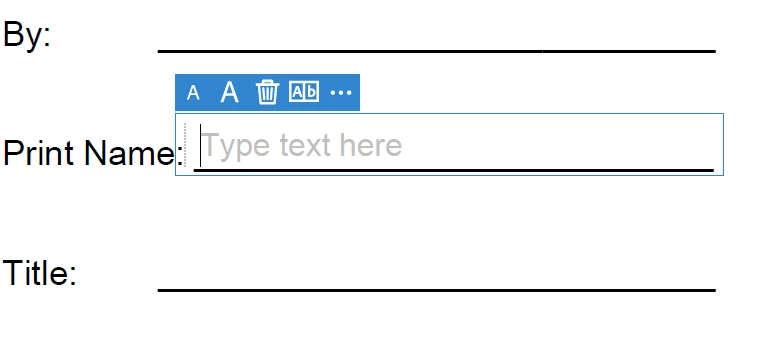
When I go to "Fill and Sign" and try to fill in text (date, name, etc.) it opens the field and the cursor blinks but I am unable to enter alphanumeric text of any kind.  It does allow me to put in my signature though.

I deinstalled and reinstalled just in case but same condition.

I have confirmed that I have the correct secuirty permissions and so forth, amongst others suggested in these forums.  Screenshot below of typical field where it won't let me type.  Let me know. Thanks.


This topic has been closed for replies.
Correct answer Peady23

Hi there


We are sorry to hear that. I have tried to reproduce the issue on my end and its working fine.


Please remove the application using the Acrobat Cleaner Tool - https://www.adobe.com/devnet-docs/acrobatetk/tools/Labs/cleaner.html , reboot the computer once and reinstall the application using the link - https://get.adobe.com/reader/enterprise/ and see if that helps. 


Regards

Amal


Amal:


None of that worked after multiple attempts.  So I uninstalled it and installed an older version (11 for XP) and that allows me to do it.  Hopefully in future releases it will work for me.

thanks.

PE

1 reply

Amal.
Community Manager
Community Manager
August 10, 2021

Hi Peady


Hope you are doing well and sorry for the trouble. As mentioned you are unable to fill in the text on the PDF file using the Fill and Sign tool


- Is this a behavior with a particular PDF file or with all the PDFs?


- What happens when you try to type the text in the PDF file? Do you get any error message, if yes please share the screenshot of the same for a better understanding.


- What is the version of the Adobe Acrobat Reader you are using? To check the version go to Help > About Acrobat and make sure you have the latest version installed. Go to Help . Check for updates and reboot the computer


Also make sure you doesn't have the color set to White as shown in the screenshot below:


Regards

Amal


Peady23Author
New Participant
August 10, 2021

Amal:


Thanks for the reply.

This for any .pdf; I've tried multiple ones that I regularly use and same effect each time.

No error message when I try and enter text.  I already shared a screen shot in the original post above.  That is what I get...an open field indicating the text box is open and the cursor blinks inside it but I can't actually type anything in.  I've tried different keyboards also just in case.  

Version 2021.005.20060 which is the most current I believe.  I also applied a patch of 07/28/21 to no effect.  I have checked the security settings and fill and sign are set to "allowed".

Here is another screenshot though showing that I have the colour set to black.


Amal.
Community Manager
Community Manager
August 11, 2021

Hi there


We are sorry to hear that.  Please try to reset the Acrobat preferences as described in the help page - https://community.adobe.com/t5/acrobat/how-to-reset-acrobat-preference-settings-to-default/td-p/4792082 and see if that works.


You may also try to create a new test user profile with full admin rights in Windows and try using the application there and check.


Regards

Amal