


Changing document colours

Copy link to clipboard
Copied
Hi,
I am partially sighted and can't read black text on white background. I am trying to scan pages from a book to get them into pdf format so that I can use the Preferences > Accessibility > Documents Colours Options > Replace Document Colours faciltiy on Acrobat Reader. The scanner I use generates jpg files and can export them to pdfs. However I cannot change the colour of the exported files. I have tried exporting in various types of pdf (pdf, pdfA, searchable pdf, searchable pdfA) but the colour change faciltiy doesn't work.
Can anyone suggest a solution? I see the scanner can also export in tiff format - if that woudl make any difference.
Exporting as a ocr'd word file doesn't work as the text I want to read is an engineering textbook with lots of odd letters and diagrams and they just don't ocr properly.
Many thanks in advance


 10
Replies
10
10
Replies
10




Copy link to clipboard
Copied
Hi @Peter.B,
Hope you are doing well. Sorry for your experience with Acrobat Reader.
Would you mind checking if changing the contrast or inverting the colors on the page help (screenshots attached for reference)?
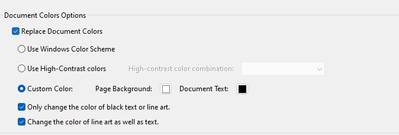
You can learn more here: Adobe Acrobat Color settings
Let us know if this helps.
-Souvik
Copy link to clipboard
Copied
Hi Souvik,
Many thanks for getting back to me. Yes, I've tried all the options in the Replace Document Colors section, and have just done so again to make sure. None of the three options work and ticking or unticking the two other boxes has no effect either. The documents are still showing black text on white background.
All suggestions would be much appreciated.
Peter
Copy link to clipboard
Copied
Copy link to clipboard
Copied
@Peter.B I tried reproducing the issue at my end but couldn't. Would you mind sharing the file with me over private message (click on my profile name-> click the blue button that says "Send a Message" on the next page).
This will help me investigate better and provide you a concrete resolution.
-Souvik
Copy link to clipboard
Copied
Hi Souvik,
I couldn't find a way to attach a file when sending a private message so I am sending it by a 'reply'.
Berndt has advised that Acrobat Reader for Windows won't invert the black and white because the pdf is of a scanned image. But I note that 'Liquid' mode in Reader for iOS inverts successfully which suggests top me that there should be a way to do the same on the Windows app. For info: I am using the latest versions of the Acrobat Reader apps for both iOS and Windows.


Copy link to clipboard
Copied
Acrobat Reader can't change the colors of scanned documents.

Copy link to clipboard
Copied
Correct, as they are just images. You need to use something like Photoshop for that.
Copy link to clipboard
Copied
Hi Bernd,
Many thanks for your response. I did wonder if that might be the case but black and white invert OK when I view the file in Liquid mode in the Acrobat reader for iOS. This isn't a solution as I have only an iPhone so can't read big files on it. Why can't Acrobat on Windows do the same thing? I am using the free versions of Acrobat Reader on both Windows and iOS.
Copy link to clipboard
Copied
Acrobat Reader on Windows doesn't have this mode.
Copy link to clipboard
Copied
Yes, you're right. But it is short-sighted of Adobe not to introduce this mode to Acrobat for Windows also.


Get ready! An upgraded Adobe Community experience is coming in January.
Learn more
 AdChoices