


New Participant
March 16, 2016
Answered

Error 110 on Acrobat Reader DC (OSX)

  • March 16, 2016
  • 8 replies
  • 76129 views

Hi,

So, I know there are multiple discussion questions posted regarding Error 110, however, it doesn't seem that there's a single concrete answer that seems to solve the issue for Error 110 on Acrobat Reader DC. When attempting to save a file, after editing, the error states "The document could not be saved. There was a problem reading this document."

Here are some miscellanious information that may be of some use:

Working on OS X El Capitan V. 10.11.3 and Adobe Acrobat Reader DC Version 2015.010.20060

Have previously checked for an update on the Reader (none available).

Have previously attempted to save as a new copy (new copy fails to save, same error).

Have attempted to save to Adobe Cloud (same error).

Have deleted the file and downloaded a copy (same issue).

However, same file is able to be saved and modified on an Adobe Reader for iPad.

Thus, at this point, any input would be much appreciated.

Thank You!
Correct answer Vanessa King

I had this issue with a file, but found a somewhat easier, less fussy solution—if multiple files within the PDF cause the 110 error issue, as it did with mine.


Start with only the problem file open—this won't work as easily if you have other files open.


  1. Under the the File menu, select Combine Files.
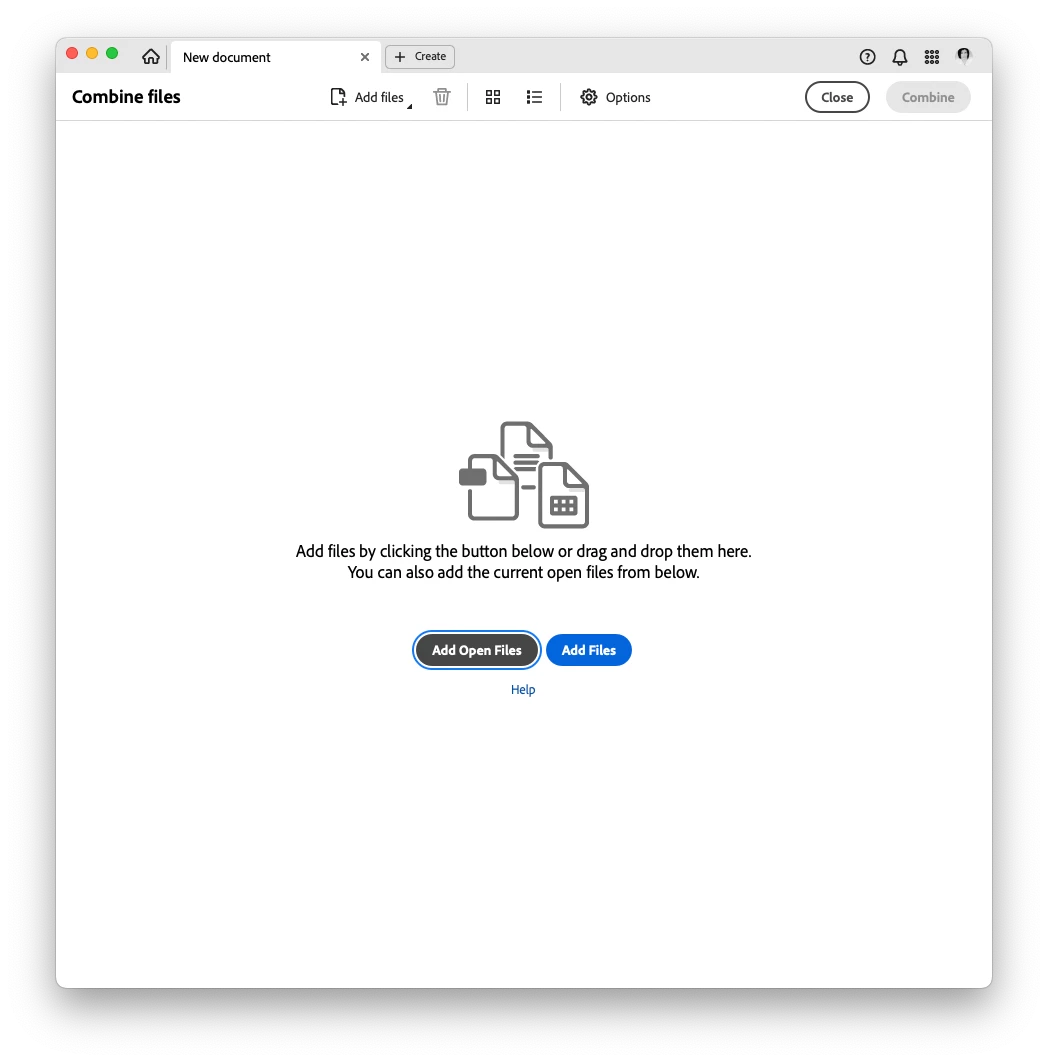
  2. You'lll get an open Binder document with nothing in it… yet. There are two buttons: Add Open Files and Add Files (see attached image, do not use the blue button in this instance).
  3. Select the Add Open Files button and you'll have a single document, with everything from the trouble file in it. I didn't have any trouble doing it this way, but I'm guessing if one of the files within the PDF is a problem Acrobat will alert you.


8 replies

Vanessa KingCorrect answer
New Participant
October 25, 2025

I had this issue with a file, but found a somewhat easier, less fussy solution—if multiple files within the PDF cause the 110 error issue, as it did with mine.


Start with only the problem file open—this won't work as easily if you have other files open.


  1. Under the the File menu, select Combine Files.
  2. You'lll get an open Binder document with nothing in it… yet. There are two buttons: Add Open Files and Add Files (see attached image, do not use the blue button in this instance).
  3. Select the Add Open Files button and you'll have a single document, with everything from the trouble file in it. I didn't have any trouble doing it this way, but I'm guessing if one of the files within the PDF is a problem Acrobat will alert you.


New Participant
July 28, 2024

How this is still an issue 8 years later is beyond me

New Participant
October 14, 2021

エラーコード81のエラーの調整方法を教えてください。

New Participant
March 18, 2020

Open pdf in Edge and edit (editing is mostly highlighting texts for me) the document. Use ''Ctrl+S" to save (not the print option), and you are good to go. And, yes this implies that, you must use Edge for this specific document every single time you want to edit it. DC will work fine for reading purposes.
Another simpler solution is to open it in any browser and then use "Ctrl+P" ie print option to save as pdf. But this will remove all bookmarks from the file, which is if say it is a 1000 pages long text book, all chapter bookmarks, which come in a tab on left hand side will be removed and you have to scroll to go to any chapter, which, tbh, is more cumbersome but will work just fine for smaller docs.

Josie_Profi
New Participant
May 20, 2019

RESOLVED

If your file can be viewed in a browser but not the app, try this...

1. Open File in Browser

2. Print or Save file as PDF from within the browser Print function

3. Navigate to the file and Open PDF.

The file is a NEW PDF file without the errors. I was able to open the NEW PDF file in DC Reader, Acrobat 10, PDF reader for Win10, and etc.

Good Luck.

New Participant
August 16, 2019

Hi just tried this and it worked. Thank you so much!

rodw77967021
New Participant
February 3, 2017

have this problem also, my workaround, do not use DC Reader, open in Edge or chrome readers

August 25, 2016

Solution to problem:

  1. Open a pdf file of say 5 pages  (Y).
  2. Insert your problem pdf (X)  after last page of (Y).
  3. Save pdf file as (Y plus).
  4. Open file (Y plus).
  5. Delete pages of file (Y).
  6. Save as (X)

Your document is saved !

Inspiring
January 1, 2017

This is a brilliant solution to a stubborn problem, which I have been looking for forever. thanks much. (PS: All you need is a single page of a pdf that can be edited and saved, I think, as a basis for the new file.)

Community Manager
March 16, 2016

Hi dashkinsmilles ,

Follow this thread to reset the preferences for the Acrobat software :- How to reset Preference settings in Acrobat.

Also check with this :- Acrobat > Preferences > Security(Enhanced) >uncheck the option for 'Enable protected mode' & 'Enable Enhanced Security '

Also check is this happening with all the documents or with this only.

Regards,

Yatharth 

New Participant
March 16, 2016

YatharthS Update:

The "Enable Enhanced Security" option was unchecked.

Attempted to save document - same Error 110 comes up.

Only occurs for a specific (single) document on OSX. The same document can be edited and saved on iPad and other platforms such as Windows. Other documents are able to be saved without the error coming up.