


New Participant
April 12, 2021
Question

Measuring Tool shows incorrect length, though scale is correct

  • April 12, 2021
  • 4 replies
  • 15366 views

Hi,


I have an issue with the measuring tool in Adobe Reader.  I can correctly set the scale, but the measurement is incorrect in the display. For example, I have a drawing with scale 3/16 in = 1 ft.  I set the ration to 0.1875 in = 1ft, but it doesn't measure correctly, an area labeled 10 ft, 1 in on the drawing is calculated as 6.16 ft by Adobe.  

Here is the scale: 
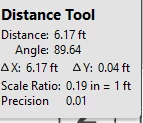
and here is a picture of the calculated measurement:
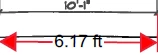
 

I open the same drawing with another PDF viewer (Foxit Phantom PDF), and it works without issue - the same area is now measured correctly: 
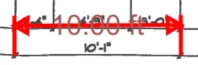


I am not sure if I am missing something, but I have tried this with multiple drawings, it happens with them all. Can anyone provide an idea about what I may be doing wrong, or is this a flaw in Reader? 

4 replies

New Participant
April 15, 2025

I had this issue and managed to find a fix.


Preferences > Measuring (2d)  and uncheck the box that says "use scale and units from document (when present)"


Hope that helps.

New Participant
April 25, 2025

Thanks Gith! That helped.


However, as I drag the measurement line, it shows the correct / accurate dimension. But when I click to complete the measurement, Acrobat labels it incorrectly. Very strange. Wondering if there is another label setting that's at work here or just something I'm missing.

New Participant
June 29, 2024

The same thing happens to me, on multiple machines with multiple documents, I can't fix it - it does not work. 

Can someone recommend a software that works? this is frustrating since I am paying for the premium of this software and now I need to find another...

New Participant
June 30, 2024
I managed to resolve this ...but I can't remember how...sorry.

Sent from Outlook for Android<>
New Participant
January 10, 2025

By chance have you been able to remember how you resolved that issue? I'm having the same problem right now and can't seem to fix it.

New Participant
April 9, 2024

The tool is not accurate. I am working in ecological design and if I make a line that is 40 inches long it should say 800 feet at the scale of 1: 240. That is the same as 1:20  (1 inch equals 20 feet) in architectural terms. The measurement is consistently off and says 778 feet. This is in adobe illustrator.

Amal.
Community Manager
Community Manager
April 12, 2024

Hi there


As this issue is occurring in Adobe Illustrator, please post your query on the Illustrator community https://community.adobe.com/t5/illustrator/ct-p/ct-illustrator?page=1&sort=latest_replies&lang=all&tabid=all so that our community experts may also look into it and share more information.


~Amal

Amal.
Community Manager
Community Manager
April 13, 2021

Hi there


Hope you are doing well and sorry for the trouble. As described the measuring tool is showing incorrect measurement.


Is this a behavior with a particular PDF file or with all the PDFs? Please try with a different PDF and check.


What is the version of the Adobe Acrobat Reader you are using? To check the version go to Help > About Acrobat and make sure you have the latest version 21.01.20145 installed Go to Help > Check for Updates and reboot the computer once.


I have tried to reproduce the issue on mu end and its working fine. Please try to repair the installation (Win Only) and see if that works. Go to Help > Repair Installation.


If it still doesn't work , please try to reset the Acrobat preferences to default as described in the help page: https://community.adobe.com/t5/acrobat/how-to-reset-acrobat-preference-settings-to-default/td-p/4792082 and see if that helps.


Regards

Amal


New Participant
April 13, 2021


Hi Amal

Thank you for replying to my inquiry. Here are the answers to your questions:

- This behavior occurs with multiple PDFs.
- The version of Adobe Reader used is 2021.001.20145. This issue has occurred on three computers, with multiple documents. 
- I've run the repair, and the issue is still occuring.
- I am unable to remove the preferences folder, I navigate to the path C:\Users\robr\AppData\Roaming\Adobe\Acrobat\DC, and there is no preferences folder (only Collab, Forms, JSCache, Redaction, Security, Stamps, and a couple of files.)

I've attached a file that is having the problem. 

Amal.
Community Manager
Community Manager
April 30, 2021

Hi there


I am sorry for the delay in response. As mentioned you ware unable to locate the preferences folder, is it a personal machine or a IT managed work computer?


I have tested the file you have shared and its working fine. Please try to remove the application using the Acrobat Cleaner Tool - https://www.adobe.com/devnet-docs/acrobatetk/tools/Labs/cleaner.html  reboot the computer and reinstall the application using the link - https://get.adobe.com/reader/enterprise/


Regards

Amal