


mctanaka
Participating Frequently
January 30, 2018
Question

Unable to download older versions of Adobe Reader

  • January 30, 2018
  • 3 replies
  • 14497 views

As discussed here (Adobe Acrobat Reader DC won't open ), I am one of several people unable to get Adobe DC to work, regardless of how many times we reparit the installation, reinstall, download the latest version or reboot the computer. So, I had to turn to older versions of Adobe Reader, which, however, has proven just as impossible:

1 - This help page claims you can pick and choose from a list of older versions; however, you can only "choose" the latest one:
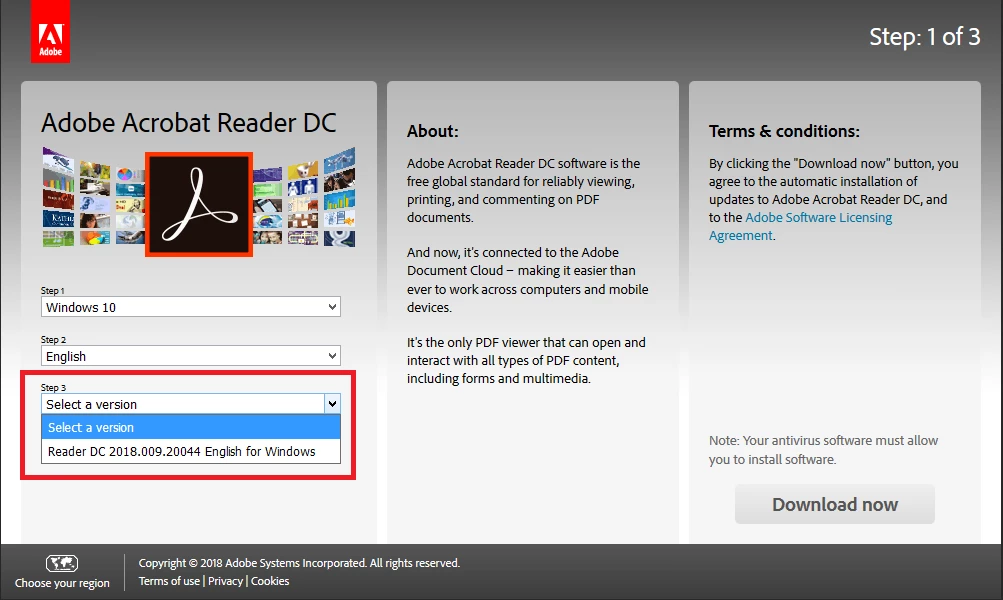
2 - And this other page does have a list of installers for older versions, but they only work for paid versions.

So, has Adobe completely discontinued the free download from older versions? If not, how on Earth can I donwload a free, working version of Adobe Reader?

This topic has been closed for replies.

3 replies

AnandSri
Community Manager
Community Manager
February 5, 2018

Hello Michel,

Thank for all information, and sorry for the  trouble. Please share your contact details, the best time for call back, the time zone via private message so that we can schedule a call back for you on work on this issue via remotely. Please share these details via private message How Do I Send Private Message  Link: https://forums.adobe.com/thread/1184148

Regards,

Anand Sri.

jaimel66574981
Participant
February 9, 2018

Hi, you have sent this to the wrong email. I did not send any requests to you.

Sent from Mail for Windows 10

AnandSri
Community Manager
Community Manager
January 31, 2018

We apologize for the inconvenience caused Michel.

As you mentioned that you have tried installation all the versions of Adobe Reader but it still fails to load and open any PDF file. I will request you to create a new Test user profile with full admin rights or enable the hidden administrator  account and try installing the Adobe Reader DC and see if this brings any difference.

Let us know how it goes in new user test profile or in hidden admin account,

Regards,

Anand Sri.

mctanaka
mctanakaAuthor
Participating Frequently
February 4, 2018

Hello Anand,

Unfortunately, none of these worked. I've tried installing the DC both in a new Test user profile with full admin rights and in the hidden administrator account (which, incidentally, I did not know ever existed). The software still refuses to load - as always, the mouse shows that loading animation for a few seconds and, then, nothing happens.

Any other ideas? I've already started considering the "nuclear option" (good ol' "format C:")..

Thanks for your help anyway! You've been answering very quickly.

Kindest regards,

Michel

AnandSri
Community Manager
Community Manager
January 30, 2018

Hello mctanaka

We apologize for the inconvenience caused, as per the description above, you are not able to download the older version of Adobe Reader as the latest version of Adobe Reader is not working, Is that correct?

Please use the Acrobat cleaner tool to remove any installed Adobe Reader Download Adobe Reader and Acrobat Cleaner Tool - Adobe Labs

Reboot the machine, and then try installing the Adobe Reader DC from Adobe - Adobe Acrobat Reader DC Distribution

Note: Latest version of Adobe Reader DC is recommended to use.

If you wish to get the older version of Adobe Reader, you can install it from ftp://ftp.adobe.com/pub/adobe/reader/

If the issue still persists with the installation, please share a screenshot of the error you are getting, to share the screenshot refer to How to share a file using Adobe Document Cloud

Let us know your findings.

Regards,

Anand Sri.

mctanaka
mctanakaAuthor
Participating Frequently
January 31, 2018

Hello Anand,

Thank you for the tips, especially for this nice ftp link, but unfortunately, the software still does not work.

I uninstalled the software and made sure it was fully uninstalled with Adobe Cleaner. Then, I installed Adobe DC, but it didn't work - it stills refuses to open any file.

Funny thing is: after that, I downloaded and installed older versions from 11 to 9, and still none of them worked! Each time, I uninstalled the version, "re-uninstalled" it using the cleaner and rebooted the computer, but still, none of these 3 older versions worked. I stopped testing after version 9 failed because I concluded that none of the other older versions will work either.

I cannot attach a screenshot of the error because this is not, erm, a "screenshootable error". The software simply refuses to open, no matter how many times I reboot the computer or install/reinstall it.

Not sure if it helps, but this started a few months ago, when I did a selective restart to detect what was wrong with my Starcraft II game. It was after this selective restart that my Reader stopped working in the way I described.

Any help please? I think you know how incredibly annoying it is to open PDF files with a browser or even with Word.

Regards,

Michel

Abzyx
Participating Frequently
March 31, 2018

mctanaka  wrote

...Funny thing is: after that, I downloaded and installed older versions from 11 to 9, and still none of them worked! Each time, I uninstalled the version, "re-uninstalled" it using the cleaner and rebooted the computer, but still, none of these 3 older versions worked. I stopped testing after version 9 failed because I concluded that none of the other older versions will work either...

Screenshot suggests you are running Windows 10. Adobe Reader 9 and 10 never supported Windows 10 because it didn't exist yet (although they might perhaps work running in compatibility mode for an older OS). As for Adobe Reader XI, the last installer issued by Adobe was 11.0.10, whereas Windows 10 support wasn't added until 11.0.18 (https://www.adobe.com/devnet-docs/acrobatetk/tools/ReleaseNotes/index.html). To install on Windows 10, I would use the 11.0.10 installer and immediately apply the final 11.0.23 patch before attempting to use Reader. Another issue: There used to be an AcroCleaner for Reader 9 at the link provided by Anand in post #2, but it isn't there anymore (and I don't know if it would've worked on Windows 10). In any case, you need to run AcroCleaner for 10.x and later (scroll down at previously mentioned link). Good luck!