February 9, 2017
Answered

How can I duplicate a PDF file

  • February 9, 2017
  • 2 replies
  • 69616 views

how can I duplicate a PDF file?

Correct answer MobileDeveloperCK

Hi,

To duplicate a file,

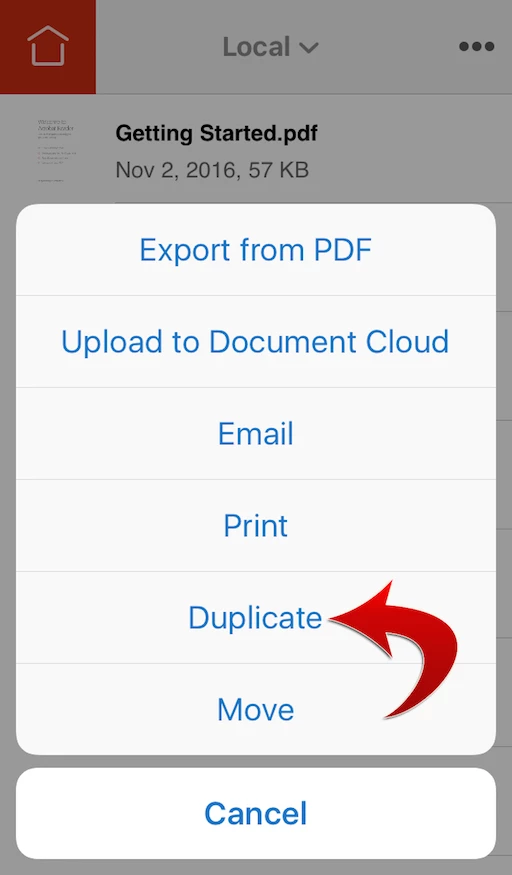
  1. In the File Browser, swipe from right to left over the file that you want to duplicate.
  2. Tap More.
  3. Tap Duplicate.

Please note that duplicating a file in the cloud storage (e.g. Document Cloud, Dropbox) is not supported in Acrobat Reader for iPhone and iPad.

Hope this helps.

2 replies

RussGladd
New Participant
May 5, 2021

How?  I am on macbook pro.  No duplicate option?


Dov Isaacs
Brainiac
May 5, 2021

On a real computer such as a Mac or Windows system, simply use the copy facility within the Finder or Windows Explorer to duplicate a file. There is no good reason to open the file to simply duplicate it!


- Dov Isaacs, former Adobe Principal Scientist (April 30, 1990 - May 30, 2021)
RussGladd
New Participant
May 5, 2021

Thank you for the response?


Plenty of reasons to duplicate.  Maybe I want to duplicate a file because majority of contents can me used and saved under a different name for different client.  

duplicating in file within the app was my hope.  

MobileDeveloperCKCommunity ManagerCorrect answer
Community Manager
February 15, 2017

Hi,

To duplicate a file,

  1. In the File Browser, swipe from right to left over the file that you want to duplicate.
  2. Tap More.
  3. Tap Duplicate.

Please note that duplicating a file in the cloud storage (e.g. Document Cloud, Dropbox) is not supported in Acrobat Reader for iPhone and iPad.

Hope this helps.