

Answered
How to change underline width and color (on my MacBook or iPad)
When using my MacBook or my iPad, how do I change the line width and color when using the underline tool or the pencil tool?

When using my MacBook or my iPad, how do I change the line width and color when using the underline tool or the pencil tool?
Hi Backpacker48,
..using the underline tool or the pencil tool
I am fairly certain that you are asking about the Commenting tools.
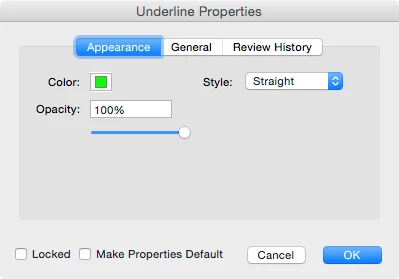
For Underline tool, there is no option to change the line width (thickness). But you can change the color and opacity. Additionally you can change the style in the desktop app.
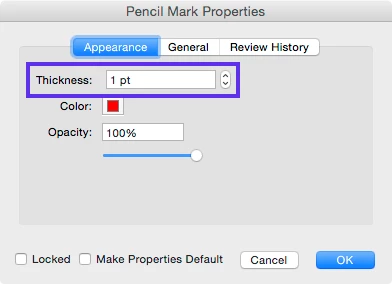
For Pencil or Freehand Drawing tool, you can change the line width (thickness) in addition to color and opacity.
The key here is to change the properties of an existing comment once it is added to a page.
Acrobat Reader DC (desktop app) on your MacBook
Acrobat Reader for iOS (mobile app) on your iPad
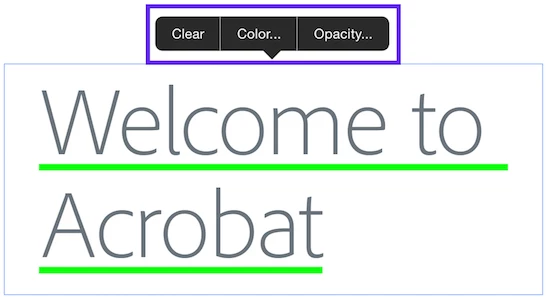
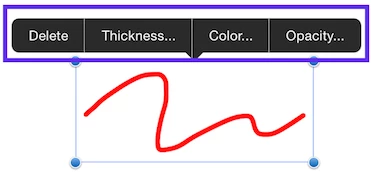
Once you change a property (e.g. Thickness, Color, Opacity), the mobile app will remember the new value of the particular comment type for the next time.
Please let us know if you have additional questions.
Already have an account? Login
Enter your E-mail address. We'll send you an e-mail with instructions to reset your password.
 AdChoices