


New Participant
December 17, 2018
Question

Intermittent Signature Save for Adobe Reader on Mobile Device

  • December 17, 2018
  • 2 replies
  • 1216 views

Hi,

I have a whole team of staff using Adobe Reader on a tablet (LG and Samsung) to collect signature on supervision logs.

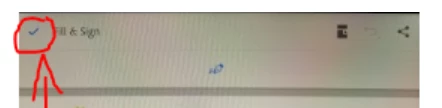
The new update only intermittently saves the signature when the hidden blue checkmark is selected to save (see image).

I think the only workaround is to close the document and reopen in to see.

If the device has multiple recent untitled documents, this is a clumsy workaround.

Please advise on how to collect signatures consistently,

We have lost many signatures.

Thanks,

TMA
This topic has been closed for replies.

2 replies

Adorobat
Community Manager
Community Manager
January 9, 2019

Hi Tamsin,

Sorry for the delay in response. I tried replicating the issue with the pdf file you shared on android 7.1 with acrobat reader version 18.5.1  but the issue was not reproducible. You may try reinstalling the app on the device and check if that helps.

-Shivam

Adorobat
Community Manager
Community Manager
December 18, 2018

Hi tnm,

As per the issue description mentioned above, signature on the pdf saves intermittently after updating acrobat, is that correct?

Could you let us know where the pdf is located- locally on the device or on the cloud?

Does this happen with a specific pdf? Have you tried with other pdf files?

Also, let us know dot version of acrobat and android version installed on the device? You may refer to the steps given in the following help document for the same: Acrobat Reader Help for Android: Troubleshooting FAQs

I tried replicating the issue on an android device with latest version of reader but the issue was not reproducible.

Thanks,

Shivam

New Participant
December 20, 2018

Hi Shivam,

So far it's happening on Samsung Galaxy Tab E Model SM-T377P Software version T377PVPU3CQ14 hardware T377P.02 Android 7.1.1 which has all the latest updates.  The Adobe acrobat version is 18.5.1.8310.

Apparently the signatures disappear after a few days.  For this reason I'm not sure if it happens across documents. The PDF that we are concerned with is a monthly log.  The log has fillable fields and a space to capture signatures to document monthly overlaps.  

For some reason the latest Adobe doesn't automatically open PDFs downloaded to the device, which may be relevant.  Only when navigating to the GDrive does the PDF open in Adobe.  But that is the case for a variety of PDFs, not just the log.  Please advice, or let us uninstall the latest update and return to the older version that worked efficiently for opening and editing.

Thanks,

TMA

New Participant
December 26, 2018

Hi TMA,

tnm49465857  wrote

For some reason the latest Adobe doesn't automatically open PDFs downloaded to the device, which may be relevant.  Only when navigating to the GDrive does the PDF open in Adobe. 

have you tried locating one of the downloaded pdf files > tap open > tap remember my choice and then tap adobe acrobat? Does that work?

Also, would it be possible to share the pdf file you are working with to replicate the issue at our end? To share the file here in the forums, refer to the steps given in this link: How to share a file using Adobe Document Cloud

You may also share the link for the pdf via private message -  How Do I Send  Private Message

-shivam


Please find attached fillable log, thanks.