

Participating Frequently
April 13, 2017
Answered

Linking devices - Adobe Reader DC

  • April 13, 2017
  • 1 reply
  • 2133 views

Hi. How do I link multiple devices so that I can sync docs across them?

This topic has been closed for replies.
Correct answer MobileDeveloperCK

Hi rob glenister,

Acrobat Reader for iPhone and iPad provides integrated storage support for Dropbox.

Please take a look at the product news.

Dropbox Integration Now Available for Acrobat Reader on iPhone and iPad

To add Dropbox as a storage option
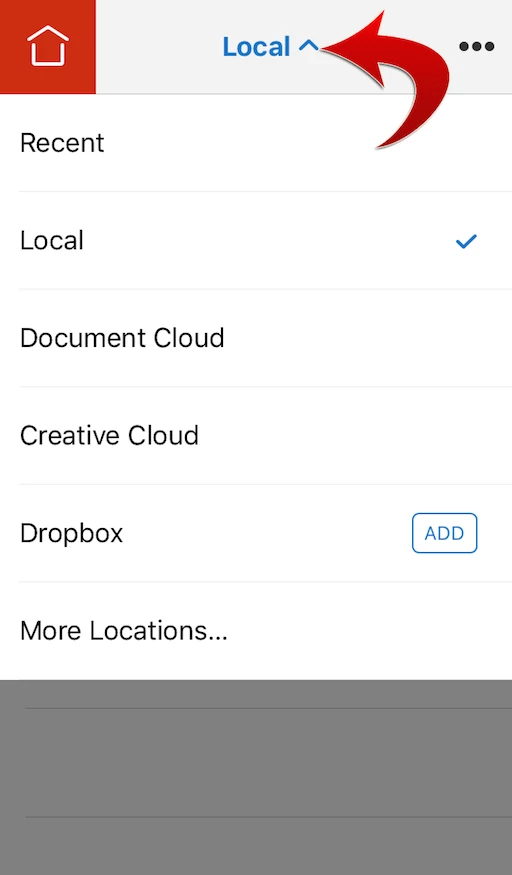
  1. Launch Acrobat Reader.
  2. Open the Location Chooser by tapping the blue text in the top bar.
  3. Tap Dropbox  ADD.

You can sign into the same Dropbox account from multiple devices.

Please see the following forum thread for more storage options (e.g. iCloud, Google Drive, Box, OneDrive).

Re: How do I view docs from google drive?

Please let us know if you have any questions.

Thank you!

1 reply

AkanchhaS8194121
Brainiac
April 13, 2017

Hi Robglenister,

You can sync file across multiple device using the Document Cloud feature of Acrobat Reader mobile/desktop application.

As Adobe Acrobat Reader DC is free application for desktop and mobile devices, so you need to download that (on the devices you want to access the files).

You may go through the help document Acrobat Reader Help for iOS: Getting started with Acrobat Reader on iOS  to see how to save docs under "Document Cloud"  and sync with the other device's Acrobat Reader DC application.

Hope this helps.

Akanchha

Participating Frequently
April 14, 2017

Many thanks. I take it that one can only sync documents in the Cloud and not from Dropbox, etc.

Appreciate your help.

Rob

[personal information removed by moderator]

MobileDeveloperCKCommunity ManagerCorrect answer
Community Manager
April 14, 2017

Hi rob glenister,

Acrobat Reader for iPhone and iPad provides integrated storage support for Dropbox.

Please take a look at the product news.

Dropbox Integration Now Available for Acrobat Reader on iPhone and iPad

To add Dropbox as a storage option
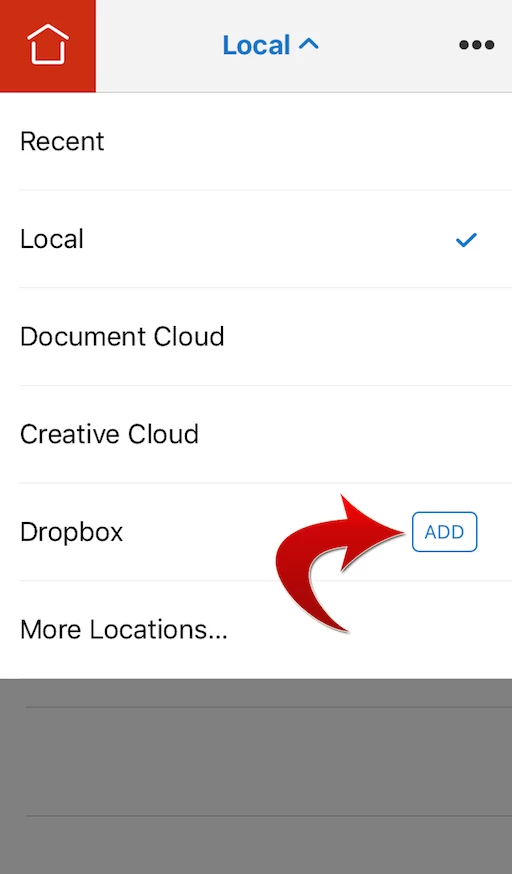
  1. Launch Acrobat Reader.
  2. Open the Location Chooser by tapping the blue text in the top bar.
  3. Tap Dropbox  ADD.

You can sign into the same Dropbox account from multiple devices.

Please see the following forum thread for more storage options (e.g. iCloud, Google Drive, Box, OneDrive).

Re: How do I view docs from google drive?

Please let us know if you have any questions.

Thank you!