

Participant
December 7, 2017
Question

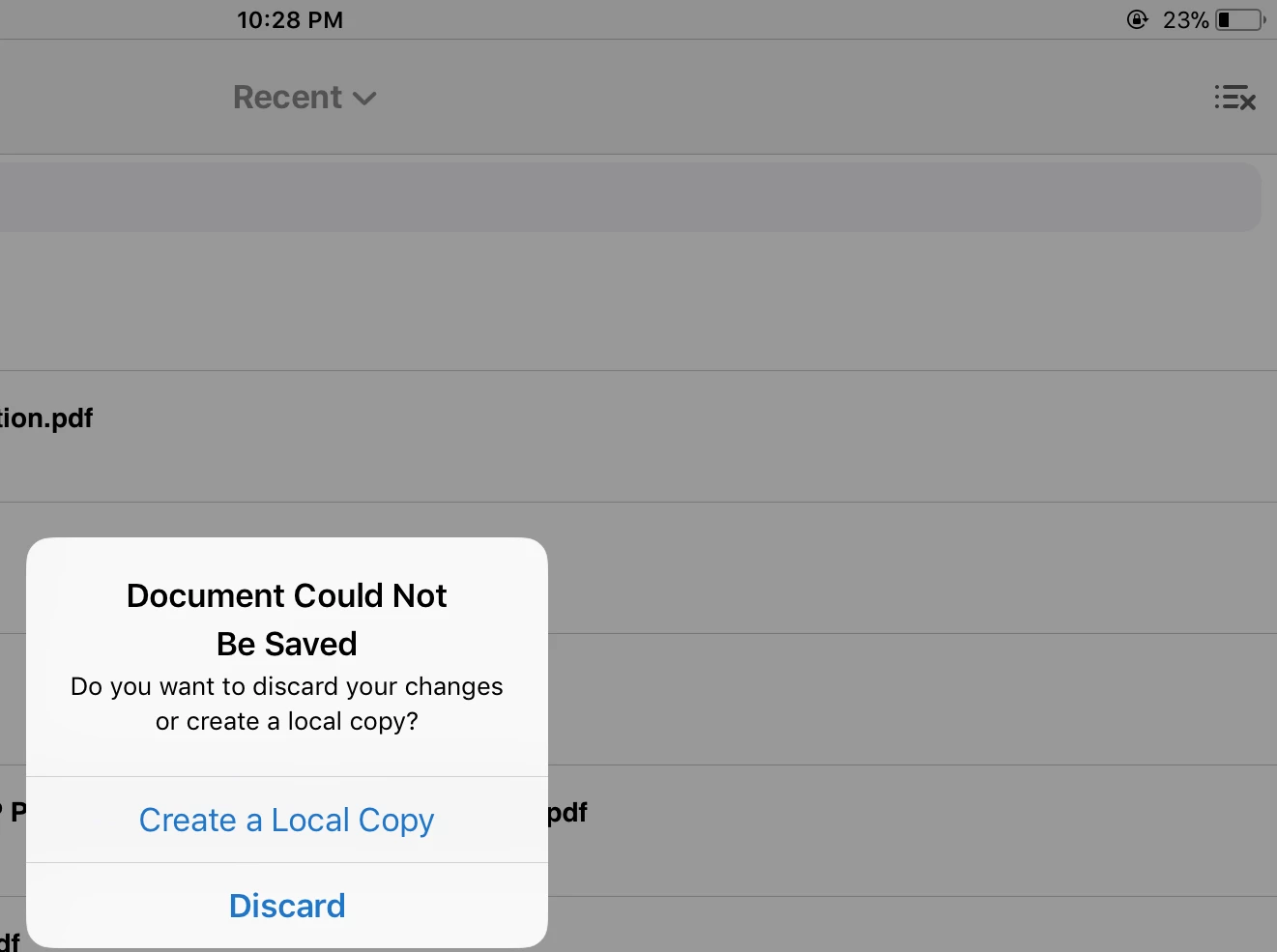
Pdf files doesn’t save highlighting and last visited page after most recent update. I’m using iOS 11.2, Pdf files doesn’t save highlighting and last visited page after most recent update. I’m using iOS 11.2

  • December 7, 2017
  • 7 replies
  • 15981 views

This topic has been closed for replies.

7 replies

Participant
December 13, 2017

Per lo STAFF

Ho eseguito 3 test:

1) Vecchio documento locale: l'ultima pagina di lettura non è salvata

2) Nuovo documento locale importato con ITunes: l'ultima pagina di lettura non è salvata

3) Nuovo documento aperto da Document Cloud: l'ultima pagina di lettura è SALVATA

Attualmente solo i documenti aperti da Document Cloud funzionano correttamente.

Participant
December 13, 2017

Anche io, nella versione italiana, ho lo stesso problema.

Ho dei file locali e, prima dell'aggiornamento l'app ricordava dove ero arrivato, ora non più.

Qualcuno sa se Adobe sta correggendo questo bug?

Se ci fossero almeno i segnalibri potremmo usare questi ma così l'app è inutilizzabile.

Participant
December 12, 2017

Huge +1. I’m reading a book and after a recent update every time I reopen it I see the same location, very annoying, would really appreciate a fix.

December 11, 2017

Hi,

I am also having the same issues as the original poster. Files in recent or local lose the last page I visited (e.g. left off in page 58, close the app or don’t use it for some time and the page goes back to number 1 when opened), as well as not saving any highlights or comments I made. With files I’ve had previous the update the same thing happens (e.g. Page was left at 250 before update, after uodated I read until 350 and close the app. Book opens in page 250).

It’s very bothersome because I cannot constantly right down the page and any changes made like highlights are simply not saved.

Participant
December 11, 2017

Im having the same problem. Whenever I open a document it opens on the first page instead of the last one I visited

Community Manager
December 11, 2017

Hi teo_parn​, mariob48507756​, alonsoc55356484​,  

Would you please clarify which problem(s) you have encountered?

The original post by chinthakak59567971 describes two distinct problems after the update to Acrobat 17.11.30.

  • Problem 1: Commenting changes (e.g. highlight, underline) are not saved.
  • Problem 2: The last viewed position (page number, zoom/magnification) are not saved.

We are aware that Problem 2 happens to all "Local" PDF documents.

  • Question 1: Have you experienced both problems or just Problem 2 (lost last viewed position) only?
  • Question 2: Regarding Problem 1 (lost Commenting changes), does it happen to all of your "Local" PDF documents as well?
  • Question 3: Regarding Problem 1 (lost Commenting changes), does the same problem happen to the PDF document that are newly copied to Local after the update to Acrobat 17.11.30?  (We are trying to determine whether Problem 1 happens to the existing PDF documents only.)

Thank you all for your help.

Participant
December 11, 2017

Answer 1: Both problems

Answer 2 & 3: the problem happens to the files that were already in Local. I just tried with a newly copied document and I only have problem 2 (lost last viewed position). Files that were already there before the update kept the previously saved comments (notes, highlights, ...) and open on the last page viewed before the update

Participant
December 11, 2017

I have the same problem, using iPhone 6 and 11.2.  And I am opening my pdf from the Local directory. Please solve this!

Community Manager
December 7, 2017

Hi,

Would you please help us by providing more information about the problem?

Where are the documents stored?  iCloud Drive or some other cloud storage?

How do you open each document?  Would you describe your steps?

When you see the dialog above, please tap "Create a Local Copy" (instead of "Discard") to ensure that you save the pending changes.

Thank you.

Participant
December 8, 2017

Pdfs are stored in ipad storage. Before the latest update it resumes last page I was when open a particular pdf. But now it doesn’t & can annotate in pdfs. Local copy saving too gives same problems instead of saving data.MobileDeveloperCK

Community Manager
December 8, 2017

Hi,

The screenshot that you posted above shows the "Recent" file browser.  Would you try opening the same local files from "Local", instead?

We are trying to find out how to reproduce the problem that you are seeing at our end.

Thank you for your help.