Participant
February 2, 2019
Answered

Submit button not working on mobile devices

  • February 2, 2019
  • 3 replies
  • 16223 views

I have created a form that has a working submit button when used from a computer.  It will email me the completed form when it is clicked on.  When I open it on my iPad or iPhone and the submit button is pressed, nothing happens.  I have spend hours sifting through threads about this, and have tried everything.  It still will not work.  Has anyone found a solution for this?  I need the form and submit button to be available via an iPad.
Correct answer derek lau @ adobe.com

Hi @S. S,

May I know which app you used to view the file and try to use the submit button? It seems still doesn't work on my end using PDF Expert and Adobe Acrobat Reader on my iOS phone and iPad. There is no action or any pop-up notification directing me to a draft/message window from Outlook/Gmail app when I clicked the SUBMIT button.


I've attached a sample file here and hope that you can help me investigate and share some resolutions.


Hi Cindy,

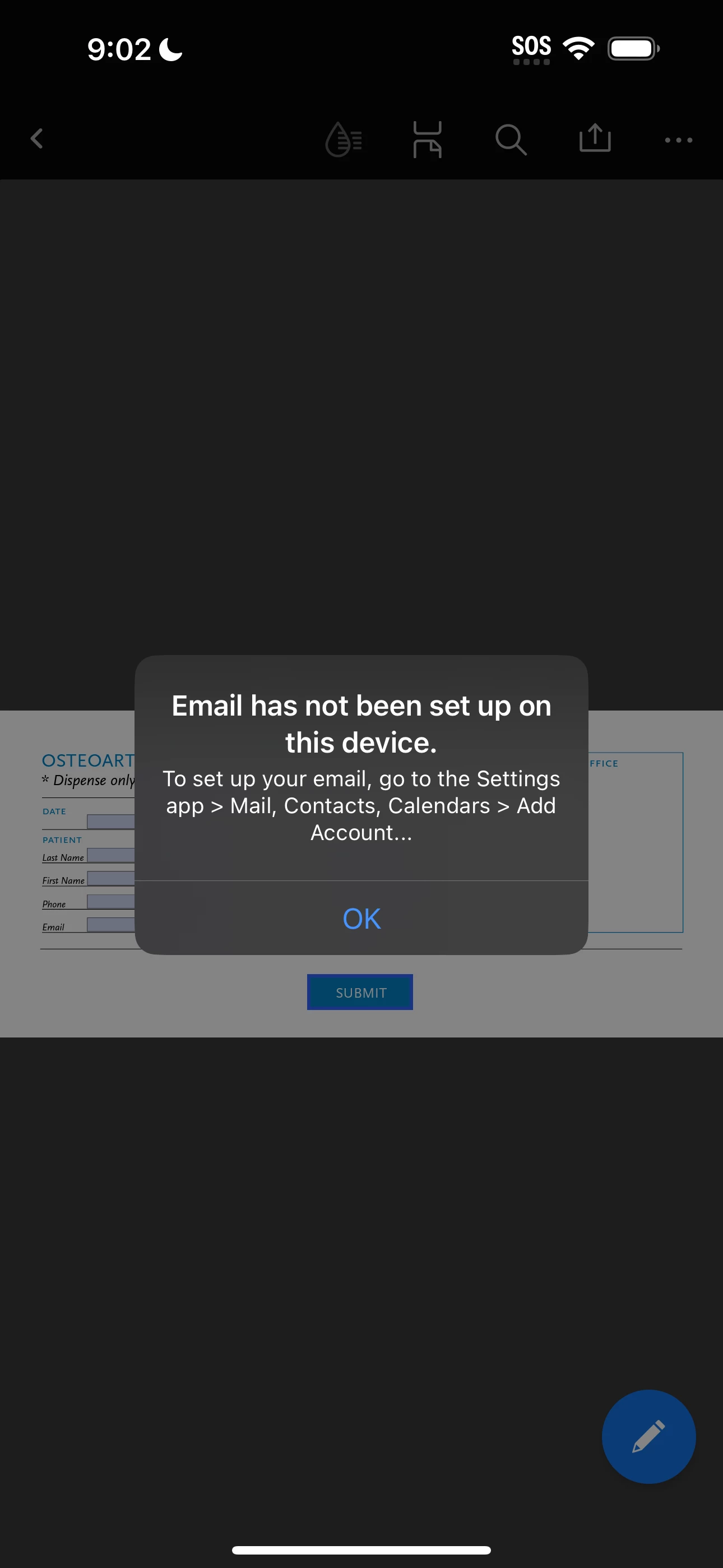
Thanks for contacting us. If you are using the current AppStore Acrobat iOS 23.03.01 on your device with iOS 16.4.1, when clicking the "Submit" button, you should see the following dialog came up,

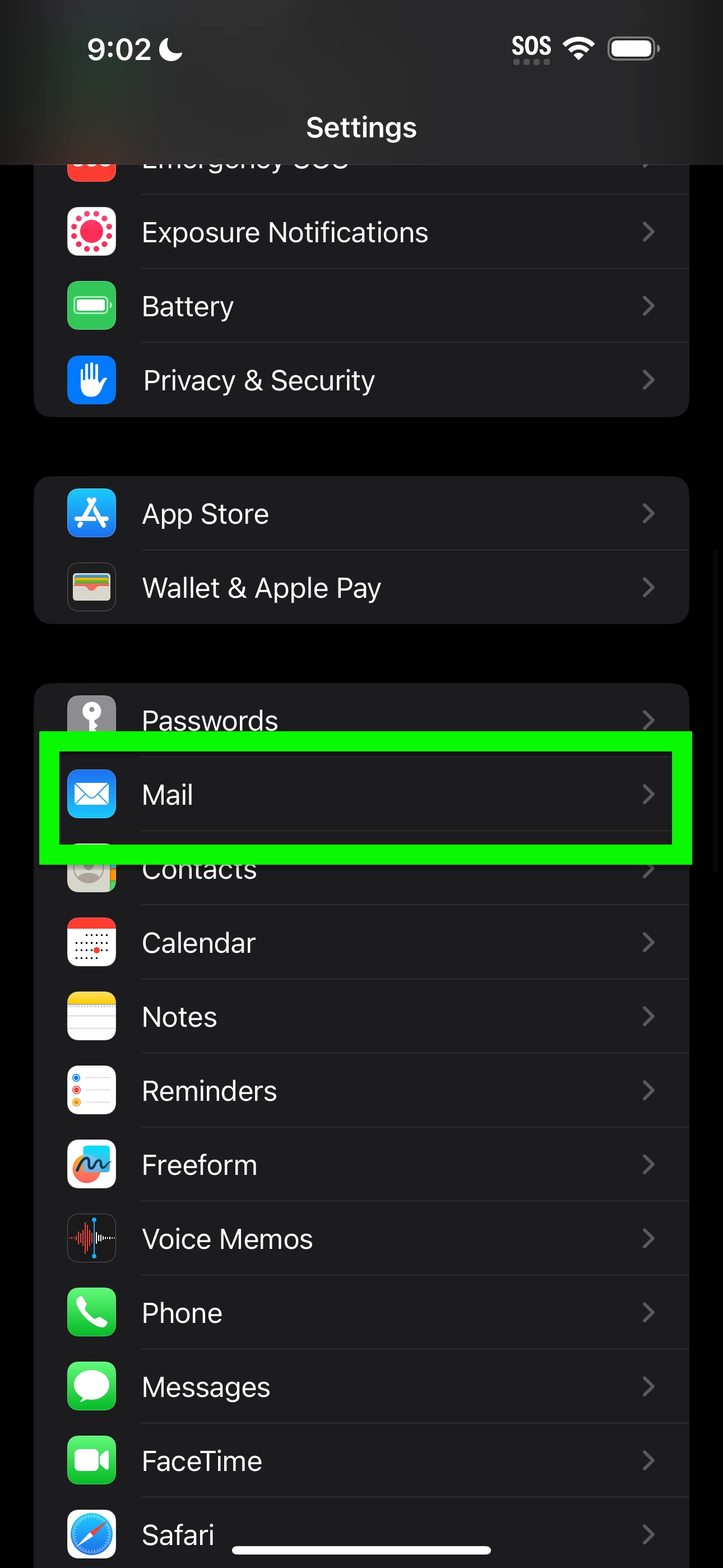
Then go to the iOS Settings app

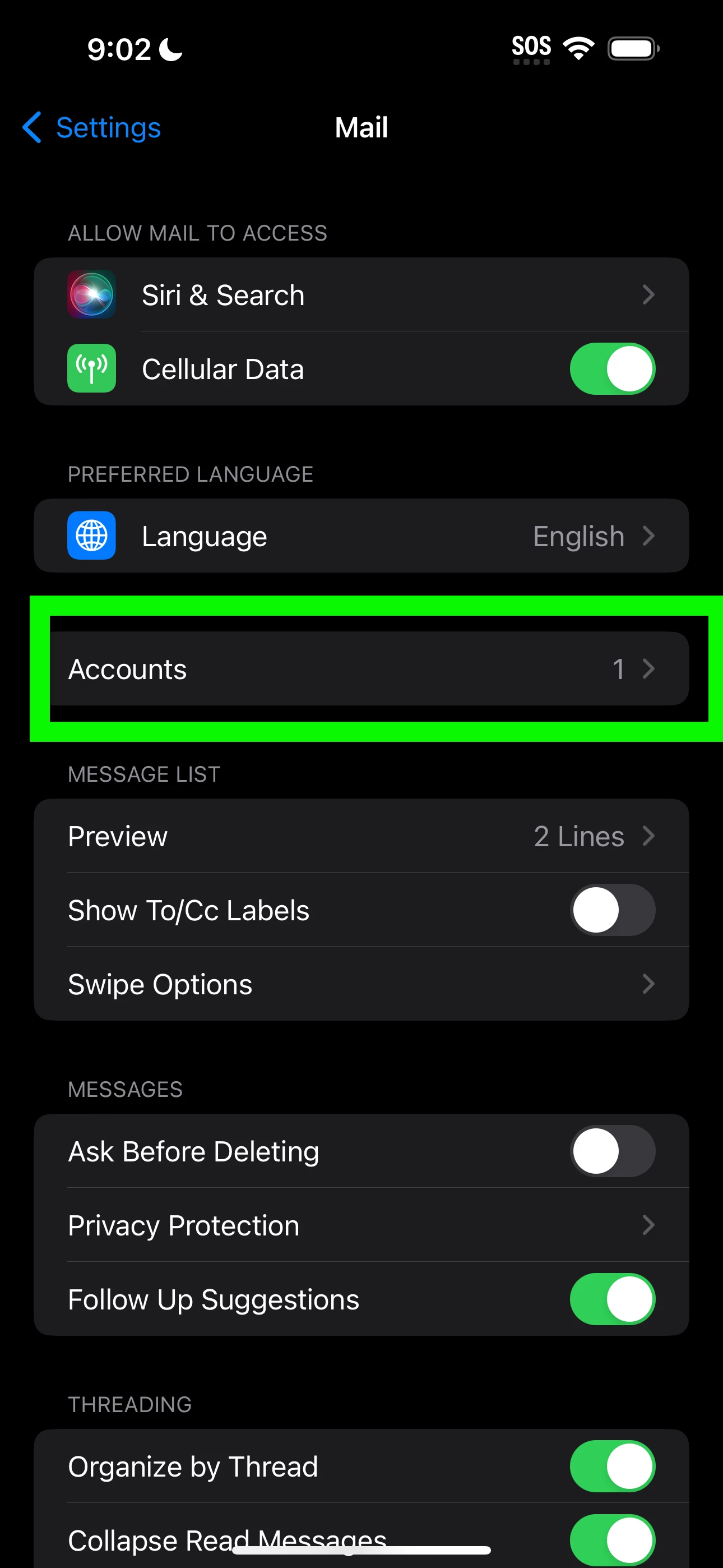
1. Choose "Mail"

2. Choose "Account"

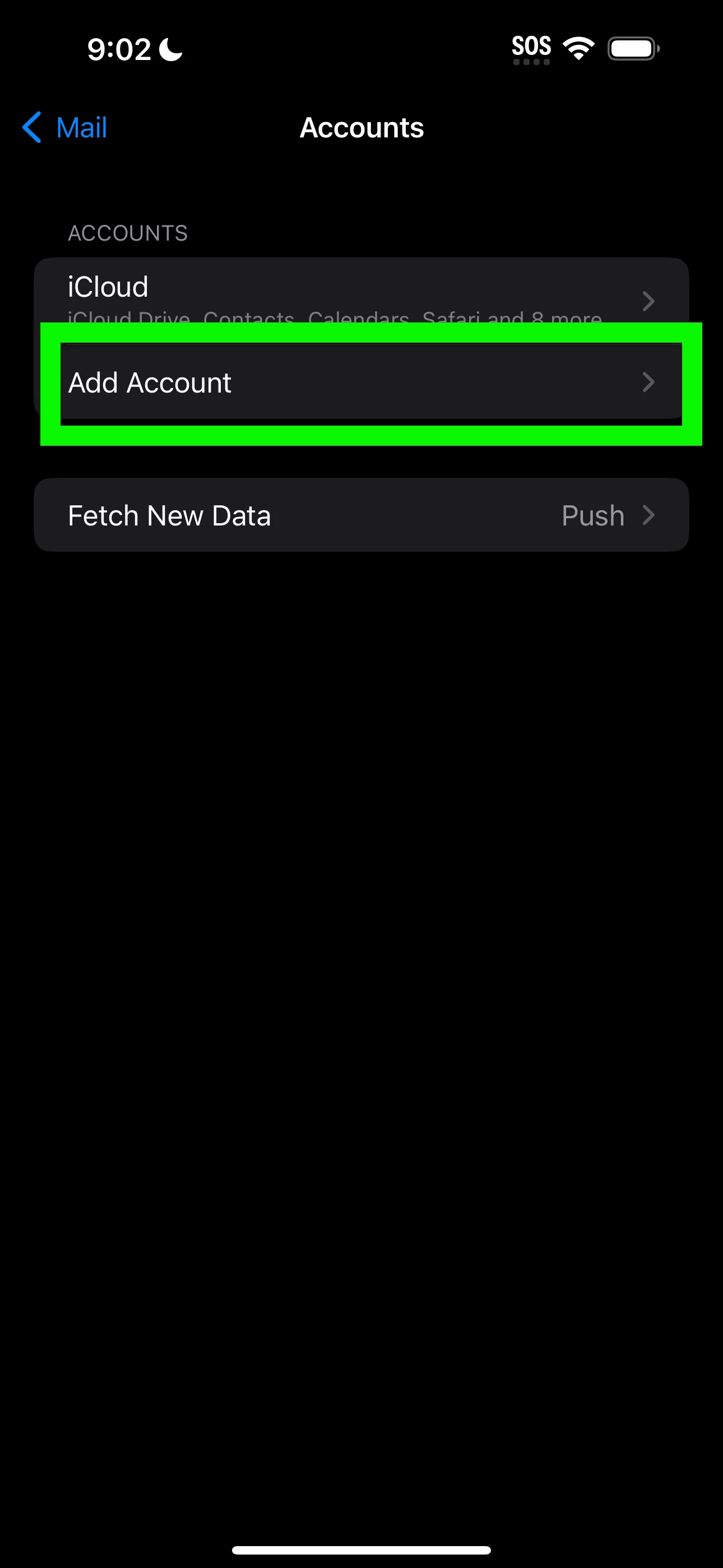
3. Choose "Add Account"

4. Choose your perferred email and continue to finish the set up the email account

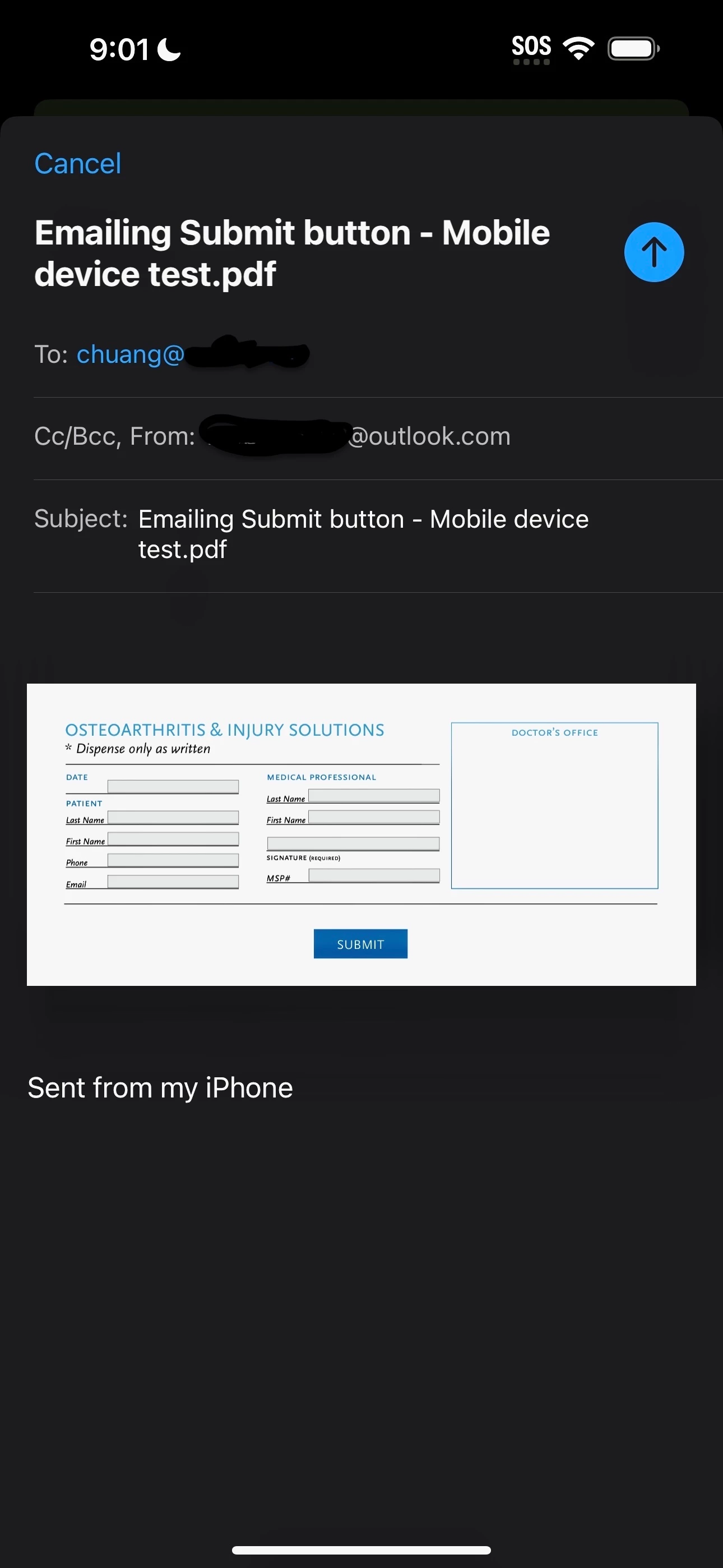
5. Open the PDF and click the "Submit" button and you should see the draft email comes up as below,

Hope this helps

3 replies

Participant
July 15, 2024

I am having a similar issue. I've tried formatting the submit button every possible way, but I am not able to select the submit button when viewing the form on my ipad. I have the form open on my work computer, send it to my personal gmail, then open the form within gmail on my personal iPad. No matter what I try, the submit button does not work. Can someone help me? 

Participant
July 15, 2024

Hi Isaac,

It works if you set the Trigger to "Mouse Down", and view the document on the Adobe Acrobat app on mobiles with a touch screen).

Hope this helps.


Cindy

Legend
February 2, 2019

This thread Action button (Send via Email) not working on mobile device suggests it should work but pulls up one particular issue; the form needs to be set to submit in HTML format.

Participant
February 5, 2019

Unfortunately I switch the format to HTML and that did not work either.  There is still no action from the submit button in the mobile application.

Cindy H.
Participant
April 19, 2023

Hi Cindy,

Thanks for contacting us. If you are using the current AppStore Acrobat iOS 23.03.01 on your device with iOS 16.4.1, when clicking the "Submit" button, you should see the following dialog came up,

Then go to the iOS Settings app

1. Choose "Mail"

2. Choose "Account"

3. Choose "Add Account"

4. Choose your perferred email and continue to finish the set up the email account

5. Open the PDF and click the "Submit" button and you should see the draft email comes up as below,

Hope this helps


Hello @derek lau @ adobe.com  and @S. S ,


Thank you so much for your quick turnaround.

I think I managed to set up my account in Apple Mail and if I view & fill the form in Acrobat Rader, the submit button did trigger a New Message window.


I also encountered a couple of issues here and hope you can give me some more tips.

  1. I've set up mailto: emailaddress; emailaddress in the Submit Form properties, but the email addresses weren't populated automatically in the New Message window triggered from Acrobat Reader on iPhone devices. The email addresses auto-poplulate on the web and in PDF creator though. (Attached screenshots for a reference)
  2.  What would be the best practices of setting up the date automatically generated when open, but freezing the date once it's saved? I've seen people adding the scripts for Page Open in Page Properties, but the date will always update to the current everytime it's re-opened.  I figured it out and pasted the scripts when Document Did Save in the Document Actions level. But if you have any suggestions, please let me know!


Thank you so much!

Cindy

Legend
February 2, 2019

What app are you opening the form in? How many apps have you tested? Are you submitting to an http, https or mailto URL?

Participant
February 2, 2019

I am opening it in Adobe Acrobat Mobile.  I have also tried PDFelement and Smart Forms, but neither of them even recognize it as a functioning button.  It is being submitted to a mailto URL.