


lynnp54145859
New Participant
August 21, 2016
Answered

Adobe Sign Server Error when trying to load a document for signing

  • August 21, 2016
  • 11 replies
  • 14728 views

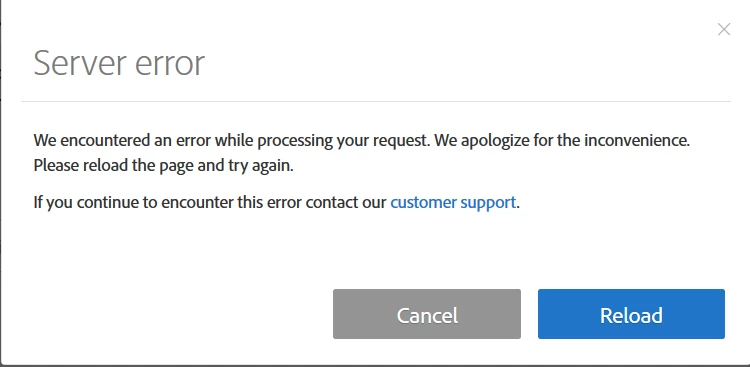
I use an enterprise license for Adobe Sign and when trying to load a document for signing, I continue to get a "Server Error" dialogue box pop up. It tells me to reload the page but the error persists.  When I click on the link for 'customer support', I do not get an option to contact anyone and was eventually led to this forum to post my issue.  Is anyone else having this issue?
 

Correct answer viciwhiz

I had this same problem.  I used a different browser (problem with internet explorer...no problem with Google Chrome).

Good luck.

Vici

11 replies

New Participant
March 31, 2021

While creating a re-usable template in Adobe eSign, I am getting Server error. Please help to resolve this.

Meenakshi Negi
Community Manager
Community Manager
March 31, 2021

Hi Deepti,


Thank you for reaching out and sorry for the trouble.


As you are receiving the server error, would you mind sharing the screenshot of the error message that appears?


Please try clearing the cache and cookies for the browser. Use an alternate browser or the new incognito window in Chrome. Check if that helps.


Let us know if you need any help.


Thanks,

Meenakshi


New Participant
September 16, 2020

Updating this answer as I was getting "Unable to communicate with Adobe Server" error for selected users in Salesforce (SFDC) after Conga document was succesfully produced.. Turns out that fields were added to the Agreement Object that were not accessible to all users and those without access received this ( very misleading) error !  Once we provided edit access to the field the error disappeared.  Hope this helps.

New Participant
September 25, 2020

How did you accomplish this?


New Participant
September 25, 2020

Dixie5EE8,  We looked at the new field in SETUP>OBJECT MANAGER> AGREEMENT and then looked at the visibility of the field to different profiles.

New Participant
November 26, 2019

Hello everybody!
I had to sign a document from a website called Soundreef, but everytime I try to open that document to sign it, the page opens a window called "Server Error" in which it tells me to refresh the page or contact the support. This should be the error code: [191126034403586.app-a18]


What could I do? Thanks!


Andrea

Meenakshi Negi
Community Manager
Community Manager
November 26, 2019

Hi Andrea,


As you have mentioned above, you are trying to open the PDF document from a website.

If the issue occurs only with the form on that website, I would suggest you to contact the support team of that website.

It might be an issue on their end.


If that is not the case, could you please share the exact workfow you do to open that form.

Are you downlaoding the form and then trying it to open in Adobe Sign to fill it? Or you are pening directly from the website?

It would be hepful if you can share the screenshot and link to the website from where you are trying to open it.


We will be waiting for your response.


Regards,

Meenakshi

Participating Frequently
May 9, 2018

I get the same on a Mac using Chrome and thought it was working with either Firefox or Safari, but none of them worked when I did it just now... frustrating because I have migrated all my contract work to this tool. The support system for contacting Adobe doesn't have an option for this tool, so this forum is the only resource I can find for getting the word out, but it looks like others have had this problem up to a year ago and no good responses or suggestions have come of it...grrr.

Participating Frequently
May 9, 2018

This is the error I get when the page loads.

We encountered an error while processing your request. We apologize for the inconvenience. Please reload the page and try again.

If you continue to encounter this error contact our customer support.

New Participant
October 6, 2017

We encountered an error while processing your request. We apologize for the inconvenience. Please reload the page and try again.

If you continue to encounter this error contact our customer support.

Meenakshi Negi
Community Manager
Community Manager
December 7, 2017

Hi Keeshas,

Sorry for the delay in response.

Please clear the cache and cookies of the browser.

Try alternate browser or use the new incognito window in Chrome.

Use this link Sign In — e-signature and e-sign Software Solution — Adobe Sign to sign in to your Adobe account.

Let us know if you still experience any issue.

Regards,

Meenakshi

New Participant
September 27, 2017

I am getting a 'server error' pop up whenever i try to send a document for signing.

It gives me the option to 'reload' but clicking this only brings up the error again in a perpetual loop.

I have not been able to send any documents out as a result.

I have tried different browsers, clearing cache, different computers etc. all with no luck.

Any help would be appreciated.

Community Manager
September 27, 2017

Hi Winston,

Click the account tab>account settings>account languages

here ensure to set a language for signing language, don't leave it set to 'Select your language' option.

thanks

New Participant
October 5, 2017

I'm having the same issue.

I found the account tab, however I can't locate "account settings?"

Any help would be appreciated!

Thanks!

viciwhizCorrect answer
New Participant
July 12, 2017

I had this same problem.  I used a different browser (problem with internet explorer...no problem with Google Chrome).

Good luck.

Vici

MichaelKazlow
Brainiac
July 10, 2017

Have you tried with a different document?

aliciaf242
New Participant
November 23, 2016

I'm using Adobe Sign to send a signed document but after I sign it reads "Server Error". I've reloaded and refreshed the page numerous times and no success. Can someone please help?

AadeshSingh
Community Manager
Community Manager
November 23, 2016

Hi aliciaf242,

Could you please clear Cache & Cookies from the web browser or try an alternate web browser (Prefer Google Chrome Incognito window) to login to your Adobe Sign account using the below link:

- Sign In — e-signature and e-sign Software Solution — Adobe Sign

If the issue persist, please share the screenshot of the error page.

Regards,
Aadesh

williamr56962245
New Participant
August 11, 2017

I've gone to another browser, cleared my cache & history and the problem continues. I've needed to send over a few contracts in the last two days and haven't been able to. When I try to get in touch with you, I'm directed to this form, no where is a phone number and the one I did find, states Desktop apps are not supported and E-sign isn't an option that I could find...quite unimpressed; I hope this works.

August 25, 2016

Last night and this morning, setting a document up for signature leads to this:

Server error

We encountered an error while processing your request. We apologize for the inconvenience. Please reload the page and try again.

If you continue to encounter this error contact our customer support.

  The customer support link just goes to the public website home page, with no sign that I can see of a Support function.  Nor can I see a Support function in the Adobe Sign dashboard after I've signed in.

What do I do now?

sameer_puri
Adobe Employee
Adobe Employee
August 25, 2016

Hi Gordon,

This looks similar to another open thread here: Server Error - Error message: Unhandled Error - HELP

Can you try the workaround mentioned there and let us know if that resolves the problem for you. Do let us know if your issue is not same as the one in the other thread.

Thanks

Sameer Puri

New Participant
April 6, 2018

Hi Sameer,

I have the same problem, it shows server error when I finished my sign, and I can re-open it after that.

What should I do now? Thank you!

Fangting