


Inspiring
August 21, 2025
Answered

Adobe Sign template – prevent scroll bar in multi-line text fields

  • August 21, 2025
  • 1 reply
  • 372 views

Hi,


In an Adobe Sign template, I have text fields where multi-line data entry is enabled.

I set the maximum character length to 500, but if the signer enters one word per line, a scroll bar appears in the text field. This means the user (or recipient) cannot see the text that has scrolled out of view in the PDF.

Is there any way to lock the scroll bar so that the user cannot enter more text once the visible space in the text field is filled?

Or, alternatively, is there a way to automatically prevent hidden/overflow text in multi-line fields in Adobe Sign templates?
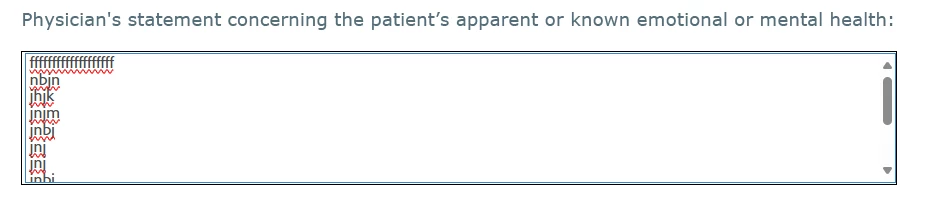
In the downloaded pdf the user cannot see the text that has scrolled out of view 

Is there any way to fix this ?

Thanks,

Sreejesh

Correct answer Meenakshi Negi

Hi sreejesh_5190,


Thank you for reaching out.


It is the designed behavior in Acrobat Sign. Using the multi-line feature adds a scroll bar when the user types in multiple-line text that exceeds the form field size. You may try to increase the form field size. 

However, once the document is signed, the text is auto-resized according to the size of the form fields, so all the text appears in the form field.

For more information on the field appearance, please refer to the following help document: https://helpx.adobe.com/sign/using/set-field-appearance.html


Let us know how it goes.


Thanks,

Meenakshi

1 reply

Meenakshi Negi
Community Manager
Meenakshi NegiCommunity ManagerCorrect answer
Community Manager
August 21, 2025

Hi sreejesh_5190,


Thank you for reaching out.


It is the designed behavior in Acrobat Sign. Using the multi-line feature adds a scroll bar when the user types in multiple-line text that exceeds the form field size. You may try to increase the form field size. 

However, once the document is signed, the text is auto-resized according to the size of the form fields, so all the text appears in the form field.

For more information on the field appearance, please refer to the following help document: https://helpx.adobe.com/sign/using/set-field-appearance.html


Let us know how it goes.


Thanks,

Meenakshi

Inspiring
September 1, 2025

Hi @Meenakshi Negi ,


I am able to see the scroll bar when I download the signed PDF and view the document using Adobe Acrobat.

Please find the below


Thanks,

Sreejesh

Meenakshi Negi
Community Manager
Community Manager
September 1, 2025

Hi Sreejesh,


Thank you for sharing the screenshot.

There are two form fields in the form: one is auto-resized, and another shows the scroll bar. 

Could you please share the workflow used to add the form fields and send the document for signature? Also, how was the document filled out and signed?

If you can share the sample document used here, it will help us understand what happened here.


Thanks,

Meenakshi