Participating Frequently
October 29, 2015
Answered

Assign user to group

  • October 29, 2015
  • 3 replies
  • 1397 views

Hi Experts,

I have a scenario where a user already has echosign account and I am looking to add him to the group which is managing the signatures. I logged in through admin account but I don't see any option to add him. How to add the user because the only option I see is create user and system is nor allowing to create that user again as the user already exists.

Thanks

Uday

    This topic has been closed for replies.
    Correct answer Rijul Raj Khurana

    Hi Rijul,

    I have sent you the reply in message.

    And For other users too, I am posting here

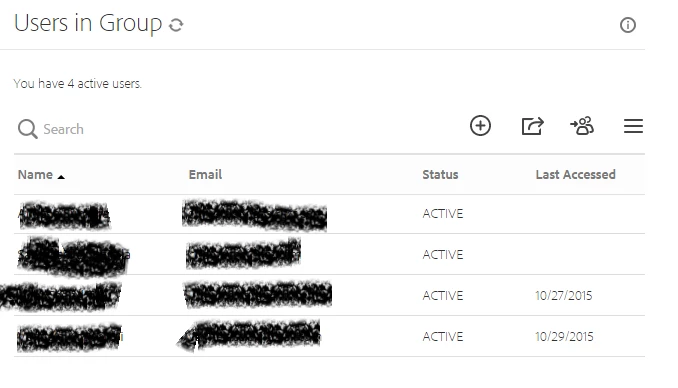
    This user is not visible under Users, so that I can proceed to assign him to the required group.

    The scenario here is like either the user himself shall be able to send request to group admin , for him to get added to the group or the group admin shall add him to the group and the user shall either accept/reject it. For eg:- if I want to add you ( Rijul) with your consent to my group, is there a way available?. If there is a way not available, then there is a no way I could make the above user able to send document for signatures, just because he already had echosign credentials created himself with his current mail id.

    Thanks

    Uday


    Hello Uday,

    Did you click on option icon on extreme right under Users and clicked Show all users? If still the user is not shown, then it's definitely not under your account. In the meantime, I have replied to your internal message as well.

    Regards,

    -Rijul

    3 replies

    ccatesEDI
    New Participant
    May 19, 2016

    I have this exact same problem. The users I want to add to our new Enterprise account already have their own Adobe credentials using their corporate email address. I am getting the error message here: This user is already associated with a different account

    The "correct answer" above is clearly not the answer to this problem. Please help.

    Participating Frequently
    October 29, 2015

    Hi Anubha,

    Thanks for the reply. I have gone through the link before,  it tells to create User first, but my user already has credentials and I want to assign him to my group. So how to do it?.

    Thanks

    Uday

    Community Manager
    October 31, 2015

    Hi Uday,

    You can go to Users->Single click the user and then select "Edit user". A dialogue box will open up and then you can change the group from dropdown as well.   

    Regards,

    -Rijul

    Participating Frequently
    November 2, 2015

    Hi Rijul,

    I have sent you the reply in message.

    And For other users too, I am posting here

    This user is not visible under Users, so that I can proceed to assign him to the required group.

    The scenario here is like either the user himself shall be able to send request to group admin , for him to get added to the group or the group admin shall add him to the group and the user shall either accept/reject it. For eg:- if I want to add you ( Rijul) with your consent to my group, is there a way available?. If there is a way not available, then there is a no way I could make the above user able to send document for signatures, just because he already had echosign credentials created himself with his current mail id.

    Thanks

    Uday

    Anubha Goel
    Community Manager
    Community Manager
    October 29, 2015

    Hi Uday,

    Please seek help from the below mentioned KB doc on how to add users:

    Document Cloud Help | Adding users to your account | eSign services

    Hope that helps.

    Regards,

    Anubha