Participant
October 3, 2018
Answered

Can't Access Adobe Sign Dashboard or Send Files

  • October 3, 2018
  • 6 replies
  • 3849 views

I cannot get to Adobe Sign in my account since this morning. Is anyone else having this issue? There is no way for me to access Adobe Sign, see pending documents or send new ones.

This topic has been closed for replies.
Correct answer malloci

All,

We have brought the ability to go back to the old manage page. In the "For Signature" page, there is a small button on the upper right hand side that reads "Adobe Sign Manage" If you select this, the old manage page will be loaded.
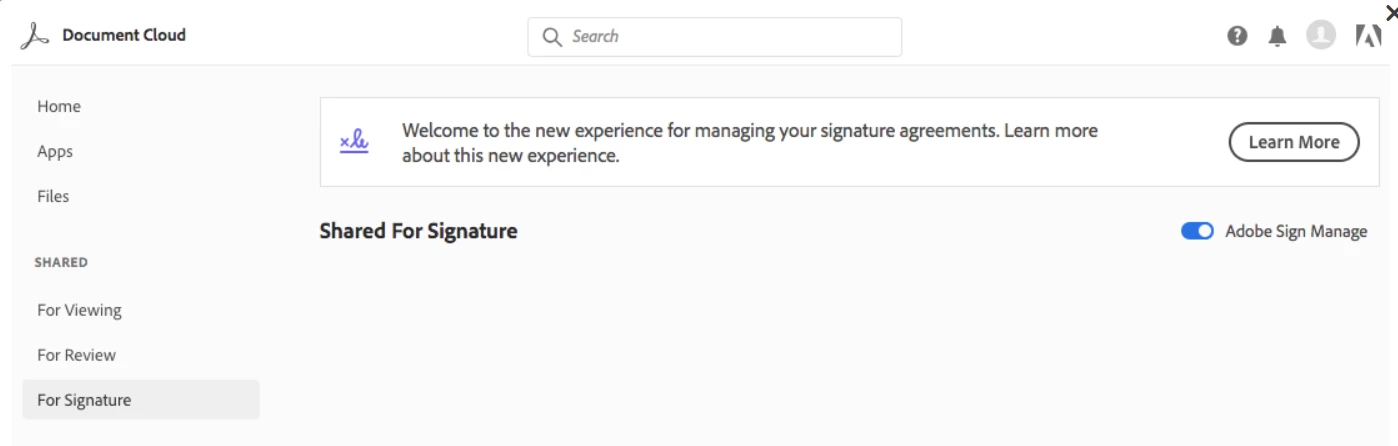
Sorry again for the frustration this has caused.

Regards,

-Steve

6 replies

Participant
March 9, 2020

I don't have document page to send

mallociCorrect answer
Adobe Employee
October 11, 2018

All,

We have brought the ability to go back to the old manage page. In the "For Signature" page, there is a small button on the upper right hand side that reads "Adobe Sign Manage" If you select this, the old manage page will be loaded.

Sorry again for the frustration this has caused.

Regards,

-Steve

AnandSri
Community Manager
Community Manager
October 8, 2018

Hi All.

Our initial launch of the all-new Doc Cloud provides the functionality you've come to depend on, but thanks to your feedback, we realize that there is still room for improvement with the Sign experience. The requested changes are back.

For detailed information, please refer to updated Adobe article What’s changed with Adobe Sign

Thanks for your time and patience thus far.

Regards,

Anand Sri.

Adorobat
Community Manager
Community Manager
October 5, 2018

Hi coastall, indofunk,

We understand the frustration you're experiencing due to the change in the Adobe Sign & Send for Signature interface - specifically the loss of the Adobe Sign dashboard and the manage page. Change is never easy, especially an unexpected one, but we feel its important to explain why we made such a change.

Our vision for Adobe Document Cloud, which includes Acrobat, our PDF services, and Adobe Sign, is to have a fully integrated location for your document and e-signature processes. We want our customers to have a seamless experience to create, collaborate and share documents - whether its to gather comments, or to have someone e-sign a document, and this meant creating a new online hub for  Document Cloud, where all your document-related activities can be managed.

Our initial launch of the all-new Document Cloud provides the functionality you've come to depend on from Adobe Sign, but thanks to your feedback, we realize that there is still room for improvement in the experience, which will be coming soon.

While we make improvements, we're bringing back access to the Adobe Sign manage page so you can easily work with existing agreement and Adobe Sign workflows in the way you're familiar with. Access to the previous manage page will be available early next week and you can toggle it on/off via the SHARED For Signature page. In the meantime, please refer to the following HelpX article that describes the new interface and how you can accomplish the same tasks you have done prior to the change: What's Changed with Adobe Sign

Thanks,

Shivam

indofunk
Inspiring
October 4, 2018

Dear Adobe AI,

Please pick up on the following keywords:

New eSign "Document Cloud" User eXperience extremely limited and frustrating!

Update tutorials to reflect whats under the hood of this new counterproductive document cloud interface.

Google search Adobe Sign alternatives-EchoSign DropBox

Customer satisfaction = NONE

Request human intervention

Clear browsing data not working,  eSign dashboard still missing.

Fix now!

Meenakshi Negi
Community Manager
Community Manager
October 4, 2018

Hi Coastall,

We do appreciate all the feedback and while we don’t always get it perfect out of the gate, we hope you will continue to help us improve our products and services.

With that said, this new release gave us the opportunity to step back and look at all the document related activities that our customers are performing - e-signing, reviewing and sharing documents. We have redesigned the new Document Cloud user interface to deliver a single web destination for managing all these document-related activities. Moreover, the same interface and experiences are also available from Adobe Acrobat DC and Acrobat Reader Mobile to allow you to access your documents and activities from any screen.

All the Adobe Sign functionality that you are used to is still available within this new unified user experience and all of your data is also still accessible from the new User experience. We do acknowledge that any change is difficult but rest assured that the change was made with an eye towards providing more functionality to you for your document needs in the future and surfacing more of your document activities front-and-center in the UI, capabilities that you already have access to.

Once again we appreciate all the feedback and hope that you will join us in this journey that we have embarked on to provide you with the next generation experiences around documents.

Please refer the following links to get further details on how to manage and track your documents in the Document Cloud web application:

- What’s changed with Adobe Sign

- Send documents for signature online

Please let us know if you need any help.

Regards,

Meenakshi