


Ross_Sharma
New Participant
September 25, 2017
Answered

Cannot access "Security Settings"

  • September 25, 2017
  • 1 reply
  • 1000 views

We have two Adobe Sign accounts. One was created several years ago, the other one about six months ago.

When I'm logged into the old account, I am able to access "Security Settings":
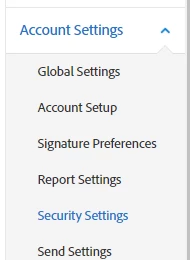
However, when I'm logged into the newer account, a lot of these settings, including "Security Settings", are missing:
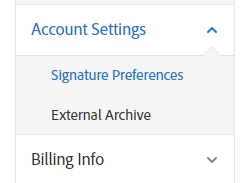
Ultimately we just want to IP-restrict our Adobe Sign account. Any help is appreciated. Thank you.

This topic has been closed for replies.
Correct answer Meenakshi Negi

Hi Ross.Sharma,

The security settings option is available in the Team account.

It seems that you do not have the admin access to the account, that is the reason the options do not appear on your account.

Let us know if you have any questions.

Regards,

Meenakshi

1 reply

MichaelKazlow
Braniac
September 26, 2017

What kind of Adobe Sign accounts? Personal, Business, and Enterprise accounts have different capabilities.

Ross_Sharma
New Participant
September 27, 2017

It is a Team account. Do I need a Business account for these settings to appear?

Meenakshi Negi
Community Manager
Meenakshi NegiCommunity ManagerCorrect answer
Community Manager
October 26, 2017

Hi Ross.Sharma,

The security settings option is available in the Team account.

It seems that you do not have the admin access to the account, that is the reason the options do not appear on your account.

Let us know if you have any questions.

Regards,

Meenakshi