


Participant
July 22, 2016
Answered

Cannot assign role to radio button from Properties box

  • July 22, 2016
  • 6 replies
  • 5623 views

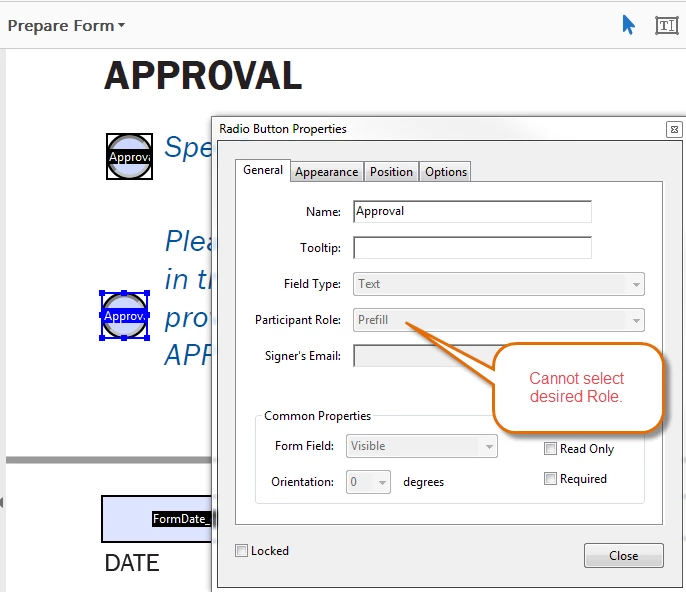
I want Signer 2 to be required to make a choice between two options (Approve / Decline) prior to signing.  However, in the properties dialog for the Radio Button the Participant Role and Field Type values are greyed out -- and show the leftover values of a previous selection:
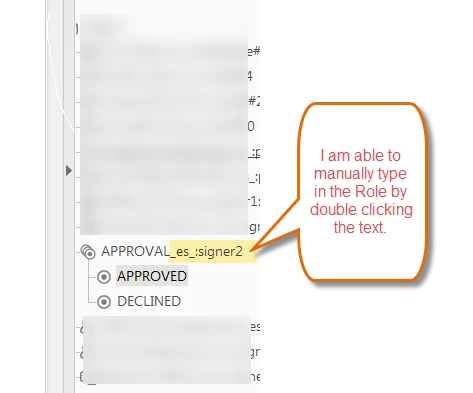
I can however manually type into the field listing.  This worked, albeit more tedious.
Correct answer AnandSri

Hello DCaulley,

Sorry for the delayed response and inconvenience caused. Try changing the Filed name by right-clicking on it and choose Rename and see if this brings any difference.

Also, check for any pending updates of Acrobat from help>check for updates, reboot the machine after installing the updates and try creating the form fields.

You may also refer to the following docs Adobe Sign Help | Adobe Sign Help

Create forms

If the issue still persists, please share the following details:

Let us know how it goes and share your findings.

Regards,

Anand Sri.

6 replies

Participant
April 7, 2020

It's 2020 and this is still not fixed. I'm using Fill & sign and the radio button propertys are greyed out. I can assign check boxes to a signer but not radio buttons, renaming the field does not help.

Participant
May 20, 2020

I wasted *several* hours trying to fix this and I believe I have found a workaround different from renaming the field and adding the particiant role there -- which doens't seem to work, anyway. 


This issue appears to be related to the default properties, i.e., if you have set a particular field's properties as the default. The new radio button insertion will try to use that same default. 


Try picking a field that has the property of the participant role you want and set that as the default, then insert a new radio button group.  This worked for me.  You might have to also rename the field and add the participant role. I had to manually do that because it didn't do it automatically.


I hope this helps save time for someone. I'm never getting back the hours I wasted on this.

mattgyver_it
Participant
September 28, 2020

(>.0) *twitch*

(>.0) *twitch*


Seriously... Thank you for replying that you figured it out. I was going crazy with these buttons.

Don't blame me. I just pushed the button. Someone else programmed that button's OnPress code. I mean, really. Why would such a dangerous button be made so big, red, and pretty. It practically screams "PUSH ME NAO!"
SDDWA
Participant
July 31, 2019

Ridiculous this still hasn't been addressed!!  This is plain and simple a bug or an omission.  Not a "different type of forms" error...

MichaelKazlow
Legend
August 3, 2019

I think you may be trying to use regular Acrobat PDF forms with Acrobat Sign. You should convert the form to an Adobe Sign e-form.

Participant
October 18, 2018

Hi- this was very helpful to find- regardless of the forum.

the problem is with Adobe Sign since this is where one can assign the role.  I’ve been working with Adobe Sign for the past 2 years and came across this problem in August 2018.

our IT team has reached out to Adobe but have not received a response.  I’m certain that this is a bug - not a user proble.  Thanks for the workaround DCaulley!

Adobe- please find a solution soon!

AnandSri
Community Manager
AnandSriCommunity ManagerCorrect answer
Community Manager
April 4, 2018

Hello DCaulley,

Sorry for the delayed response and inconvenience caused. Try changing the Filed name by right-clicking on it and choose Rename and see if this brings any difference.

Also, check for any pending updates of Acrobat from help>check for updates, reboot the machine after installing the updates and try creating the form fields.

You may also refer to the following docs Adobe Sign Help | Adobe Sign Help

Create forms

If the issue still persists, please share the following details:

Let us know how it goes and share your findings.

Regards,

Anand Sri.

Participant
February 26, 2018

I am in the process of creating my very first sign-able form and have spent 4 hours trying to fix this, all the while assuming I'm doing something wrong. Frustrated that it turned out to be a bug. Thank you for the workaround!

Participating Frequently
November 7, 2017

Over a year and Adobe hasn't answered this!?

Thom Parker
Community Expert
Community Expert
February 27, 2018

If you want an answer you need to provide some more information. What tool are you using to create this form? What kind of form is it?

Thom Parker - Software Developer at PDFScriptingUse the Acrobat JavaScript Reference early and often
Participant
February 27, 2018

Hello Thom, I appreciate your interest and desire to help. I was simply meaning to state that I saw the same behavior and solution that DCaulley illustrated so I didn't see much gain in posting similar information. Anyway, here are the basic steps that I followed. I'm certainly willing to provide more if it helps.

I am using Adobe Acrobat DC via a CC subscription to create a form that is to be digitally signed by another party. I generated a PDF from Microsoft Word, opened it in Acrobat, and went directly to Prepare Form. I added 4 "sender" fields whose roles are "prefill", and then one group of three radio buttons whose roles are "signer". I used the radio button tool from the toolbar to add each button individually (no copy/paste). I completed the rest of the form which consists of one checkbox, a signature field, a date field, and two more text fields. Unfortunately, when testing the form through Send for Signature, the radio buttons were not available to be edited by the signer.

I re-opened the PDF in Acrobat and again selected Prepare Form. When examining the properties for each of the 3 radio buttons, the role was now showing as Prefill and the dropdown for selecting another role was disabled, exactly as shown by DCaulley. The manual workaround he suggested of renaming the group to include the desired role fixed the issue and the form is now working as expected. However, the fields in the Properties dialog are still disabled.

Hopefully the below info helps to explain or reproduce what we've seen. Note that in my case I don't care to see the "Choice" label, for example 50x10M, so only the radio portion is visible.

And lastly, this is the Properties -> General tab for the Group.