


Participant
July 22, 2016
Answered

Cannot assign role to radio button from Properties box

  • July 22, 2016
  • 6 replies
  • 5623 views

I want Signer 2 to be required to make a choice between two options (Approve / Decline) prior to signing.  However, in the properties dialog for the Radio Button the Participant Role and Field Type values are greyed out -- and show the leftover values of a previous selection:
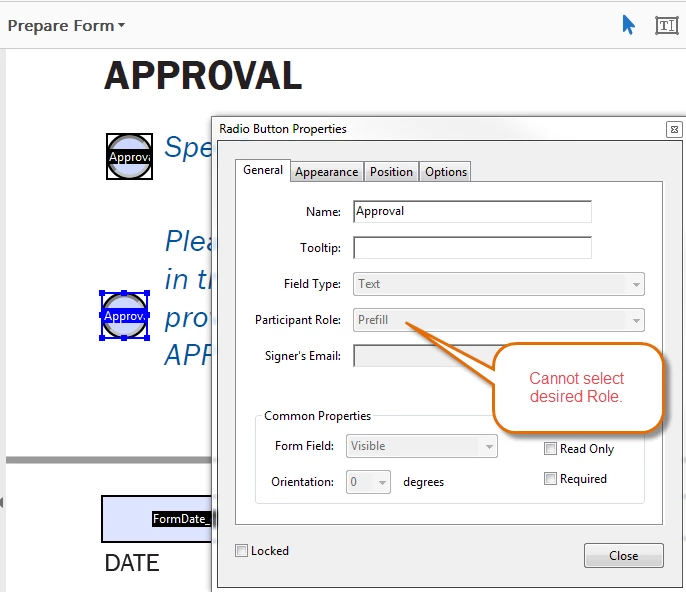
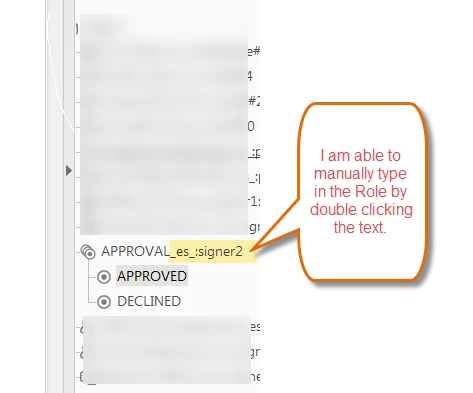
I can however manually type into the field listing.  This worked, albeit more tedious.
Correct answer AnandSri

Hello DCaulley,

Sorry for the delayed response and inconvenience caused. Try changing the Filed name by right-clicking on it and choose Rename and see if this brings any difference.

Also, check for any pending updates of Acrobat from help>check for updates, reboot the machine after installing the updates and try creating the form fields.

You may also refer to the following docs Adobe Sign Help | Adobe Sign Help

Create forms

If the issue still persists, please share the following details:

Let us know how it goes and share your findings.

Regards,

Anand Sri.

6 replies

Participant
April 7, 2020

It's 2020 and this is still not fixed. I'm using Fill & sign and the radio button propertys are greyed out. I can assign check boxes to a signer but not radio buttons, renaming the field does not help.

Participant
May 20, 2020

I wasted *several* hours trying to fix this and I believe I have found a workaround different from renaming the field and adding the particiant role there -- which doens't seem to work, anyway. 


This issue appears to be related to the default properties, i.e., if you have set a particular field's properties as the default. The new radio button insertion will try to use that same default. 


Try picking a field that has the property of the participant role you want and set that as the default, then insert a new radio button group.  This worked for me.  You might have to also rename the field and add the participant role. I had to manually do that because it didn't do it automatically.


I hope this helps save time for someone. I'm never getting back the hours I wasted on this.

mattgyver_it
Participant
September 28, 2020

(>.0) *twitch*

(>.0) *twitch*


Seriously... Thank you for replying that you figured it out. I was going crazy with these buttons.

Don't blame me. I just pushed the button. Someone else programmed that button's OnPress code. I mean, really. Why would such a dangerous button be made so big, red, and pretty. It practically screams "PUSH ME NAO!"
SDDWA
Participant
July 31, 2019

Ridiculous this still hasn't been addressed!!  This is plain and simple a bug or an omission.  Not a "different type of forms" error...

MichaelKazlow
Legend
August 3, 2019

I think you may be trying to use regular Acrobat PDF forms with Acrobat Sign. You should convert the form to an Adobe Sign e-form.

Participant
October 18, 2018

Hi- this was very helpful to find- regardless of the forum.

the problem is with Adobe Sign since this is where one can assign the role.  I’ve been working with Adobe Sign for the past 2 years and came across this problem in August 2018.

our IT team has reached out to Adobe but have not received a response.  I’m certain that this is a bug - not a user proble.  Thanks for the workaround DCaulley!

Adobe- please find a solution soon!

AnandSri
Community Manager
AnandSriCommunity ManagerCorrect answer
Community Manager
April 4, 2018

Hello DCaulley,

Sorry for the delayed response and inconvenience caused. Try changing the Filed name by right-clicking on it and choose Rename and see if this brings any difference.

Also, check for any pending updates of Acrobat from help>check for updates, reboot the machine after installing the updates and try creating the form fields.

You may also refer to the following docs Adobe Sign Help | Adobe Sign Help

Create forms

If the issue still persists, please share the following details:

Let us know how it goes and share your findings.

Regards,

Anand Sri.

Participant
February 26, 2018

I am in the process of creating my very first sign-able form and have spent 4 hours trying to fix this, all the while assuming I'm doing something wrong. Frustrated that it turned out to be a bug. Thank you for the workaround!

Participating Frequently
November 7, 2017

Over a year and Adobe hasn't answered this!?

Thom Parker
Community Expert
Community Expert
February 27, 2018

If you want an answer you need to provide some more information. What tool are you using to create this form? What kind of form is it?

Thom Parker - Software Developer at PDFScriptingUse the Acrobat JavaScript Reference early and often
Participant
February 28, 2018

Thank you for responding. I ask because the forms you and DCaully are asking about are not regular Acrobat forms. Which is the main reason the question was not answered. When asking questions it is important to indicate the type of form you are working with, otherwise everyone is guessing about what you're doing. This question should have been moved to a different forum. The Roles property is specific to the Adobe Sign workflow.   I believe, but don't know for sure, that the issue you're seeing is related to how you are editing the form. I believe you may be mixing form technologies.


Thom, thanks for the comments and your work in supporting the community.

From my perspective, I simply opened the Adobe Acrobat DC program and began using the basic tools presented. When the problem was encountered I went searching and (thankfully) found DCaulley's post. Unfortunately, I'm not completely clear with the difference between what I'm trying to accomplish vs what constitutes a "regular Acrobat form". There are many synergies in the Adobe software offerings these days.

Regardless, my feeling is that there is an issue with this portion of Adobe Acrobat DC that has a reasonable workaround...as long as you know what it is. I just wanted to report my experience, hopefully to contribute towards a solution or hear some advice on how to avoid the situation. If you could suggest a better forum to post the issue I'd be happy to do that. Thanks!