


Copy link to clipboard
Copied
When an individual is copied (cc'd) on documents sent for signature via AdobeSign, there have been reports of inconsistent behavior. In some instances, the cc recipient receives the documents as email attachments, while in other cases, they receive only a link to view the documents. However, when a link is provided, it often does not work for the recipient.
Could you help identify what might be causing this inconsistency, and why the link does not function properly for cc'd recipients?
@NBS38684755c07s this is combination of Adobe Sign's account-level settings and how those settings interact with different email clients or recipient access privileges. Adobe Sign allows administrators to configure whether a PDF copy of the agreement is attached to emails and if links are included, and certain enterprise account settings might even control whether CC'd parties receive all intermittent emails or just the final signed document. Therefore, the varied behavior suggests that these ba
...
Thank you for reaching out, and sorry about the trouble caused.
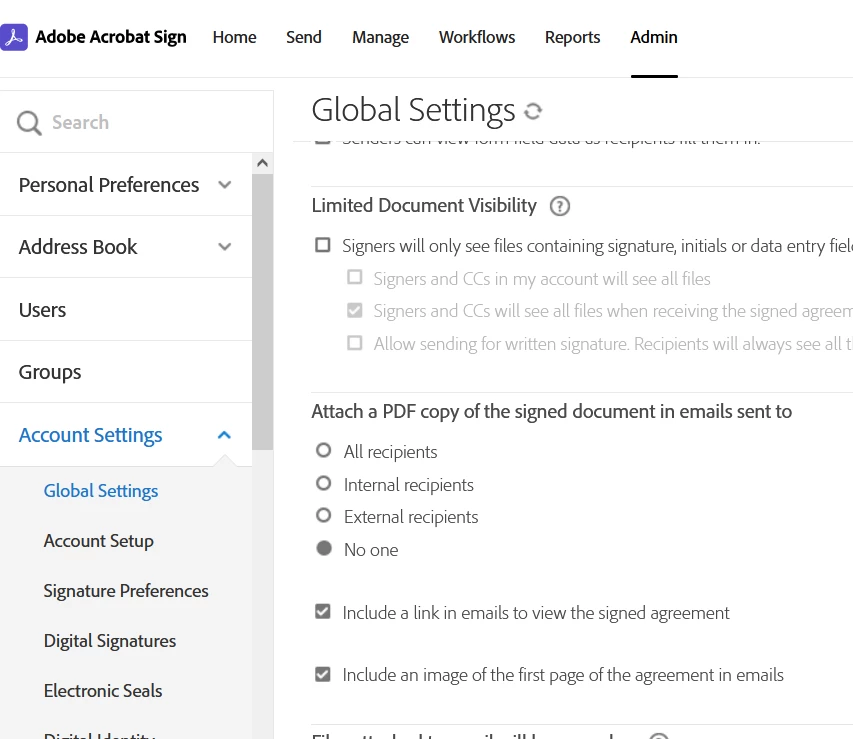
This appears to be weird behavior. Generally, it depends on the settings set under Account Settings> Global Settings if the document will be received as a link in the PDF. If you have Administrator rights, please check.
We have checked that you are using the Adobe Sign Enterprise plan. If you still experience any issues, the experts can best answer them. Please contact our Adobe Sign Enterprise suppor
...Copy link to clipboard
Copied
@NBS38684755c07s this is combination of Adobe Sign's account-level settings and how those settings interact with different email clients or recipient access privileges. Adobe Sign allows administrators to configure whether a PDF copy of the agreement is attached to emails and if links are included, and certain enterprise account settings might even control whether CC'd parties receive all intermittent emails or just the final signed document. Therefore, the varied behavior suggests that these backend configurations might not be uniformly set across all sending accounts, or there could be a specific setting that either deliberately suppresses the attachment or generates a link that requires an authentication step not automatically provided to a CC'd user, causing the link to fail. To resolve this, it's best to consult the Adobe Sign account administrator for the sender to verify their exact "Send Settings" and "CC" notification configurations.
Now, while you are waiting for the Adobe Sign Account Adminstrator to get back to you, you could try simpler solutions to that don't require a deep dive into backend settings, focusing on sender actions and recipient communication?
Copy link to clipboard
Copied
Thank you for reaching out, and sorry about the trouble caused.
This appears to be weird behavior. Generally, it depends on the settings set under Account Settings> Global Settings if the document will be received as a link in the PDF. If you have Administrator rights, please check.
We have checked that you are using the Adobe Sign Enterprise plan. If you still experience any issues, the experts can best answer them. Please contact our Adobe Sign Enterprise support team for the correct information. You may contact them or raise a ticket using the steps in the following help document: https://adobe.ly/4jxyN3i.
Thanks,
Meenakshi
Find more inspiration, events, and resources on the new Adobe Community
Explore Now