


Exit
  • Global community
    • Language:
      • Deutsch
      • English
      • Español
      • Français
      • Português
  • 日本語コミュニティ
  • 한국 커뮤니티
0

Data validation in form field Adobe Sign

Community Beginner ,
Feb 06, 2018 Feb 06, 2018

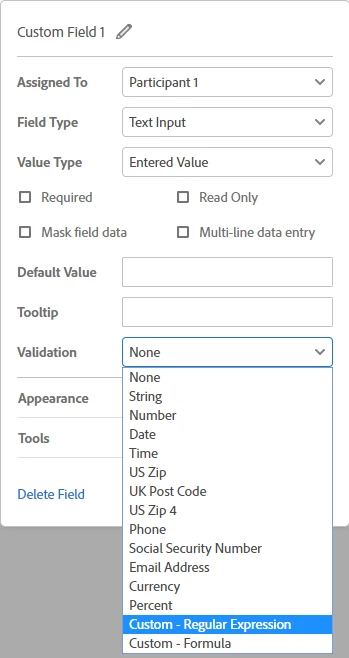
I'm trying to enter data validation for a field in my template to require the participant to enter 4 characters (letters or numbers). I only see "maximum" allowed. The field in my template is the final four digits of a credit card payment (first 12 digits are in a separate masked field). I tried "string" allowing letters and numbers (using letter O in place of number 0 due to problem with csv dropping leading zeros) but I'd like to make the field error proof by requiring 4 (no more no less) characters in the field. Solution?
2.1K
Translate
Report
Community guidelines
Be kind and respectful, give credit to the original source of content, and search for duplicates before posting. Learn more
community guidelines

correct answers 1 Correct answer

Adobe Employee , Feb 08, 2018 Feb 08, 2018

Greetings!

The validation you are looking for is the Regular Expression.

Regular Expressions allow for defining a pattern of characters and/or numbers.  It can get deep quick, but your use case is pretty simple.

four digits between 0-9 would be : ^\d{4}$

  • ^ = The start of the string, preventing some number of characters before the expression value
  • \d = Digits, or 0-9
  • {4} = four of them. No more, no less
  • $ = Ends of the string, preventing four numbers, and then any other characters

However, this type of v

...
Translate
Adobe Employee ,
Feb 08, 2018 Feb 08, 2018
LATEST

Greetings!

The validation you are looking for is the Regular Expression.

Regular Expressions allow for defining a pattern of characters and/or numbers.  It can get deep quick, but your use case is pretty simple.

four digits between 0-9 would be : ^\d{4}$

  • ^ = The start of the string, preventing some number of characters before the expression value
  • \d = Digits, or 0-9
  • {4} = four of them. No more, no less
  • $ = Ends of the string, preventing four numbers, and then any other characters

However, this type of validation is only available at the Business and Enterprise levels of service.

If you are on the Free, Individual or Team level of service, the Regular Expression option will not be available to you.

Translate
Report
Community guidelines
Be kind and respectful, give credit to the original source of content, and search for duplicates before posting. Learn more
community guidelines