


Participant
April 21, 2025
Question

Digital signature with javascript issues

  • April 21, 2025
  • 1 reply
  • 1142 views

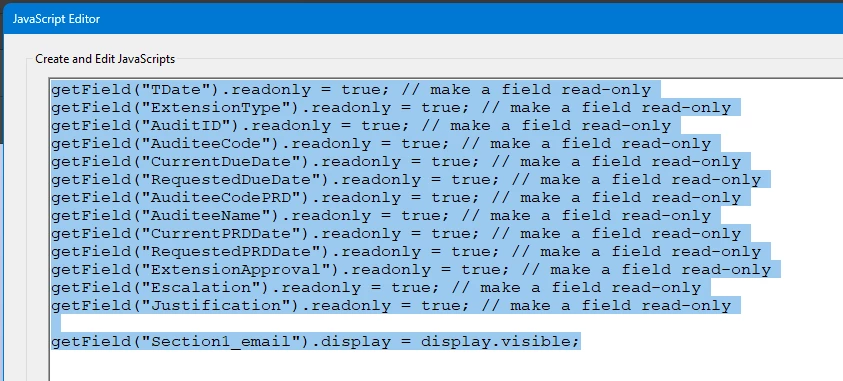
I will include pictures. After I digitally sign the document, I click the X in the upper right corner and I get prompted to save Yes No Cancel choices. If I select Yes all is good, but if I select No the document closes. When I open the document again the digital signature is there but the fields changed to read only with javascript in the sign area of the digital signature are not read only.
 

Before Digital Sgnature is applied
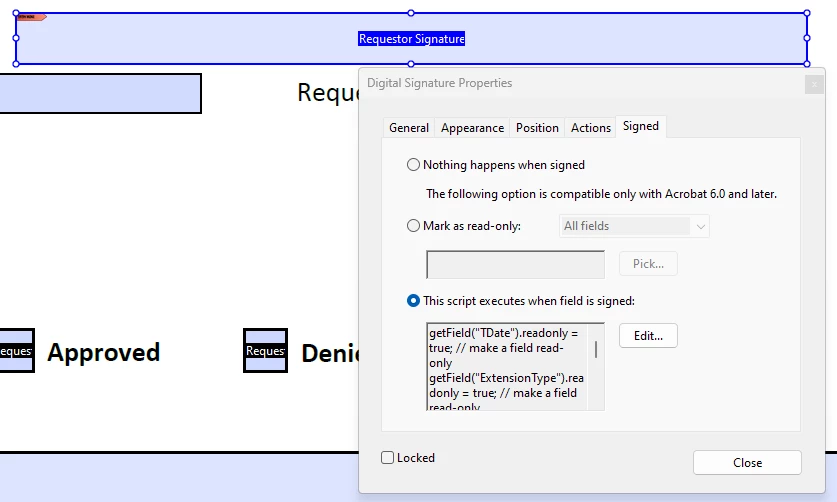
This is where the Javascript is located in the sign area of the signature field.
 

This is after the Digital Sgnature is applied.
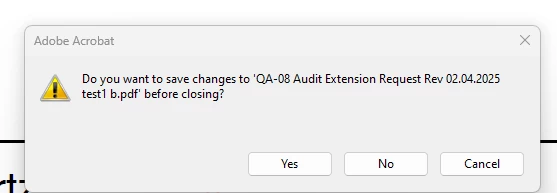
 

This is what I get when I close the document.

If I select set read only and select the fields I do not get the prompt when I close the file. If I select No the signature is saved, but the fields are not read only. When I open the file there ar no problems with the digital signature and the fields that are now read only

1 reply

JR Boulay
Community Expert
Community Expert
April 22, 2025

[MOVED TO THE ACROBAT SIGN DISCUSSIONS]

Acrobate du PDF, InDesigner et Photoshopographe
Meenakshi Negi
Community Manager
Community Manager
April 23, 2025

Hi mark_5355,


Thank you for reaching out.


Please let us know if the field changes to read-only after adding the signature. If yes, this is designed behavior. As the signature is added and the file is saved, making changes to those fields is impossible. 


If that is not the case, could you please share the screen recording showing the steps you used and the changes that occurred so that we can better understand? 


Thanks,

Meenakshi

mark_5355Author
Participant
April 24, 2025

Thank you for the information.


Could you please share more information about why you are adding the script here? Also, share the workflow for completing the document. 

It would be really helpful if you could share the screen recording so we can understand the process. Also, please share the PDF so we can replicate the issue.


Thanks,

Meenakshi


Attached are 1 screen recording, 2 PDFs that I started with and 3 PDFs saves after signing. The recording goes through showing the code in each PDF used and shows the steps of filling out and saving then re-opening with the final outcome for each. What i would like is to get the javascript that is in the sign area to run before the save so there is no prompt to save when closing the file.