


Participant
October 9, 2023
Question

E-sign documents will not send

  • October 9, 2023
  • 2 replies
  • 2466 views

Hi,


E-sign will not send documents for signing - they don't need filling out, they just need a signature, that is the only field on the document.


If  I try to send the document for signing through the destop app I get the following error message;
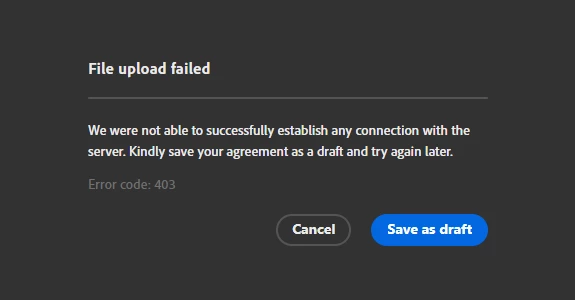


If I try to use the online site I get this error message;
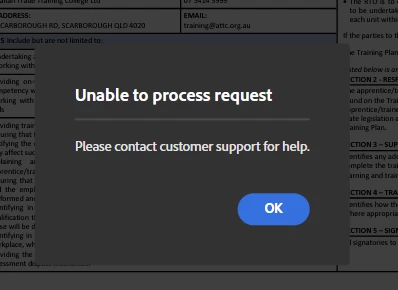
I have cleared the cookies, logged out an logged back in and I just keep getting the same message.


This is beyond frustrating as I have agreements I need to get out and e-sign was one of the main reasons a got the subscription.


How do I get this fixed so I can get my work done?


Thank you

2 replies

Meenakshi Negi
Community Manager
Community Manager
October 16, 2023

Hi Kelly32248969cgfy and Sherry3286051946x4,


Thank you for reaching out.


As you get the error, please let us know if you have made any recent changes to the account that may have caused the issue.

Please let us know if you are using the templates or the document saved locally on the machine to send for signature.


Try the following:

- Clear the cache and cookies for the browser.

- Try using the new incognito window on Chrome.

- Ensure that the internet is not intermittent.


Let us know if the issue persists.


Thanks,

Meenakshi

Participant
December 9, 2023

I have the same issue. Tried every single solution pointed out here.

Participant
October 11, 2023

This is happening to me as well, and we cannot figure out how to fix the issue

mariahweyne
Inspiring
October 13, 2023

Can you share the steps you are making to request the signature?

Participant
October 16, 2023

Hi Mariah,

Please see the steps I follow listed below;


  1. Press Request e-signatures button (sometimes I get the error message as soon as I press this button, sometimes it waits until I have completed all of the steps)

2. Add a file from my computer.


3. Get e-signatures fast box pops up – fill out (it doesn’t matter here if I fill this out or cancel and prepare the document using the menu on the side – I have tried both multiple times)


4. Place fields for signature and date in the positions they need to be filled out in


5. Press review & send


6. Press send


7. Get error message


Thanks