
Participant
February 22, 2023
Question

Fake Email

  • February 22, 2023
  • 2 replies
  • 112693 views

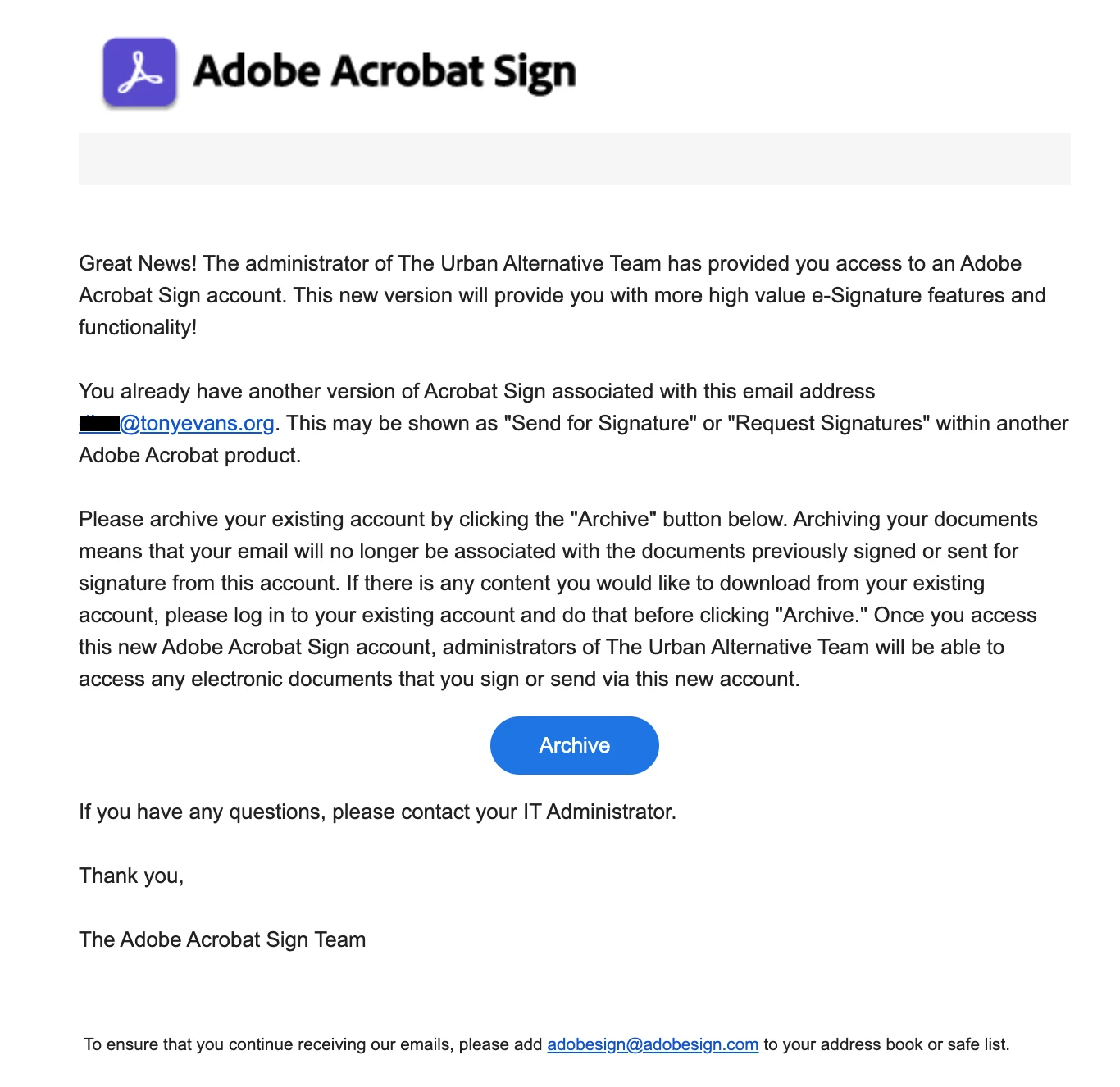
Someone on our team account keeps getting the following email. I am the admin on the account, however, I did not provide this. I can only assign licenses for Creative Suite and Adobe Acrobat. This person has Adobe Acrobat DC Pro already. The email address it's coming from is adobesign@adobesign.com. Can someone tell me if this email is legit, or do we need to to mark it as phishing email? I've contacted our account manager, and to no suprised, I haven't heard back.
 

2 replies

Meenakshi Negi
Community Manager
Community Manager
February 27, 2023

Hi jenetraj,


Thank you for reaching out.


The email that you receive is from the Adobe Acrobat Sign team. It is a genuine email sent to you for the information and to archive the existing account. It is sent when a user gets access to Acrobat Sign from their organization and already has an Acrobat Sign account activated under the same email address.

As you have mentioned that the person has Acrobat Pro already, it includes the Acrobat Sign Individual plan. Even after canceling the subscription at his end, the Acrobat Sign account will remain there as a free account. 

In this case, you may ask the user to check the account at his end and download the required documents. Once that is done, the user can use the Archive option in this email. That will convert the old account to the account to which you have provided access.


Let us know if you have any questions.


Thanks,

Meenakshi


Marking a reply or response “Correct” will help future users with the same issue quickly identify the correct answer.

Participant
August 9, 2023

Good day Adobe team,


I have received the same email to sign a Nedbank invoice. Based on this thread I went ahead and clicked on the link to "review and sign". This takes me to another page: Review and Sign (adobe.com).  I've included a screenshot of what this page looks like. There is an option to sign the document and to view the document. When selecting the "View Document" option, it provides a pop-up with this question: 

Microsoft Defender then blocks the site, deeming it as unsafe to proceed (attached screenshot as well).
 
This begs the question as to how safe and legit this actually is? Both links do not take me to any Adobe website or sign in page for Adobe. The URL's have nothing to do with Adobe. I will for this reason not be signing this off. I emplore Adobe to adjust the requirement of this so that users should need to sign-in to the normal Adobde trusted login page to view and sign any documents they might need for verification of accounts or anything of the sort.
 
If Adobe is going to revoke or make any changes to my account for any reason because of this, I will be hugely dissappointed.
 
Kind regards,
Anel
Meenakshi Negi
Community Manager
Community Manager
August 13, 2023

Hi Anel31572842gn4c,


Thank you for reaching out.


Could you please share the screen recording of the email received and what happens when you try to open the link in the email?

If you find the email spam, please click on the Report Abuse hyperlink option provided at the bottom of the email. The team will get information about the email and will take the required action.


Thanks,

Meenakshi

mariahweyne
Inspiring
February 24, 2023

That is not a fake email nor phishing.  It is the email from which all of Adobe Sign transactions are sent. Users should white list the email to avoid emails going to spam.

jenetrajAuthor
Participant
February 24, 2023

Hi, my organization has been getting hit with a lot of phishing emails lately. It is very possible that this has already been reported as such to our IT admin (for our organization, not Adobe). I am the Admin on our team account who assigns the licenses. Yet I've never assigned anything for Adobe Sign and did nothing else to add this feature. Maybe the communications team at Adobe should rethink how they communicate about Adobe Sign to people who have these accounts.

There are 2 people on the team who've been receiving these emails and have been ignoring them, with one possibly reporting these emails as phishing. So saying that I (the admin) updated our account for this is VERYmisleading. The fact that I also reported this to our account manager and never heard back doesn't help either, which is why I posted my concern here. I really need to hear back from an Adobe staff before I feel comfortable telling other staff to whitelist this email.


Thanks,
------------------------------
[image: Jenetra Jackson]

Jenetra Jackson
The Urban Alternative
Visual Designer and Project Coordinator
------------------------------


@jenetraj 

[phone, email, and web address removed by moderator — this is a public forum]