Greetings!
The idea of creating multiple fields that must always contain the same field values is called "field pollination". Typing any string into any one of the fields pollinates that content to all other fields.
Field pollination is predicated on field names. All fields that have exactly the same name will cross-pollinate the value of the field to all other fields. (Field names are important!)
If you are creating your form with text tags or Acroforms, you can simply copy and paste the tag/field and the name value will copy and paste successfully.
If you are using the in-app authoring environment, you will need to open the properties of a field you want to use multiple times. Configure that field according to how you need it to work (appearance, validations, that kind of thing).
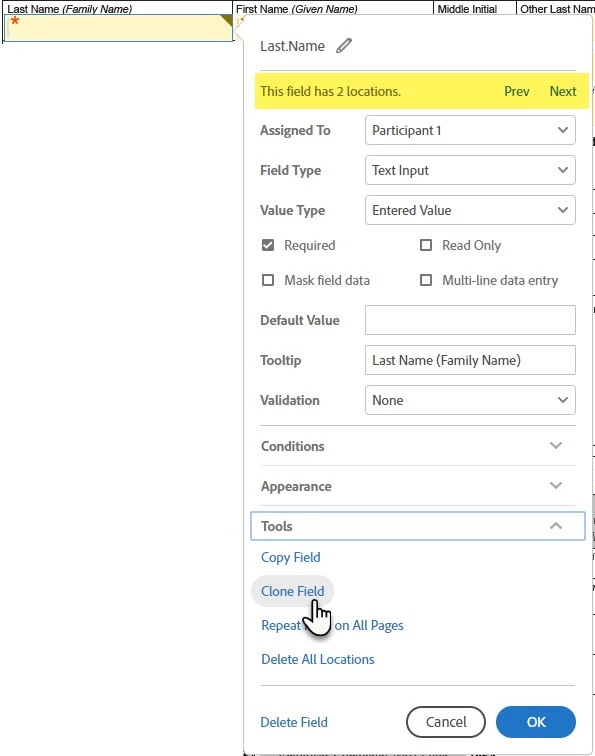
Then expand the Tools section, and click the Clone Field link at the bottom of the properties window.
This creates an exact replica of the field, including the name.
Additionally, at the top of the field properties, you will see the number of field clones that exist, with a handy Prev || Next option that will cycle you through those cloned fields.
There's no practical limitation to the number of fields you can clone, or the number of clones that can exist for any one field.
Tangential tip: If you have a lot of forms, or if you have to cycle your forms often, it may be worth creating a naming convention that you use across all forms. This would allow you to leverage field pollination across files if you ever send an agreement with multiple library documents attached.

 AdChoices