


jackiem12659037
Participant
April 26, 2018
Answered

Fill & Sign Greyed Out. What can i

  • April 26, 2018
  • 4 replies
  • 182020 views

Hi there,

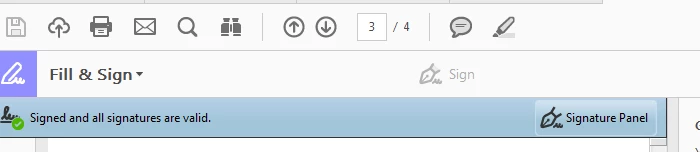
I'm trying to sign a document that has been signed by another party by using the 'Fill & Sign' tool but the icon is greyed out and it won't allow me to sign. Why and what can I do to add my signature as another signature? I am using Adobe Acrobat Pro DC.

Thanks

Jackie
Correct answer Adorobat

Hi Jackie,

It seems the first signature has effectively locked down the PDF. In order for you to sign over the top of another persons signature, you would need to have blank signature fields (one for you AND another user) already placed in the PDF before the first signature is signed.

You may also try signing pdf using digital ID. Please visit this link for more info on: Digital IDs in Acrobat

Let us know if you need any help.

Shivam

4 replies

splambo
Participating Frequently
October 24, 2023

1. Open Acrobat on its own, not by opening a document.

2. Edit > Preferences > Signatures > Verification > More...
-Uncheck 'Verify signatures when the document is opened.
-Under 'Verififcation Behavior', select 'Always use the default method'.
-Under 'Verififcation Information', select 'Never'.
-click OK

3. Edit > Preferences > Signatures > Creation & Appearance > More...
- Uncheck 'use modern uder interface'.

4. Exit Acrobat

Open your PDF and use Tools > Certificates > Digitally sign.

Participant
October 19, 2020

When I try to digitally sign a document it grays out the application, and unable to go forward. I need help asap. Military personnel. Cannot see any other pop up


floschl
Participant
December 3, 2020

Dear Mr. Military personnel,

please activate your brain and read the previous answer. 

Thanks and all the best

Participant
January 16, 2019

Hi,

Just in case anyone suffers the same problem and, eventually, drops by this post as I did and it doesn't give a clue of what you can be doing wrong... I've been loosing what I felt like a long part of yesterday's afternoon trying to sign a pdf document with the Fill & Sign (as mentioned above) or Review and Sign (as I've read it elsewhere)... all of the symptons are there (greyed out sign, no hand icon where you are supposed to sign, etc, etc...). Well, the case, is you don't have to go to 'Fill & Sign' or 'Review and Sign' but you should go to 'Certificates' then you will see a different toolbar with a Digitally Sign pen (plus other options) instead of the greyed out... That did the trick for me. Hope it helps... Adobe... please clarify your user interface... in its current form it leads to confussion.... it would be much better for example to group all signing options in the same bar (so you can have 'digitally sign' and 'sign' side to side... either of the two will be active... howda! alas! so much time saved! (sumup the time of every user that was asking for this here and at lots of blogs in the internet and the one of those who didn't ask, all in desperation)

Thank you. Best regards.

william11
Participant
February 14, 2019

Juanmadg Thank you so much!  Very frustrating going through all these forums telling you to use the Fill and Sign tab when its greyed out and your Certificates direction worked.  Thanks again!

Adorobat
Community Manager
AdorobatCommunity ManagerCorrect answer
Community Manager
May 1, 2018

Hi Jackie,

It seems the first signature has effectively locked down the PDF. In order for you to sign over the top of another persons signature, you would need to have blank signature fields (one for you AND another user) already placed in the PDF before the first signature is signed.

You may also try signing pdf using digital ID. Please visit this link for more info on: Digital IDs in Acrobat

Let us know if you need any help.

Shivam

Participant
July 26, 2021

Good to know that we need to put in all of the blank signature fields up front.  The question becomes how to do it.  Sure you can go into Tools-Fom and hit the 10th icon across to insert the signature fields.  However, I have found it easiest just to sign the form digitally in every location that I want a signature.  Then I right click on the signature field or fields that need to be signed by others.  I choose “Clear Signature” on each block that I want cleared. I am then left with a signature in the slot I want and open signature fields for others to sign in.