


Question
Fonts in Adobe Sign
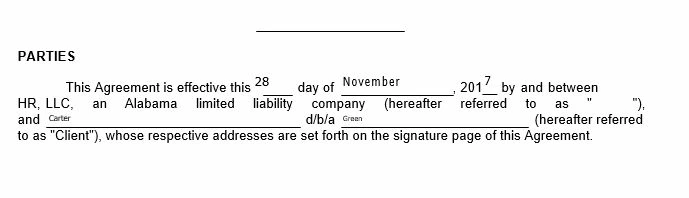
When I setup my document template in Adobe Sign, I have several fields that need to be completed. When I insert the text fields within the document, there is a capability to change the font to one of 6 choices and to change the point size. I use Auto for the point since in most of the fields, because, the data within the field can be of any length. The issue I have is that the font ends up being very small and offset in the text fields (see attached). I have tried using higher point sizes and then the font is too big.
What would be a workaround for having the font in the text fields match the font in my document? My document is Arial 10 pt.
 AdChoices