


Participant
January 22, 2016
Answered

How do you remove the Blue Line, Date and Name from Signature in Acrobat Sign?

  • January 22, 2016
  • 13 replies
  • 68304 views

We would like to use esign for documents; however, these documents are dated elsewhere and the signature should not be dated. Is there a way to turn the blue line, etc. on and off in esign? Thanks!
Correct answer MagentaSA

I know, that I am signed as admin, but I can't find the settings, can you please help?


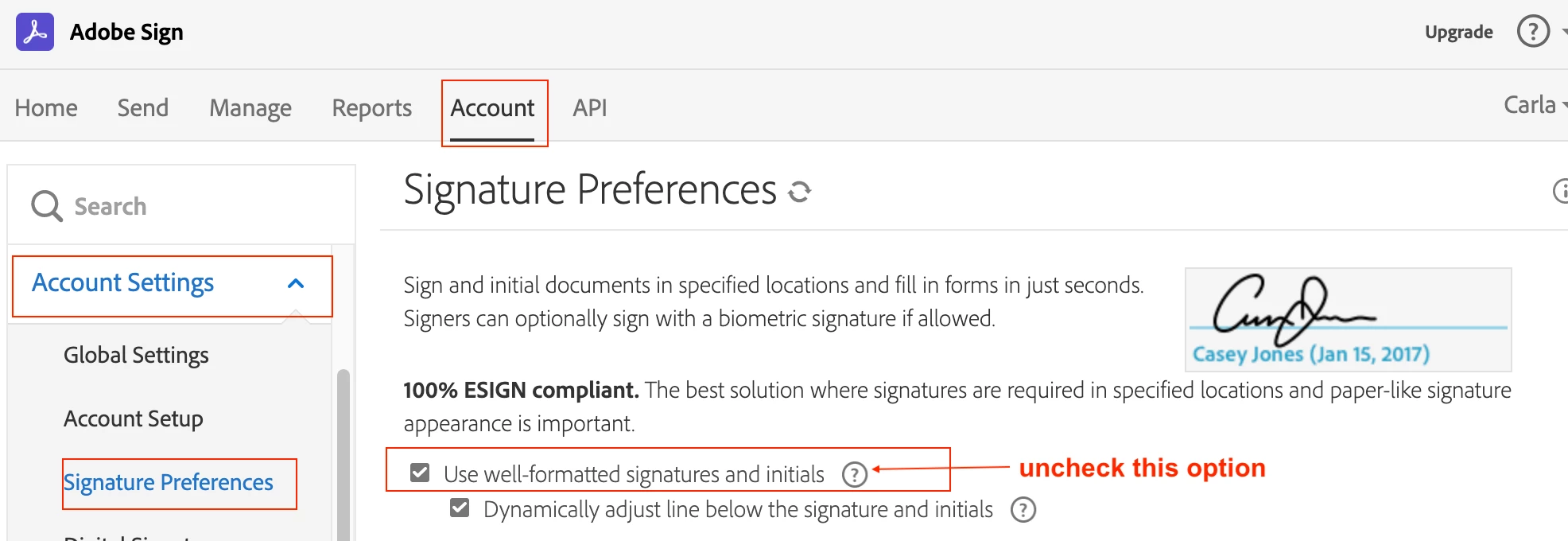
You need to be logged as the admin. The goto Accounts Tab> Account Settings> Signature Preferences> the uncheck Use well-formatted signatures and initials. IF you cant see the accounts tab then you are not the account admin or group admin.

13 replies

Participant
February 2, 2023

I send documents for signing by clients and they should not be time/date stamped when signed.


I used to be able to do this, but now the software is adding date stamps again which is very frustrating, and not suitable for our documents.


ADOBE - what is going on???


[Moderator moved the thread to the correct forum]

kglad
Community Expert
Community Expert
February 2, 2023

are you using e-sign?

Participant
January 11, 2023

Is there a way to remove the date that appears in the signature field after the e-signature is obtained?

Participant
January 12, 2023

If you have updated your account to use the New Authoring Experience you can select the signature block to just be a signature.

Participating Frequently
September 8, 2022

Thank you.


Unfortunately, following this procedure only make the signature smaller, and removes the date under it. It doesn't remove the blue line around the signature, it is thinner though. I can't seem to see any other options to remove the border around the signature scan.

mariahweyne
Inspiring
October 30, 2023

Go to your settings and make sure 100% E-SIGN is un checked.  


For the signature to appear larger, make the space taller, not wider. 

Participant
May 5, 2021

I am having the same problem and I am an admin, this is the account tab and I dont find any settings here


Participant
May 5, 2021

on my personal account settings here is what I can see


Participant
January 5, 2021

Hello,

how can you remove the time stamp and name from requested signature block ? Our signers don't have accounts and so no access to preferences to disable that. We only want them to sign, nothing more.

Thanks!

MagentaSA
Inspiring
January 6, 2021

You can change your signature settings under the Accounts Tab> Account Settings> Signature Preferences, then uncheck "Use well-formatted signatures and initials see image provided 

 If the options to "upload and image of their signature" or "drawing a handwritten signature" option is chosen then the blue line and date are by default switched off

Sharing our knowledge today for your use tomorrow.
Participant
January 13, 2021

Hello, and thanks.


But sorry, I can't seem to find the option. This is what I have in the account setting :


Also, I'd rather repeat: it's not my signature I want to change, it's the requested signatures I don't want to have the blue part. And the signers don't have accounts.

July 3, 2020

Using Acrobat DC Pro & Adobe Sign

I want to set up a signature field on a document to send to my boss. Not sure if this matters, but he only opens the document up on his iPad. So, when he "signs" the document, I don't want the date or time stamp to display under his signature. I did some research and someone said to change the signature preferences, but that didn't work. What is the best way to accomplaish this task?


Your help is greatly apprecited.

Maureen

Participant
June 28, 2021

did you ever figure out how to remove the date stamp?  I'd like to do that. Don't know how.


Participant
June 2, 2020

Hi - I am having the same problem. Can you help? 

Participant
September 24, 2020

I also have the same problem, :S it's to difficult for something very easy.

Meenakshi Negi
Community Manager
Community Manager
February 27, 2021

I don't see these, does it mean that I am not logged as admin? If so, how do I log in as admin?


Hey CHA,


Thank you for reaching out and sorry for the trouble.


We have checked your account and see that you have Adobe Sign individual as a part of Acrobat Pro DC.

The settings for Signature preferences are not available under this account. This is the reason you do not find this option.


Hope that information helps.


Thanks,

Meenakshi


Participant
May 3, 2020

Hello Adobe community,

I have been struggling with a problem regarding using Adobe sign. I am using the free version to sign an important document that I have been having trouble with. Unfortunately. it seems like when I try to print this document that has been signed, the little blue text underneath the signatures still exists. I have tried to follow this tutorial - https://helpx.adobe.com/sign/kb/to-enable-disable-name-date-below-the-signature.html in order to remove the text, but the options do not show up when I click on the "edit signature" settings. 

For some reason, it seems I am not the admin of my own account which does not make sense because I have not shared the account with anyone - I simply use adobe for personal use. 

How do I enable admin on my account and how do I fix this blue text issue? 

Thanks,
-Xen0s02 

Adobe Employee
May 4, 2020

Hello, 


I can see from the image you posted you have a FREE Adobe Sign account. There are no Admin features available with FREE accounts. If you would like to use the features that are built into Adobe Sign, please consider upgrading to a paid subscription - https://acrobat.adobe.com/us/en/sign/pricing/plans.html?promoid=65FN7V4N&mv=other. 


If someone has sent you a document for signature via Adobe Sign, you may want to ask them to adjust the signature field position and resend to you. 


Thank you, 

Shannon 

Participant
May 4, 2020

Thank you, I had a feeling that was why. Have a good day!

-Xen0s02

Participant
January 22, 2020

I have created a signature and date on my agreement which is stored in the Adobe Sandbox. When I preview this document all looks good. However, when I send the document, the recipient sees the signature and the date correctly displayed at the bottom of the first page (and is able to add their signature) but on the second page, at the top, the Signature block is displayed. How can I remove the signature block when it is not visible in the document when I edit or preview?

MichaelKazlow
Legend
January 22, 2020

This happens when there is not enough room for the signature to fit on the page. Are you purposely putting on a signature and a signature block?


FWIW, I have never figured out how Sign determines when a signature or other field needs to move to a different page. 

Participant
December 2, 2018

Hi, I have signed up for Adobe Sign and I too would like to turn off the blue line, name and date on the signature. How do you do it? There is no 'Accounts tab'.

Meenakshi Negi
Community Manager
Community Manager
December 3, 2018

Hi Kylieh,

I see that you have the individual account of Adobe Sign.

The option is not available in the Individual accounts.

You may try contacting the Adobe Sign support team and check if they can make the changes to the settings for you from there end.

For the subscribed account, find below the steps to contact support:

• Login to your Adobe Sign account directly via Sign In — e-signature and e-sign Software Solution — Adobe Sign

• Once logged in, check the upper right corner of the page and click the question mark icon.

• It will re-direct you to the page where you get the option to create the support case or to start a chat with the team.

• If you've never logged in this way, use the forgot password option on the login link to set your password.

Hope that helps.

Let us know if you have any questions.

Regards,

Meenakshi