


Participant
January 22, 2016
Answered

How do you remove the Blue Line, Date and Name from Signature in Acrobat Sign?

  • January 22, 2016
  • 13 replies
  • 68304 views

We would like to use esign for documents; however, these documents are dated elsewhere and the signature should not be dated. Is there a way to turn the blue line, etc. on and off in esign? Thanks!
Correct answer MagentaSA

I know, that I am signed as admin, but I can't find the settings, can you please help?


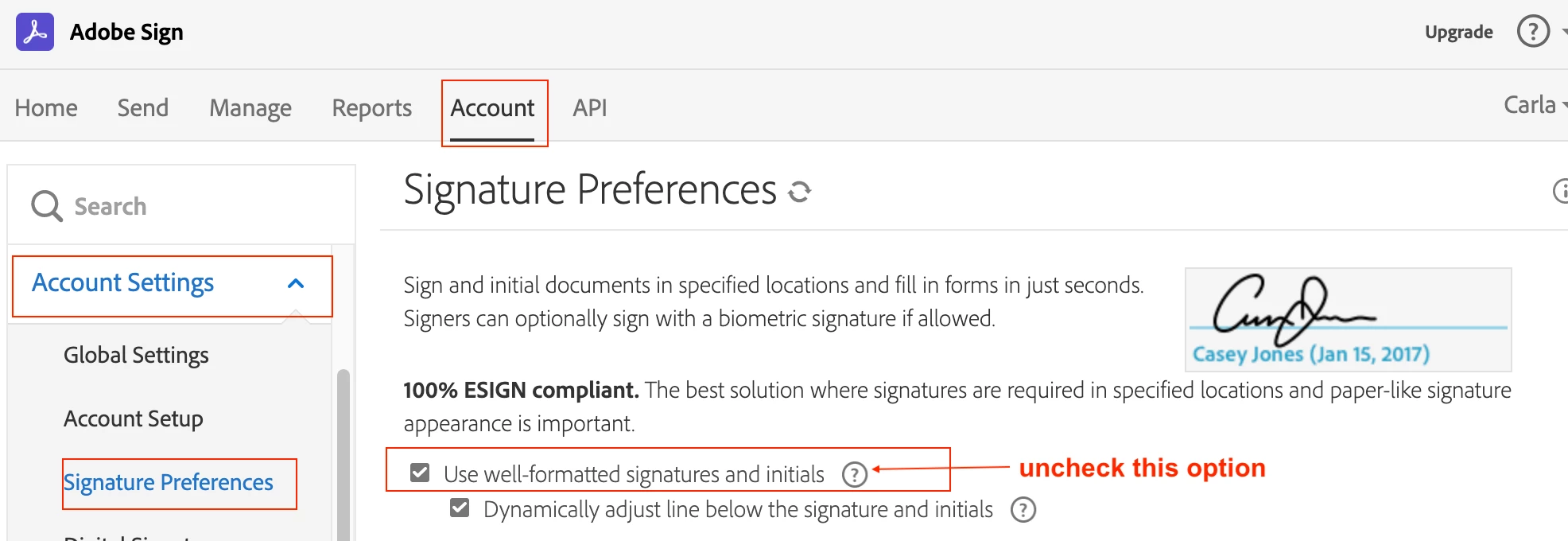
You need to be logged as the admin. The goto Accounts Tab> Account Settings> Signature Preferences> the uncheck Use well-formatted signatures and initials. IF you cant see the accounts tab then you are not the account admin or group admin.

13 replies

BachLawOfficePeoria
Participant
September 20, 2018

I would like to use Adobe Sign but every time I have sent one out for signature and received it back, it comes back with a blue line, their name, and date below. The documents I am sending for signature should not have this information. Please advise on how to remove this from my "Send for Signatures" tool? Thank you.

Community Manager
September 21, 2018

Greetings!

The setting you are looking for will require an account level admin to adjust.

Assuming you are an admin:

  • Log in as your admin user
  • Click the Account tab at the top of the screen
  • Expand the Account Settings menu
  • Select the Signature Preferences section
  • Uncheck Use well-formatted signatures and initials
  • Save the configuration

SLans
Participating Frequently
August 10, 2022

Hi there. Can this be User-level rather than having an account-wide effect? Our company has given a 'Sender' account to a few employees. There's one User/Sender who would like to remove the blue line with name and date but of course the others do not want to. Please let me know.

courtneybitton
Participant
April 4, 2016

Can we add the name/date to all signature types? If a signer has an uploaded image of their signature, then the name/date do not appear. This is inconsistent, because all other signature types have their name/date appear below the signature.

Community Manager
April 18, 2016

Hello Courtney,

Sorry for the delay. The name & date is only shown when the signers sign the document by typing their name. When they use the image, it is not shown as per the design.

Regards,

-Rijul

xpanbc
Participant
June 26, 2017

Hello Rijul,

I have the opposite issue. I would like the signature without name and date. What options do I have? Only uploading an image?

Cheers,

PT

Community Manager
January 23, 2016

Hello Lillian,

You can disable the date and name by going to Account tab->Account settings->Signature Preferences and uncheck "Well formatted Signature".

-Rijul

RoRljAuthor
Participant
January 25, 2016

There is no account tab. =(

Community Manager
January 26, 2016

Hello Lillian,

Then, it seems that you are the user and not account admin. Can you inbox me your registered email address so that I can check your account?

Regards,

-Rijul