


Copy link to clipboard
Copied
For executed contracts, I need to include the Document History validating the electronic signature. I have a Business account and have selected the "Attached Audit Report to Completed Documents" button in the Global Settings tab. The Document History is now sent as a separate .pdf file with the signed document. To properly identify the signed document, I need the Document History to be included as the last page(s) of the .pdf file containing the signed document. Can this be accomplished?
Hi teresaj91022691,
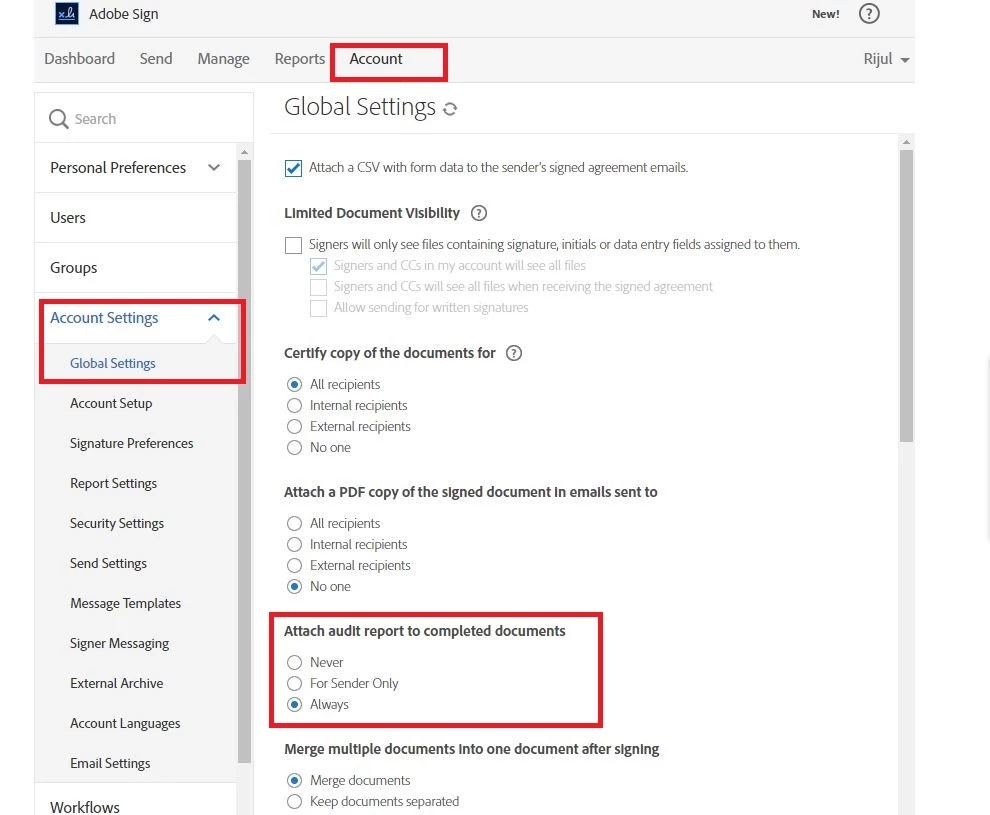
Please sure you have kept "Attach audit report to completed documents" to "Always".
Regards,
Aadesh
Copy link to clipboard
Copied
Hi teresaj91022691,
Please sure you have kept "Attach audit report to completed documents" to "Always".
Regards,
Aadesh
Copy link to clipboard
Copied
Thank you, Aadesh. I have selected "Always" in this section but the Document History is sent as a separate document and not included in the signed document. Is there another selection I need to make to have Document History be included as the last page(s) of the signed document?
Copy link to clipboard
Copied
When I select Account Settings, I only see Signature Preferences and External Archive. I don't see the rest of the list items here.

Copy link to clipboard
Copied
Please be informed this feature is only available in Adobe Sign Business & Enterprise accont. And I suppose you are logged into an Individual account.
Please click on the (?) Symbol at the top right corner of your account & open a support ticket or chat, our technical support team will help you to make the required changes throught the backend tool.
Regards,
Aadesh
Copy link to clipboard
Copied
This used to work for professional adobe sign accounts. I remember having documents with the audit trail attached. When was this ability removed from the Adobe Acrobat Pro subscribers?
Copy link to clipboard
Copied
Ok, I did a little more digging. Thankfully the audit trail page at the end of the document IS available still to Adobe Acrobat Professional subscribers when they use Adobe Sign (send for Signature)!
After all parties sign a document using Adobe Sign, an email is sent to the appropriate parties containing the completed document as an online link AND as an attachment in the email. The audit trail page is only included in the document itself when viewing the file that is attached in the email. If the user attempts to view the file using the online link, then the audit trail page will not be available. 
This is a screenshot of a document being previewed using the online web link. It will only show the audit trail in a separate scrollable window pane, or in the downloadable "audit report" but not in the actual document.

However, when the file is downloaded FROM THE EMAIL that is sent the audit trail will be at the end of the document (the last page).

Get ready! An upgraded Adobe Community experience is coming in January.
Learn more