


Participant
April 7, 2017
Question

How to create if else statement in Adobe Sign

  • April 7, 2017
  • 1 reply
  • 2746 views

Hi,

I am trying to calculate a field in an Adobe sign form. The basic add, subtract, multiply, I am okay with.  However, when it comes to if, else statements I am a bit lost.

Here's an example of what I am trying calculate for field W-A:

If Intra-state-Airfare-Quote is greater than 0, move it to field W-A

else

Check if Out-of-State-Itinerary-1 is not blank, if not blank then move it to field W-A
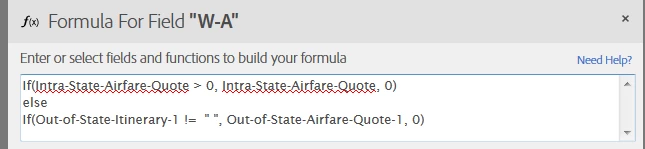
I know I am doing it wrong.  Your help is very much appreciated.

JZ

This topic has been closed for replies.

1 reply

AadeshSingh
Community Manager
Community Manager
April 16, 2017

Hi jianZ

On the Preview page where you place the field on the document, double click on the field on which you want to set the calculated value.

Set "Field Type" to : Calculated Value -> On Formula Field click on "f(x)".

Now select the Function f(x) that you want to use on the field as show in the below window:

Regards,

Aadesh

jianZAuthor
Participant
April 18, 2017

Hi Aadesh,

Thanks for the info.  I tried to follow the function but received the following error when trying to save it:

Could you please tell me what I am missing in the above expression?

Thanks again.

JZ

AadeshSingh
Community Manager
Community Manager
April 23, 2017

Hi jianZ

Please make sure you are using the same field name from which you are fetching the value to compare using the condition operator.

Regards,

Aadesh