


Answered
How to force "Draw" Signature when sending document for signature?
Is there any way to force my recipients to use the "Draw" signature option? I could not figure out how to do so....
Thanks!

Is there any way to force my recipients to use the "Draw" signature option? I could not figure out how to do so....
Thanks!
Thank you for reaching out.
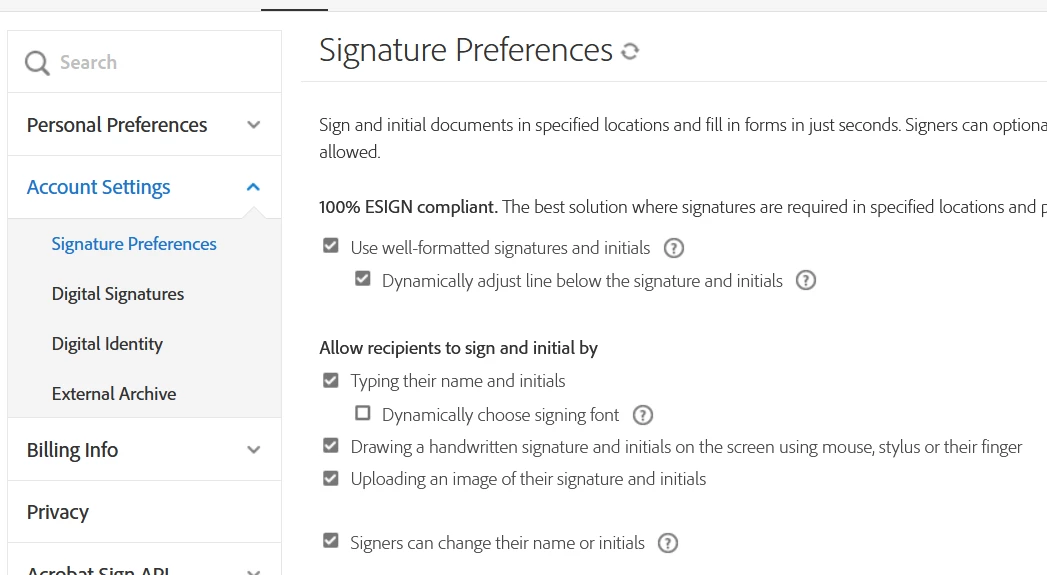
If you require only the drawn signature from the signer, the feature is available Under Account Settings.
Please use the steps suggested below:
- Open the link https://acrobat.adobe.com/link/home/ and sign in using your Adobe ID.
- click on the profile icon and select settings.
- Go to E-Sign settings and click on hyperlink Edit settings.
- Click on Account Settings > Signature Preferences.
- Make the changes to the Signature preferences as required.
Check the screenshot below:
Let us know if you have any questions.
Thanks,
Meenakshi
Marking a reply or response “Correct” will help future users with the same issue quickly identify the correct answer.
Already have an account? Login
Enter your E-mail address. We'll send you an e-mail with instructions to reset your password.
 AdChoices