


New Participant
June 10, 2022
Answered

OAuth Redirect URI: error: access_denied, error_description: Scopes not enabled for this application

  • June 10, 2022
  • 1 reply
  • 2050 views

We are developing a partner application for Adobe Acrobat Sign and have followed the OAuth 2.0 Authorization Code Flow specifiations here: https://secure.echosign.com/public/static/oauthDoc.jsp

Several members of our team have created accounts for testing.

  • Some accounts are older accounts and are on the na3 shard.
  • Other accounts are newer and are on the na4 shard. 

When a user in our application chooses to integrate with Acrobat Sign, we redirect them to the following URL:

https://secure.echosign.com/public/oauth/v2?redirect_uri=https://<OUR_SERVERS>/oauth-code-flow/oauth-redirect&response_type=code&client_id=<OUR_CLIENT_ID>&state=<OUR_CSRF_TOKEN_THAT_IS_A_UUID>&scope=agreement_read:account+agreement_write:account+agreement_send:account+library_read:account

  • For our test accounts that are on the na3 shard, we are getting an error access_denied, with an error_description: Scopes not enabled for this application
  • However, it works fine (we get a code) for our test accounts on the na4 shard.

Has anyone come across the "Scopes not enabled for this application"?  

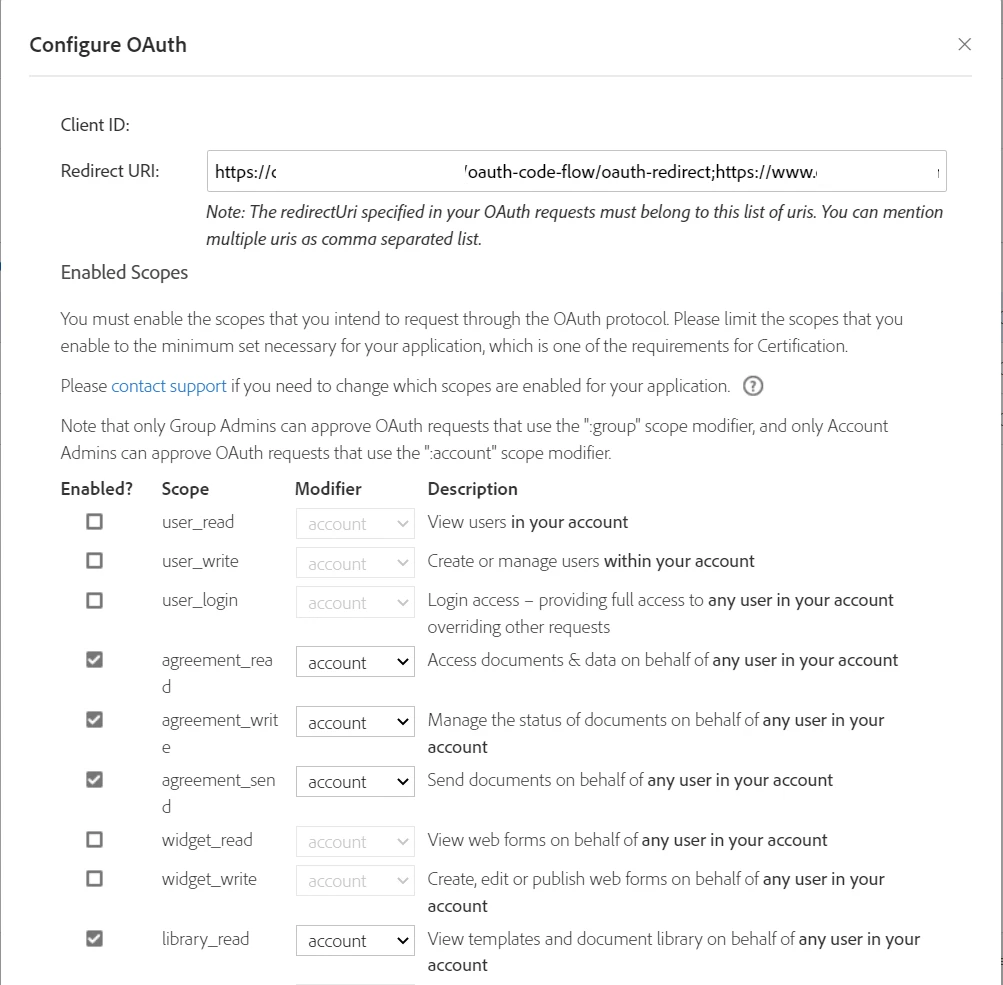
We do have the correct scopes enabled for our Acrobat Sign API Application that match the scopes being requested (see screen capture, with sensitive data redacted).
 

This topic has been closed for replies.
Correct answer ptbonterra

We resolved this issue.  It turned out that error was indicating the problem:

  • error: access_denied
  • error_description: Scopes not enabled for this application

We did the following:

  1. Set the Scope Modifiers in our API Application as follows: agreement_read:self, agreement_write:self, agreement_send:self (removed library_read since we don't think we need it)
  2. Modified our OAuth 2.0 Code Flow Application to redirect to https://secure.echosign.com/public/oauth/v2 with query String parameter "scope" that requests agreement_read:self, agreement_write:self, agreement_send:self

This resolved our issue.  We suspect that the older accounts may not be considered "enterprise" and the application scope modifier is for enterprise level accounts. 

1 reply

ptbonterraAuthorCorrect answer
New Participant
June 13, 2022

We resolved this issue.  It turned out that error was indicating the problem:

  • error: access_denied
  • error_description: Scopes not enabled for this application

We did the following:

  1. Set the Scope Modifiers in our API Application as follows: agreement_read:self, agreement_write:self, agreement_send:self (removed library_read since we don't think we need it)
  2. Modified our OAuth 2.0 Code Flow Application to redirect to https://secure.echosign.com/public/oauth/v2 with query String parameter "scope" that requests agreement_read:self, agreement_write:self, agreement_send:self

This resolved our issue.  We suspect that the older accounts may not be considered "enterprise" and the application scope modifier is for enterprise level accounts.