


Participant
October 27, 2023
Answered

Power Automate Adobe sign action(s) all have an exclamation point and can't save the flow now.

  • October 27, 2023
  • 4 replies
  • 1665 views

The flow was based on "Create an agreement from a library template and send for signature"
In SharePoint a user can select the record. Use the flow trigger that sends 2 sign agreements and a welcome letter. The agreements have dynamic values from the SharePoint record and have worked well until 2 days ago. The flows work but can not edit the flow or save the flow.
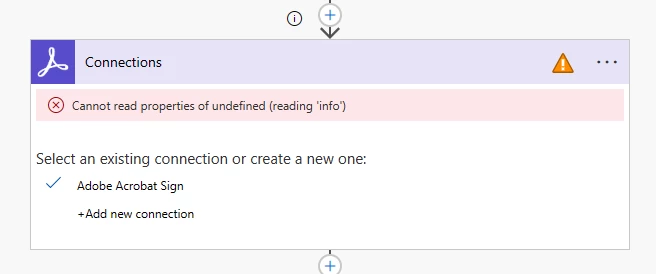
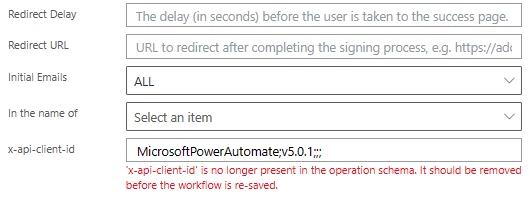


Also, in the Adobe "Create an agreement from a library template and send for signature" action this is also throwing errors and if removed and saved the action will not open at all.


Any idea what changed. Nothing on my side has changed.

This topic has been closed for replies.
Correct answer Sergio27359136h4ro

I solved it (I think) ... The exclamation point is gone and I can edit the flow again and is working. I had a back up of the flow. Open the adobe action take out (blank) the "x-api-client-id" field. Enter the connector person's email address (the user that set up the connections - Adobe) in the "In the name of" field in format:   email:x@x.com


If you were to take out (blank) the  "x-api-client-id" and save the flow (without doing the "In the name of")  part, it will be lost and will have to be recreated.

4 replies

Participant
October 31, 2023

I solved it. (I think) the exclamation point(s) are gone and the flow can be edited and is working. I had a back up of the flow. I removed (blanked) out the "x-api-client-id" field and the "In the name of" field put the adobe user (that set up the connection for Adobe) email address in the format:   email:x@x.com


If the "x-api-client-id" is removed and the flow resaved it will be lost as it will not be editable and will have to be recreated.

Sergio27359136h4roAuthorCorrect answer
Participant
October 31, 2023

I solved it (I think) ... The exclamation point is gone and I can edit the flow again and is working. I had a back up of the flow. Open the adobe action take out (blank) the "x-api-client-id" field. Enter the connector person's email address (the user that set up the connections - Adobe) in the "In the name of" field in format:   email:x@x.com


If you were to take out (blank) the  "x-api-client-id" and save the flow (without doing the "In the name of")  part, it will be lost and will have to be recreated.

Participant
October 31, 2023

We are having the same problem! Anyone figure it out?

Participant
October 31, 2023

I have the identical problem, starting around the same time.  Anyone have any answers?