


DarkKnightMike
Inspiring
January 4, 2018
Answered

Recipient pop-ups malfunctioning in "Send for Signature" feature

  • January 4, 2018
  • 1 reply
  • 1415 views

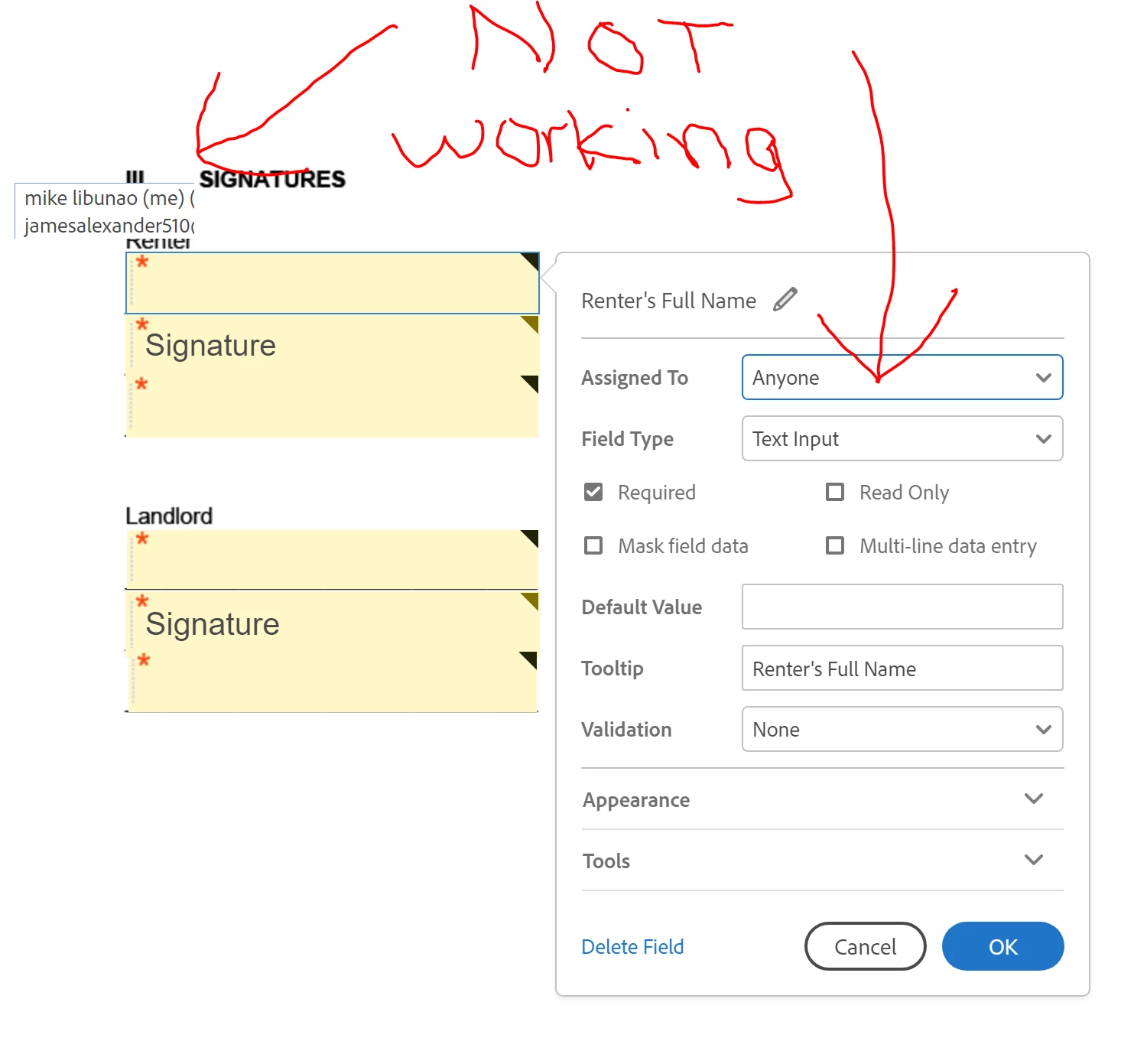
The pop-ups where you choose which recipient needs to fill out a field, or sign is malfunctioning. The pop-ups are cut-off, and the dropdown UI feature to choose the recipient itself doesn't work (the UI that pops up after double-clicking one of the form fields).

Here's my system info:

Windows 10 (v1703, build 15063.786)

Adobe Acrobat Pro DC (v2018.009.20044)
This topic has been closed for replies.
Correct answer DarkKnightMike

Please try to send the document for signature online here https://cloud.acrobat.com/sendforsignature

Open the link and sign in with the same Adobe ID and password that you use for Adobe Acrobat DC.

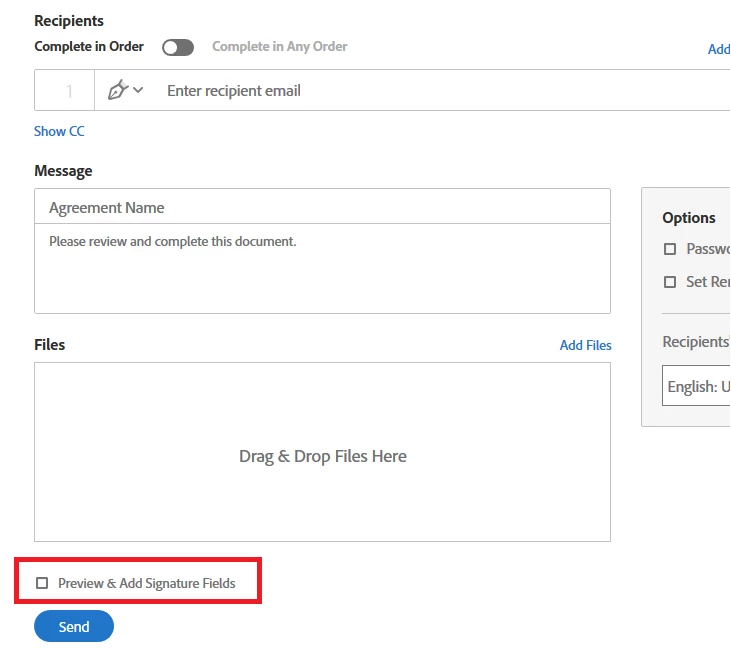
Once you on the Send page, make sure that you check the box for Preview and Add Signature at the bottom.

Then click on Send.

Then try to add the form fields to PDF form and check if the options work there or not.

Let us know how it goes.

Regards,

Meenakshi


So this workaround works, which is great. Still it would be awesome if the workaround wasn't needed at all, and it worked just within the app like it's supposed to.

1 reply

Meenakshi Negi
Community Manager
Community Manager
February 19, 2018

Hi DarkKnightMike,

Sorry for the delay in response.

As you have mentioned, you are not able to assign the form fields to the document under the send for signature.

Please try to update the application to the latest patch released.

Refer this help document Release Notes | Adobe Acrobat, Reader for information on the updates.

Then check if you still experience the issue.

Let us know how it goes.

Regards,

Meenakshi

DarkKnightMike
Inspiring
April 10, 2018

The problem still persists. Seein as how there are no further updates for Acrobat DC I assume I already have the latest version which is 2018.011.20038.

Again, this appears to happen only on PC as it functions as it should on Mac.

Meenakshi Negi
Community Manager
Community Manager
April 12, 2018
  1. Tried resetting preferences as instructed, and that didn't fix the problem.
  2. Used the cleaner to get Acrobat off of my system > restarted > reinstalled Acrobat DC > Didn't fix the problem
  3. Non-subscription version of Acrobat DC isn't an option for me since I'm only a Creative Cloud subscriber

I think it's safe to say that the "send for signature" feature on the Windows version of Acrobat DC is broken. It would REALLY be great if Adobe could fix this seeing as how this one of the more useful, and key features of the app.


Please try to send the document for signature online here https://cloud.acrobat.com/sendforsignature

Open the link and sign in with the same Adobe ID and password that you use for Adobe Acrobat DC.

Once you on the Send page, make sure that you check the box for Preview and Add Signature at the bottom.

Then click on Send.

Then try to add the form fields to PDF form and check if the options work there or not.

Let us know how it goes.

Regards,

Meenakshi