

moniqueh78571478
Participant
April 27, 2015
Answered

Reorder pages

  • April 27, 2015
  • 1 reply
  • 3023 views

Hi, I just signed up for individual esign account. Is there a way to reorder pages of a multi page template. Page 6 for instance should be after page 12. Is there a way of reordering without starting over?

Monique

    This topic has been closed for replies.
    Correct answer AadeshSingh

    Hi Monique,

    To reorder the pages in a multi-page template please follow the below steps. 
    • Open the template in Acrobat.
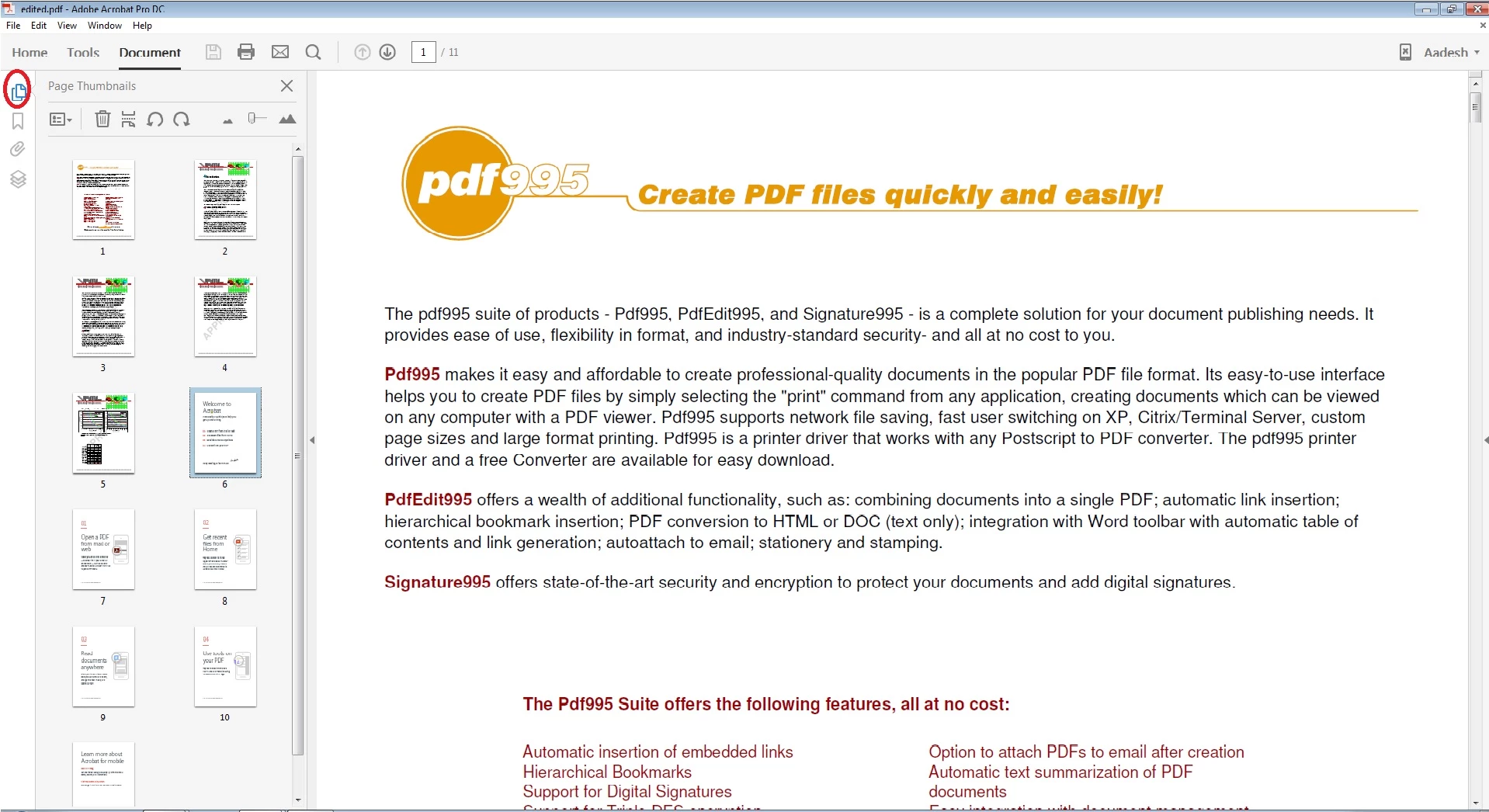
    • Click on the Page thumbnail option on the left as shown in the screenshot below.

    • Now you can drag & drop the pages of the template to the desired page location.

    Please Save the changes & once again you will have to upload the file to the e-sign account.

    Let us know if you still experience any issue, we will be happy to help you.

    Regards,

    Aadesh

    1 reply

    AadeshSingh
    Community Manager
    AadeshSinghCommunity ManagerCorrect answer
    Community Manager
    April 28, 2015

    Hi Monique,

    To reorder the pages in a multi-page template please follow the below steps. 

    • Open the template in Acrobat.
    • Click on the Page thumbnail option on the left as shown in the screenshot below.

    • Now you can drag & drop the pages of the template to the desired page location.

    Please Save the changes & once again you will have to upload the file to the e-sign account.

    Let us know if you still experience any issue, we will be happy to help you.

    Regards,

    Aadesh

    moniqueh78571478
    Participant
    April 28, 2015

    So when I save the PDF from this screen and open it in Adobe, it says it is a signed doc and can’t be edited. Is there a way to download the doc template without it thinking it is signed? I have this one all edited to be filled in, I don’t really want to start over.

    Monique Hanson

    CONFIDENTIALITY NOTICE: This message is intended for the sole use of the addressee.  It may contain information that is privileged, confidential, private, and/or protected from disclosure under applicable law. If you are not the addressee, you are hereby notified you may not use, copy, disclose, or distribute to anyone the message, any information contained in the message, and/or any information attached to the message. If you are not the addressee, please immediately advise the sender by reply email and destroy all copies of this message.  Thank you.

    [personal contact info removed by moderator]

    AadeshSingh
    Community Manager
    Community Manager
    April 28, 2015

    Hey Monique,

    That's correct, you won't be make any changes to the signed doc.

    { As a work around if you don't want the digital signature part & just want to reuse the template you can open it in Acrobat & use the 'Prepare Form' tool for the same document then delete the Digital Signature part, make the changes to the PDF & once again Save it. However this will compromise the authenticity of the document as the digital signature part will be removed. }

    Regards,

    Aadesh