



Jennifer33605755onq5
New Participant
November 2, 2024

Consistent Issues for Past 2 Days With Uploading Media to Posts

  • November 2, 2024
  • 38 replies
  • 6016 views

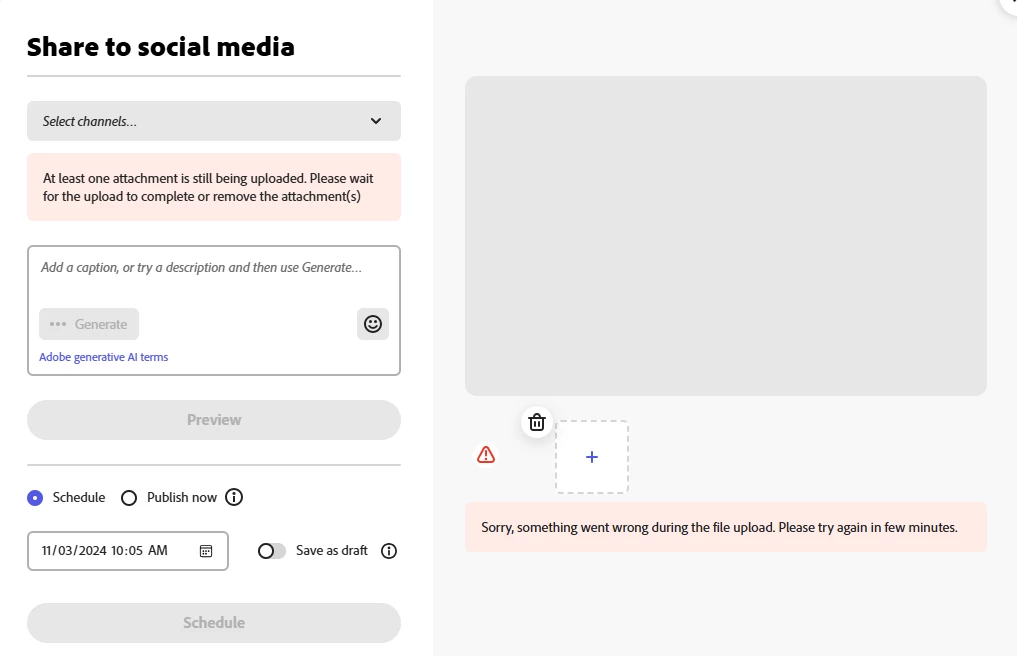
I have been receiving the error shown in the screen shot below for the last two days every time I attempt to upload media to a post in the Adobe Express Scheduler.


It is taking 7-10 attempts before the media will upload successfully. I have closed/reopened the website, cleared cookies, rebooted - none of these steps has any effect on the issue.


The issue is also occuring on my iPhone Adobe Express app.


I have never encountered this issue before. This is having a negative impact on my posting schedule and becoming very time consuming. 


Is something broken? Please advise and resolve. 
38 replies

New Participant
April 15, 2025

Its so slow tonight....I've been trying for almost 2 hours to get one uploaded. I have cleared the cache and deleted my history but still slow. Very frustrating!

Amitej S
Community Manager
Community Manager
April 16, 2025

Hi @amy_1481, Are you still having trouble working in Adobe Express? Have you tried using other recommended browsers, such as Edge, Chrome, Safari, or Firefox? Are you getting any error messages during the workflow? Can you share a screen recording so we can check and investigate?

I tried replicating this but it worked fine for me, can you retry and share your observations?


Best,

Amitej

Adobe Employee
March 16, 2025

@roni_7407 just wanted to double check that you are running into issues uploading assets in the Adobe Express Scheduler (as in the original post here) in addition to the uploading inside the Express editor (as you reported here)?


Thanks

Abhi G

Participating Frequently
March 16, 2025

Same on a Mac browser. Unreal.

New Participant
March 12, 2025

same problem 

Amitej S
Community Manager
Community Manager
March 12, 2025

Hey @cfir winehouse, Welcome to our Adobe Express community! Can you please explain your issue with Adobe Express more? What type of file are you trying to upload? Which social media platform do you want to post on? What device are you working from? Are you getting any error messages? If you could share a screen recording of the workflow with the feature's failure, it would help you investigate the issue. 


Thanks

Amitej

Tarun Saini
Community Manager
Community Manager
January 20, 2025

Hi @gailv29297809 @Jennifer32323596sxcr @Dan35343551qmci,


Could you please let us know if this is happening with images or videos while posting? Is it a specific platform? Is it consistent? Can you share the edit access of your project with us via private message?


Regards.

Tarun

New Participant
January 20, 2025
It is usually video and Instagram stories. I already downloaded and shared
the last one via my phone. I tried it again and it seems to be working
alright now. I can let you know when I have a problem again.
New Participant
January 18, 2025

A design, created in Adobe Express, will not load to be able to be scheduled in social media. I continually get an error: Sorry, something went wrong during the file upload. Please try again in few minutes.


Screenshot attached.

New Participant
January 17, 2025

Same issue. This has happened on and off for weeks. I've added extra time to an already long process. Please help.

New Participant
January 10, 2025

This happening to me too.  I am using Adobe Express within FeedHive.  I've rebooted my computer and tried repeatedly, but it is not allowing me to add any images to a blank canvas.  Please help!

Tarun Saini
Community Manager
Community Manager
January 8, 2025

Hi @jerryw48492253,


Thanks for your response. We're sorry for the delay. Could you please let us know if this is happening with images or videos while posting? Can you share the edit access with us via private message?

If possible, do you mind sharing the screen recording of the issue?


Regards,

Tarun

Known Participant
December 27, 2024

Here is a screenshot of what I see in the BRAVE browser. It looks the same as the error I am getting in Google Chrome. 


This particular item was based on an Adobe template. But I am also having issues with media created from scratch. I have restarted my Mac, tried a different browser, closed and reopened the tabs for new.express.


Here is the current problematic item:

https://new.express.adobe.com/id/urn:aaid:sc:US:661d8749-6c05-4d60-81f0-da2f3a294838?category=templates


My subscription account is under jerry@khaosdigital.com


This is the third time this has happened in the last 4 months.