



Francis-Crossman17221443
Community Manager
Community Manager
September 16, 2021
Question

DISCUSS: Automatically shut down the computer when the AME render queue is complete

  • September 16, 2021
  • 10 replies
  • 12858 views

You can now choose to automatically shut down your computer when the entire Media Encoder render queue is complete.  Check the option at the bottom of the queue. 
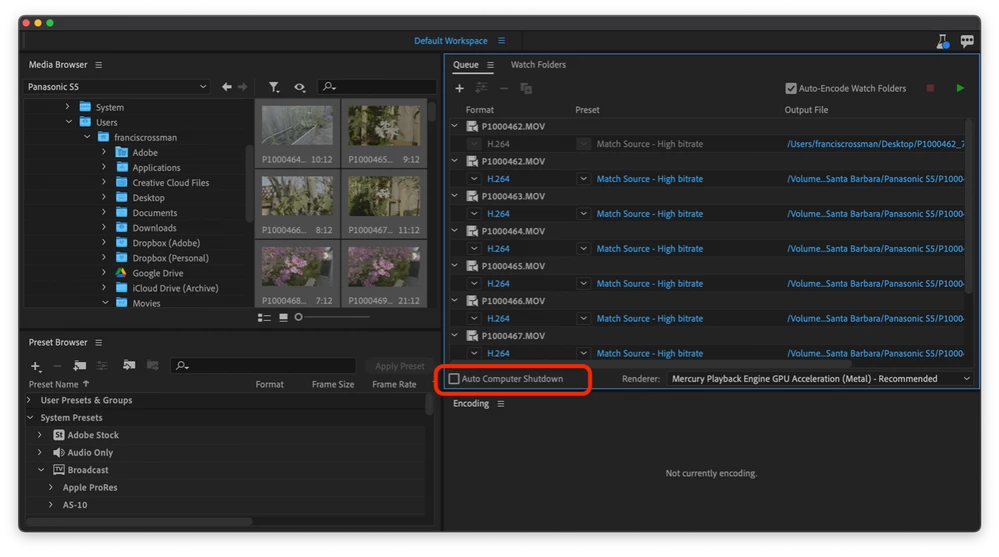


This is useful to save energy by powering down the system after a long overnight render job for example.  Media Encoder will issue the shutdown command to the OS, but other apps could still interrupt the shutdown process at the OS level, so be sure to quite those other apps.  This option is sticky, meaning it will still be checked the next time you launch Media Encoder.


Be careful testing, because . . . your computer will shut down . . . which is the intention of course 🙂


This feature is available in AME beta 22.0 build 89 and later.


We want to know what you think.  Please join the conversation below.

10 replies

New Participant
February 7, 2025

Ah nothing quite like pressing STOP hoping to correct a last minute mistake and see your computer shutdown before your eyes... please fix behaviour 😅 
STOP ≠ Queue Complete, OK to Shutdown

Inspiring
June 17, 2024

You know...


You don't really need this (or the option to sleep) if you make AME keep the machine awake while it's rendering. Then the normal sleep cycle will engage after the predefined sleep time in the OS.

Fergus H
Community Manager
Community Manager
July 6, 2022

This feature is now shipping in v22.5 of Adobe Media Encoder. More information is available here: https://helpx.adobe.com/media-encoder/using/whats-new/2022-2.html

elarj
New Participant
August 6, 2022

Would like to see an option to suspend/sleep system.

pablokur
Inspiring
October 27, 2022

Thanks for the info. 


I don't think we've been able to reproduce the problem where during rendering the machine sleeps. How long is your sleep time set to on the computer and how long are the renders (roughly)? 


Regards,

Fergus


Hello! Above I wrote that I suggested adding a check item to enable or disable (show/hide) the shut down option. Because sometimes I unintentionally activate it and I don't want it to turn off. Also, it activates sometimes with the spacebar.

I even attached a photoshop edited image in order to show what this option would look like. This is a fake image of course. Its attached. Thanks!

pablokur
Inspiring
July 6, 2022

Hi Francis! it may be great for those macbook users but it's not for imac's because i may accidentally check the option and I dont want to shut down so I can continue working. Maybe in appearance panel on preferences window would be great to show or hide the option. Tks! Sorry for my english! 

New Participant
June 10, 2022

It has been months since this was announced, is it ever coming to the regular version of Media Encoder?

Participating Frequently
May 27, 2022

Hello,


On version 22.4 build 53 where can I find this feature?

I'm on OS Monterey 12.4 if this is of importance.


Thank you!


New Participant
April 7, 2022

Hi, I am using AME version 22.2 built 64. If my version is more updated than your AME beta 22.0 build 89. I should find such option on my window


Ann Bens
Community Expert
Community Expert
April 8, 2022

Try the latest version of now.


Inspiring
January 16, 2022

I had never seen that option before.  It would be better if it would sleep rather than shut down.  Or provide the option for action after render queue is finished, with sleep/shutdown an option.

Participating Frequently
November 13, 2021

Make it a dropdown menu with multiple options like HandBrake does:


Averdahl
Community Expert
Community Expert
September 16, 2021
quote

This option is sticky, meaning it will still be checked the next time you launch Media Encoder.


By @Francis-Crossman17221443


IMHO this option should not be sticky.


I use this option in Macrium Reflect sometimes, not always, when i do daily backups and it´s a great feature and it´s great that it comes to AME. But since it does indeed shut down the computer without questions it has the potential to ruin things/work. That´s why i think this option should not be sticky.


Make it "un-sticky" as default and add the option to make it sticky in the Preferences.

Francis-Crossman17221443
Community Manager
Community Manager
September 16, 2021

That's a totally fair point @Averdahl. I tend to agree.

Ann Bens
Community Expert
Community Expert
September 18, 2021

No, don't make it sticky.

You're doing some other work and AME is running in the background, and all of a sudden your machine dies...........