



Improved Caching for Longer Playback: A New Era of Composition Playback in After Effects
Exciting news for After Effects users! Say goodbye to RAM limitations and hello to smoother, longer playback!
We are thrilled to announce that Improved Caching for Longer Playback is now available for After Effects Beta users beginning in version 25.2.0.079. Gone are the days where you need to buff up your system with massive amounts of RAM to preview your comp. This exciting update transforms how playback works in After Effects, moving beyond the constraints of RAM Preview to a more efficient disk-based system.
What’s New
Improved Caching for Longer Playback enables you to render and play back your entire composition without being constrained by RAM allocation. By utilizing the disk cache more efficiently, After Effects can now:
- Deliver longer playback durations
- Improve performance especially on systems with lower specifications
Why Does it Matter to You
Previously, After Effects would stop rendering when memory was exhausted, resulting in partial composition playback. Now, with Improved Caching for Longer Playback:
- After Effects will render entire compositions without RAM size constraints (4K? 60fps? You no longer need to render partial work areas!)
- RAM is used more efficiently to render individual frames
- The system dynamically cycles between disk and memory as needed
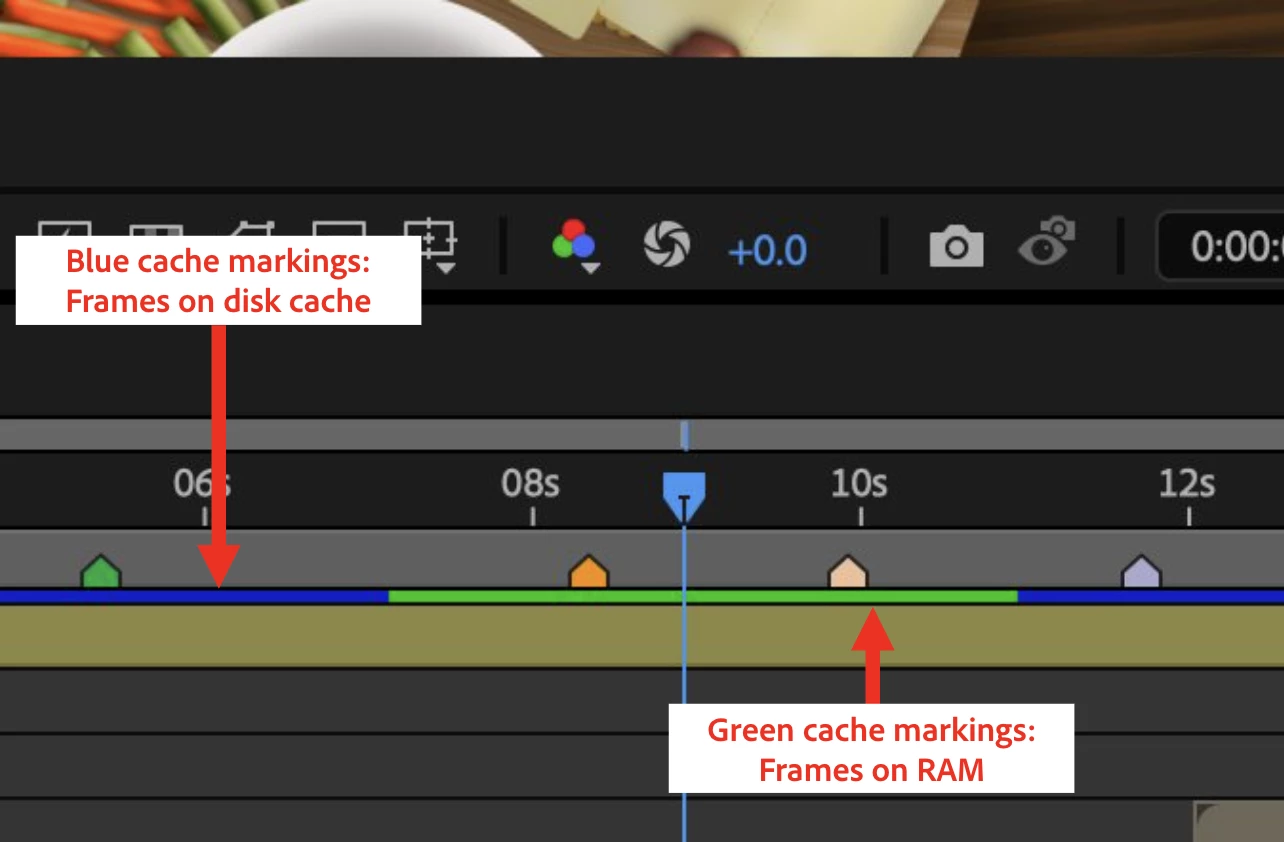
Getting Started
Improved Caching for Longer Playback is activated by default from version 25.2.0.079 of After Effects Beta. No additional setup is required to start experiencing the benefits.
If you need to disable Improved Caching for Longer Playback, please go to “Preferences” -> “Media & Disk Cache” -> “Advanced Options” -> Uncheck “Enable Preview from Disk Cache”
We Want Your Feedback
Test this feature with your projects and let us know:
- How does the playback duration compare to your previous experience?
- Are you noticing smoother preview/playback experiences?
- The cache bar (the blue and green bar under your composition) behaves differently than before: is it distracting? Is it confusing?
- Have you encountered any specific challenges or limitations?
Share Your Experience - Leave a comment with the following information:
- Your hardware specifications:
- Total system memory (GB)
- RAM available for AE (GB)
- Maximum Disk Cache Size in AE Preferences (GB)
- Available disk space (GB)
- Type/make of disk
- Your experience with Improved Caching for Longer Playback
If you detect any problems with quality, submit your projects
- Open your After Effects project
- Go to File -> Dependencies -> Collect Files
- Choose Collect -> Save As (Name Your Folder)
- After Effects will compile your .aep file, footage, and a text report
- Zip the folder and share the link with us in the comment section below (your projects will remain confidential and will be used for testing purposes only!)
Known Issues and Feature Limitations
The disk cache size and speed are limiting factors. The disk size limits preview duration. The disk speed limits the bitrate (frame size / FPS / bit-depth) of what can be previewed in real-time.
Looking Ahead
This is just the beginning of our journey to transform the way After Effects handles playback. Beta testing of Improved Caching for Longer Playback will last a little longer than some of our other features because it fundamentally changes how preview works on After Effects and we want to get it right!
Internally, we have been testing a representative sample of projects with a suite of hardware configurations, and we are excited to finally put this feature in your hands and get your feedback. Test your unique projects on your hardware so we can ensure that our performance updates benefit all customers and meet quality metrics before launch.
Your feedback during this beta phase is crucial in helping us refine and perfect this feature before its official release. We are excited to see how Improved Caching for Longer Playback enhances your creative workflow and look forward to your valuable feedback!
 AdChoices