




TeresaDemel
Adobe Employee
Adobe Employee
March 10, 2021
Question

Multi-Frame Rendering is here! (AKA The multithreading you’ve been asking for)

  • March 10, 2021
  • 147 replies
  • 167166 views

Multi-frame Rendering is here for After Effects beta users. Right now, you will have access to Multi-Frame Rendering for export only. Keep your eye on this forum, as we will be rolling out new features until we launch.


Internally, we have been testing a representative sample of projects with a suite of hardware configurations, and we are excited to finally put this feature in your hands and get your feedback. Test your unique projects on your own hardware so we can ensure that our performance updates benefit all of our customers and meet speed and quality metrics before we launch.


Beta testing of Multi-Frame Rendering will last a little longer than some of our other features because we currently do not support Multi-Frame Rendering in Preview, Motion Graphics templates, Dynamic Link, Adobe Media Encoder and AERender Command Line Interface.


Check out the blog and FAQ post to learn the following:

  • What is Multi-Frame Rendering?
  • What factors influence performance?
  • Which effects have been optimized for Multi-Frame Rendering?


Start Testing!
We want to hear from you! Share your thoughts and ideas in this forum.

  • How much faster is Multi-Frame Rendering compared to Single-Frame Rendering with your comps on your machine?
  • Does our benchmark project perform at the expected speed on your system?
  • If you run into specific speed or quality issues with your project, share your project with us at mfrbeta@adobe.com.


Test Your Comps
Test your comps in Multi-Frame Render mode vs. Single-Frame Render

  • Use Ae Render Queue to export your comp in Multi-Frame mode.
  • Purge both the disk and memory cache, then
  • Use Ae Render Queue to export your project in Single-Frame mode. Note: Use the same output module for Single-Frame and Multi-Frame mode. Go to Preferences -> Memory and Performance -> Enable Multi-Frame Rendering (beta) and uncheck the box to use Single-Frame Rendering Mode


Leave a comment and the following information in this forum:

  • Your hardware specs: # cores in your CPU, GB of memory, GPU model and amount of VRAM
  • Single-Frame render speed (Use “Render Time” noted in your status bar)
  • Multi-Frame render speed


If you detect any problems with render speed or quality, submit your projects

  • Open your After Effects project
  • File -> Dependencies -> Collect Files -> Collect -> Save As (Name Your Folder)
  • After Effects will store your .aep file, footage, and text report (file log)
  • Zip up your project and send it to us at mfrbeta@adobe.com (or send a link to it hosted on your creative cloud storage if it’s too large to email).


Share the following information in your comment:

  • Your hardware specs: # cores in your CPU, GB of memory, GPU model and amount of VRAM
  • Single-Frame render speed (Use “Render Time” noted in your status bar)
  • Multi-Frame render speed
  • Mercury CPU or GPU Mode used


Test our benchmark project and see how your hardware compares
We would love to know how your hardware compares to the results we have gathered from our test suite:
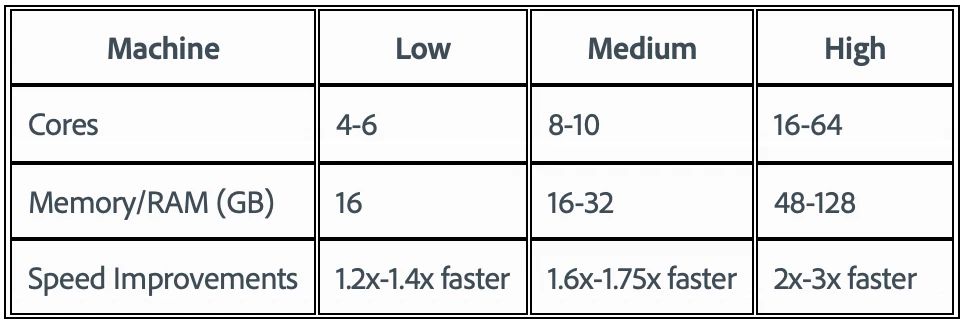
 

To test the benchmark project on your machine:

  • Download the benchmark project
  • Use Ae Render Queue to export the benchmark project in Multi-Frame mode.
  • Purge both the disk and memory cache, then
  • Go to Preferences -> Memory and Performance -> Enable Multi-Frame Rendering (beta) and uncheck the box to use Single-Frame Rendering Mode
  • Use Ae Render Queue to export the benchmark project in Single-Frame mode. Note: Use the same output module for Single-Frame and Multi-Frame mode.


Share the following information in this forum:

  • Your hardware specs: # cores in your CPU, GB of memory, GPU model and amount of VRAM
  • Single-Frame render speed
  • Multi-Frame render speed

147 replies

New Participant
March 11, 2021

It's wonderful to see your project show my 12 threads maxed out at 100% usage! 🙂

What would be more wonderful is to see my projects do the same.

I started running some of mine and it doesn't do the same.

Also lumetri had to be diabled as it's not set up for Multi-Frame Rendering.

I know this is beta. But If I would have seen my projects max the cpu usage out I'd be much

more excited.

I love you Adobe, Keep at 'er....


New Participant
March 11, 2021

Specs: AMD Ryzen 5950x / 64 GB RAM / RTX 3090 (nothing is overclocked or put on boost mode etc)


Results:

Single frame: 8 min, 55 sec

Multi-frame:3 min, 54 sec

March 19, 2021

Almost the same specs here: 

AMD Ryzen 5950x 16 Cores / 128 GB RAM / RTX 3090 FE 24GB


Results:

Single frame: 9 min, 11 sec

Multi-frame:3 min, 48 sec


Tried this beta with other project, render fails because of insufficient VRAM (not true, 6GB used at full load)


Anyway. Adobe, you've made my day!

Community Manager
March 19, 2021

Awesome result! For your other project, you could try flipping to Mercury Software mode (for now, until we better handle the GPU VRAM OOM issues), and see if it completes.

New Participant
March 10, 2021

AMD Ryzen 9 3900X 12-core 3.80 GHz / 128 GB / RTX 2080 Ti 11GB (3x) / Win 10 (64) / 4TB SSD Scratch / 1TB M2 OS drive

  • Mercury Software / Single Frame = 14:52, 3.7 GB cache used
  • Mercury GPU (CUDA) / Single Frame = 18:04, 9.2 GB cache used
  • Mercury Software / Multi Frame = 8:20, 59.4 GB cache used
  • Mercury GPU (CUDA) / Multi Frame = 9:37, 5.4 GB cache used
Known Participant
March 10, 2021

AMD Ryzen 3960X/ 256GB Ram/ 3xRTX 3090/Win 10/Mercury GPU

To ProRes 422 HQ

With Multiframe: 4:36
Single Frame: 12:36

SnoopMikey
New Participant
March 10, 2021

Love this - total game changer!


Specs: Intel i9-10900K (10 cores) / 128 GB RAM / GeForce RTX 2060 8GB VRAM


Results:

- Single-Frame Render Speed: 11:33

- Multi-Frame Render Speed: 6:33

(both with w/ Mercury GPU Accelleration) 

Inspiring
March 12, 2021

TRS Mikey!!! Thanks for the memories.

Inspiring
March 10, 2021

I thought this day would never come. 


Would love to know more about how this differs from the old multiframe render (2014)


Here are  my Benchmarks:


AMD Threadripper 3960x 24 Core ~4ghz, | 128GB DDR4 RAM, | rtx2080ti 11GB | Windows 10 64 20H2


Single Frame Software to ProRes4444 - 12min 30s....painful so I didn't rerun with GPU. 

Multi Frame w/ Mercury to ProRes4444 - 4min, 11s (average # of cores / threads 😎

Mutli Frame Software to ProRes4444 - 4min, 21s

----
For comparison: 


RenderGarden w/ AE18.0 12 Seeds, 12 Threads Software (enabling GPU tends to crash due to lack of sufficent vram):  Last  thread 4min 12s then QT and h264 creation put it to 4min 43s total. 


Inspiring
September 24, 2021

Here's the bad news....


I rendered one of my real world projects w/ Render Garden 12 seeds / 12 threads and It cranked out the comp in 5Min 33s using the stable release of AE. GPU On etc. 


Beta using MFR same settings It took over twice as long at at 11min 56 seconds. 


The project is a lot of shape layers, some 3d sections, sort of a typical vector animation job. No third party effects or really many effects of any kind except for fractal noise in one scene.


It feels like MFR really bogs down on any of the sections with a lot of 3D Layers. 


Hoping they can still work out some of the kinks in MFR on real world projects it still struggles to use the whole CPU for me Happy to share the project file to adobe if they think they can learn something from it! 


Community Manager
September 25, 2021

If you're able to send us the comps, we'd love to look at them. Send them to mfrbeta@adobe.com. 

In terms of VRAM usage, it'll be swapped out as soon as space is needed. No performance impact as far as we are aware. 

thanks! 

Participating Frequently
March 10, 2021

I have been waiting for this feature to come back for so long!


Here are my results:


CPU: i7-6950x

RAM: 64GB

GPU: Titan X (Pascal) 12 GB

OS: Win 10 64-bit


Single Frame: 18 min 45 sec

Multi-Frame: 9 min 16 sec

andy-mrio
Inspiring
March 10, 2021

Hi,

exciting update!


Here's the result of the benchmark (export is a PSD sequence):

  • Intel i9-9900k / 64gb ram / rtx3080 - 10gb vram / Windows 10 64bit
  • Single frame : 12:20
  • Multi-Frame : 7:04
  • Mercury GPU


Also rendered with 17.7 (gpu) : 11:53


New Participant
March 12, 2021

AMD Ryzen 7 3800X - 8 cores/16 threads at 4.3ghz
32gb RAM at 3333mhz
1050ti 4gb
windows 10 64 bit

Single: 16:03
Multi: 10:16
Software only render, as the mercury CUDA crashed the render due to not enough VRAM

Community Manager
March 12, 2021

There should be an update in today's AE Beta build (x24) that should reduce the likelihood of VRAM running out. That said, you may end up with a better result from software with your configuration as the benchmark project does push the GPU VRAM usage.