




TeresaDemel
Adobe Employee
Adobe Employee
March 10, 2021
Question

Multi-Frame Rendering is here! (AKA The multithreading you’ve been asking for)

  • March 10, 2021
  • 147 replies
  • 167166 views

Multi-frame Rendering is here for After Effects beta users. Right now, you will have access to Multi-Frame Rendering for export only. Keep your eye on this forum, as we will be rolling out new features until we launch.


Internally, we have been testing a representative sample of projects with a suite of hardware configurations, and we are excited to finally put this feature in your hands and get your feedback. Test your unique projects on your own hardware so we can ensure that our performance updates benefit all of our customers and meet speed and quality metrics before we launch.


Beta testing of Multi-Frame Rendering will last a little longer than some of our other features because we currently do not support Multi-Frame Rendering in Preview, Motion Graphics templates, Dynamic Link, Adobe Media Encoder and AERender Command Line Interface.


Check out the blog and FAQ post to learn the following:

  • What is Multi-Frame Rendering?
  • What factors influence performance?
  • Which effects have been optimized for Multi-Frame Rendering?


Start Testing!
We want to hear from you! Share your thoughts and ideas in this forum.

  • How much faster is Multi-Frame Rendering compared to Single-Frame Rendering with your comps on your machine?
  • Does our benchmark project perform at the expected speed on your system?
  • If you run into specific speed or quality issues with your project, share your project with us at mfrbeta@adobe.com.


Test Your Comps
Test your comps in Multi-Frame Render mode vs. Single-Frame Render

  • Use Ae Render Queue to export your comp in Multi-Frame mode.
  • Purge both the disk and memory cache, then
  • Use Ae Render Queue to export your project in Single-Frame mode. Note: Use the same output module for Single-Frame and Multi-Frame mode. Go to Preferences -> Memory and Performance -> Enable Multi-Frame Rendering (beta) and uncheck the box to use Single-Frame Rendering Mode


Leave a comment and the following information in this forum:

  • Your hardware specs: # cores in your CPU, GB of memory, GPU model and amount of VRAM
  • Single-Frame render speed (Use “Render Time” noted in your status bar)
  • Multi-Frame render speed


If you detect any problems with render speed or quality, submit your projects

  • Open your After Effects project
  • File -> Dependencies -> Collect Files -> Collect -> Save As (Name Your Folder)
  • After Effects will store your .aep file, footage, and text report (file log)
  • Zip up your project and send it to us at mfrbeta@adobe.com (or send a link to it hosted on your creative cloud storage if it’s too large to email).


Share the following information in your comment:

  • Your hardware specs: # cores in your CPU, GB of memory, GPU model and amount of VRAM
  • Single-Frame render speed (Use “Render Time” noted in your status bar)
  • Multi-Frame render speed
  • Mercury CPU or GPU Mode used


Test our benchmark project and see how your hardware compares
We would love to know how your hardware compares to the results we have gathered from our test suite:
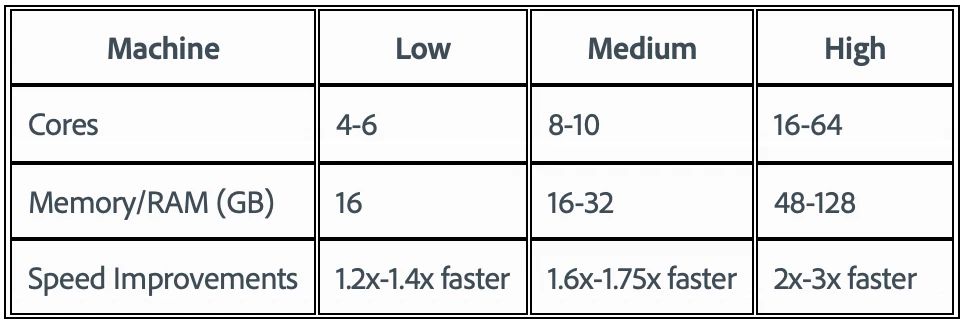
 

To test the benchmark project on your machine:

  • Download the benchmark project
  • Use Ae Render Queue to export the benchmark project in Multi-Frame mode.
  • Purge both the disk and memory cache, then
  • Go to Preferences -> Memory and Performance -> Enable Multi-Frame Rendering (beta) and uncheck the box to use Single-Frame Rendering Mode
  • Use Ae Render Queue to export the benchmark project in Single-Frame mode. Note: Use the same output module for Single-Frame and Multi-Frame mode.


Share the following information in this forum:

  • Your hardware specs: # cores in your CPU, GB of memory, GPU model and amount of VRAM
  • Single-Frame render speed
  • Multi-Frame render speed

147 replies

Kyle Hamrick
Community Expert
April 3, 2025

Hey @TeresaDemel , just a heads-up that the link in your original post appears to be offline. Perhaps an unintended casualty of the Adobe cloud storage shift? I'm not sure how often people are still grabbing this project, but might be worth updating to a new download link when you have the chance. Thanks!

Inspiring
September 9, 2024

I'm not sure where things got off the track but anecdotally I have seen a steep decline in render performance over the least few releases. Multi-frame render will only render 1-2 frames at a time:


And my CPU and GPU sit mostly unused, with huge amounts of availiable ram. I'm not rendering that heavy of comps, just a few video clips and shape/text layers and yet I cant get anywhere near real time even at 1/4 1080p res. 


Over half  CPU is idle while rendering only 1-2 frames at a time! 


The benchmark still renders fast with 8-10 concurrent frames rendering at a time and 80-100CPU useage, but it seems like vast portions of the app are not optimized at all when it comes to real-world usage! 

Community Manager
September 9, 2024

Can you send us a sample project that isn't rendering well? Happy to look through it and see what is going on.

Inspiring
September 9, 2024

I'll see if I can send a sample. Don't have a ton of time today but soon. 

ACC MotionVFX
New Participant
January 26, 2024

Hadn't checked back here in a while and figured I'd run my new work laptop through the test to see how it did. It's crazy how far things have come in the last couple years with optimization. UI is snappy for me and I have no problem previewing this at Full quality. I'll take it.

2023 16-inch MacBook Pro
MacOS Sonoma 14.2.1
Apple M3 Max
128GB RAM
40-core GPU
After Effects 24.1.0
Multi-Core: 3:39
Single-Core: 6:22
CAPS off

Inspiring
January 26, 2024

Dude you've got an m3 max, what do you expect 🙂

ACC MotionVFX
New Participant
January 31, 2024

Honestly expected all of the stuff I've been dealing with the last few years as far lacking resource utilization, etc. on the Mac side. Nice surprise.!

New Participant
November 29, 2023

- I9-9900K, 8 core, 16 thread; 64 GB ram; RTX 2080Ti 11GB vram

- Single-Frame: 15 min 14  sec

- Multi-Frame: 10 min 00 sec

AE Version: 22.0.0

New Participant
April 10, 2023

Legion 5 15IAH7

i7-12700H 14C 20T, 16GB RAM, RTX 3050Ti 4GB VRAM

PNG Sequence

Caps lock OFF

Mercury CUDA

14 min 36 sec (multi frame not available)

AnimoMotion
Participating Frequently
September 14, 2022

After Effects 2022 version 22.5

Windows 10 64bit 19042.1706

CPU AMD Ryzen 9 5950X 16-Core Processor 3.40 GHz

GPUZotac GeForce RTX 3080 Trinity OC 10GB GDDR6X PCI-Express

RAM  G.SKILL Trident Z Neo Series 128GB (4 x 32GB) 288-Pin DDR4SDRAM DDR4 3600


MultiCore: 3m49s

SingleCore: 10m12s

Caps Lock OFF


Note - This was running from my M.2 OS Drive, using a seperate M.2 Media Cache 

I will post results from running the project on my normal project drive (an SSD drive) which I run Dropbox on, later today. 

I will also post results from my Macbook M1 Max, 64GB RAM later as well. 


And eventually I'll run these with Caps Lock on, and then with AE 22.6. I don't expect wildly different results but good to compare. I have been working on a project which has had numerous crashes and failed renders using Multi-core and only when I switched to Single-Core could I get it rendered. This project has multiple fx and plug-ins, as well as various large PSD layers and 3D layers. So something there isn't playing well but I am unsure at present if it is Multi-Core related or something like an effect or layer that is causing the problem. I will continue to investiage and post results here for those projects too (after delivery!)

AnimoMotion
Participating Frequently
September 14, 2022

Mac OS Monterey 12.5

Macbook Pro 16 2021

M1 Max

64GB RAM

After Effects 2022 22.6.0 (Build 64)

Running under M1 After Effects:

Multi-Core: 8m27s

Single-Core: 11m27s

Caps Lock OFF 

Running After Effects (Intel Version):

Multi-Core: 13m10s

Single-Core: 18m33s

Caps Lock OFF

Known Participant
June 23, 2022

i've been out of the loop in here for a while. But today my Mac Pro udpated to 22.4 and it seems when i'm scrubbing the timeline my content is juddery. which i've never seen before. it's also not doing this on my MBP running the same version. What's annoying is i've also just changed my display to the Pro XDR and wonder if there is something there doing it. Any advice most apprecaited.

Cheers


Known Participant
June 24, 2022

Just to add, the issue is only when the display is in a scaled resolutions in its full 6k the issue doesn't exist. And when I force the display into anything over 3k it also doesn't exist. But the default for display and anything lower is terrible. 

Known Participant
June 24, 2022

Plot thickens it actually does it on my MacBook Pro also running the oatest version. Especially when the comp is in full resolution. So has actually nothing to do with the display. 

Known Participant
April 6, 2022

Mac Studio

M1 Ultra 48-Core GPU

128GB Ram

macOS 12.3.1

After Effects Beta 


Multi-Frame render time (benchmark project): 04:26


This is a demo of the experiencing of cache-previewing the project (half resolution, starting with memory & cache purged):


Known Participant
April 6, 2022

Ok, so it seems After Effects actually uses the M1 Ultra decently when rendering; this is a snapshot at the end of the test render.
The trouble I'm seeing is that the computer is not used nearly as much in the normal workflow, and it feels a bit weird to see some lag, and the CPUs not being used to their fullest.
Anyway seeing the scores I noticed the render time is close to a threadripper 5900x; great performance but given the specific advantages of the M1 Ultra, I'd expect a bit more.
I think AE could be optimized further to reduce the render time to 4.00 minutes flat.


Twelvizm
Participating Frequently
March 12, 2022

Why is my project rendering so painfully slow while AE is hardly using my computer's resources?

Community Manager
March 14, 2022

My guess is you are using effects in your project that are not all MFR compatible? You can look for a yellow warning icon for each effect in the Effects Control window to see if any are not. In that case, AE needs to slow down the render somewhat to account for those non-compatible projects. 

mkzayar
Known Participant
March 10, 2022

Hope I am not reporting my result after THE END. I have been subscribing Adobe Suite for very long but never ever been used any other application except Photoshop and Illustrator. Bought Mac Pro 2019 about 6 mohths ago and did not have chance to use it till now.


Multi Fram ON : 3:43

Multii Frame OFF : 12:14


Mac Pro 2019

CPU : Xeon W-3275M - 28 Core - 56 Threads.

RAM : 96GB

HDD : 8TB Apple SSD 

Graphic Card : 2 x W6800X Duo

Extra PCIE : After Burner Card, Sonnet 4x4 (Silent) with 4x2TB WD SN850.


The result seems Mac Pro 2019 is not quilified to use Adobe especially AE. I know photoshop is slow even to save and need to wait sometime 5-10 sec to save but after tryig to preive the project in AE, it almost making me cry to see that playhead is not even moving and getting barely 2fps. I cannot belive my eyes.


MF-ON

MF-OFF


This Mac Pro 2019 cost me so much but seems like Adobe is not meant for Mac anymore. I use Davici Resolve, Motion, Hitfilm, Blender, C4D and did not notice anything that make me slowdown except Fusion Effects.


I can see a lot of people here are gettting very good result and but me .. nah


I would like to ask here what is wrong with my Mac Pro ?

How can I check ?

Is Adobe just for Windows ?


I also check with PUGETBENCH yesterday and just got 874.


Don't know why is the Tracking Score is so low.

Is it because of Adobe is not compatible with Mac or Intel Mac ?

Only M1 or Threadripper can use faster ?


Regards

Community Manager
March 10, 2022

Your export times look much faster with MFR on than MFR off, and at about 3x faster which is right inline with the expected performance improvements for that machine.


The benchmark project isn't meant to preview in real time (unless you drop it to 1/4 resolution or lower, then you'll get closer). 


hellopaul4
Inspiring
March 10, 2022

This is why it'd be very interesting to compile a league table of the various Intel/AMD PCs and Macs from these results - it could save people many £thousands when speccing an After Effects machine, and as I mentioned before, it'd be very interesting to see if Apple can redeem themselves as AE maybe becomes more optimised for their Apple Silicon. From a brief look through people's posts, Apple's current line-up seems to be somewhat lacking in the performance department.


(I know, I know...one benchmark project does not fit all usage scenarios, but it's an interesting starting point!)