Community Manager
February 18, 2025
Question

New in Beta: Welcome to Smooth Zoom in After Effects!

  • February 18, 2025
  • 13 replies
  • 6104 views

We're excited to introduce Smooth Zoom in After Effects (Beta) version 25.2.0.113, a major improvement to zooming in After Effects that allows for precise, fluid magnification in the Composition, Layer, and Footage panels.


What’s New?

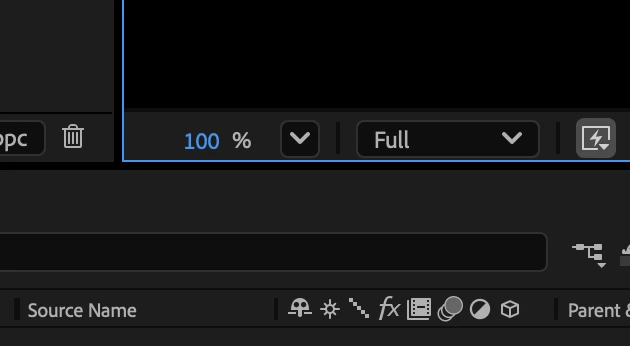
Since the earliest versions of After Effects, zooming was limited to fixed magnification levels (33.33%, 50%, 100%, 200%, etc). That’s no longer the case! With Smooth Zoom, you can now adjust magnification to any valid value with decimal-point precision using a new hot text control in the viewer.


All zooming tools in After Effects have been upgraded to incorporate this new capability:

  • Precise hot text Magnification control directly in the viewer.
  • Scroll wheel zooming with smoother, more precise adjustments.
  • Redesigned Zoom Tool behavior for a more intuitive experience.


Additional Enhancements
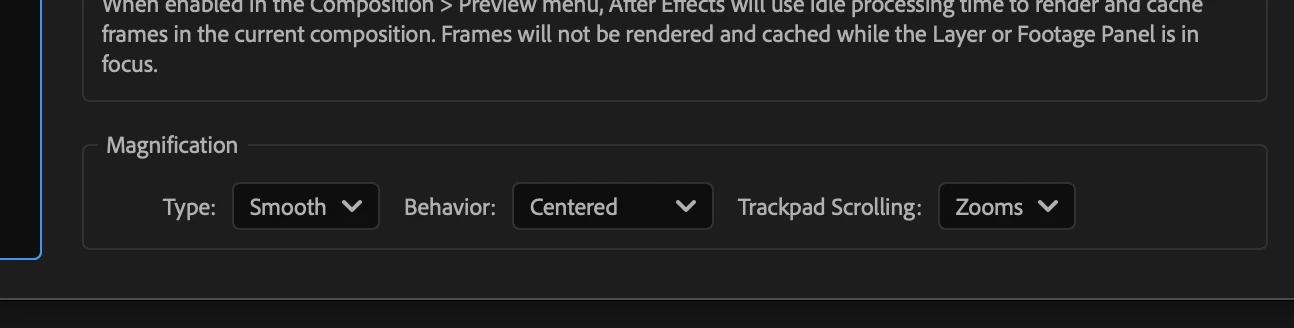
You can find new settings under Preferences -> Previews -> Magnification :

  • Type: Choose between Smooth and Legacy.
  • Behavior: Follow Cursor or Centered.
  • Trackpad Scrolling: Zooms or Pans.


Legacy Mode reverts to the original fixed increments when using various zooming methods if preferred.
Behavior : Follow Cursor magnifies the viewer based on the cursor's current location. 

Behavior : Centered Always zooms to the center of the panel. 

You can toggle between Follow Cursor and Centered behaviors dynamically by holding down the Alt/Option key while zooming. The view stays locked onto the intended area—whether zooming to the center or under the cursor.


  • Trackpad & Touch Enhancements:
  • Pinch to Zoom feels more natural and responsive.
    A new mode Trackpad Scrolling : Pans allows two-finger drags to pan the viewer, mimicking the Hand Tool. The pan direction respects OS settings and can be reversed if desired (Natural Scrolling Trackpad setting).


Increased Maximum Zoom Levels: AE now allows zooming beyond previous limits if the image buffer size permits (e.g., if the maximum zoom allowed for the current composition size is 5000%, it can now be reached instead of the 3200% limit being imposed before due to the fixed magnification level).


Zoom Snapping & Speed Control:

  • Zoom will snap to the prior common zoom values for accuracy (eg. 33%, 50%, 100%, 200% etc).
  • Hold Shift to speed up zooming, Ctrl (Windows) / Cmd (Mac) to slow it down.


We Need Your Feedback!
We’d love to hear how Smooth Zoom fits into your workflow. Specifically:

  • Should the default Zoom Behavior be Follow Cursor or Centered?
  • Do you like the new Trackpad Scrolling: Pans functionality as the default?
  • Is Legacy Mode necessary, or would you be ok if it were removed?


Give it a try and let us know what you think in general!
 

13 replies

Wabber_HM
Inspiring
September 18, 2025

This is my first time using the new zoom behavior in the latest public After Effects. I guess following the cursor is intuitive. It was always more of an "After Effects-only" way, of just zooming to the center and at fixed increments. But I kind of miss the fixed increments. Now it's just zooming to arbitrary, multi-decimal place zoom levels which often make the preview look blurry. And is there a way to re-center the view? What was even a problem before was if I pan around and then zoom, it won't take me back to a centered view. I feel lost without it. In Photoshop, I just press the Home key and it centers the view to the top. And I could always press Ctrl+1 to reset to 100%. How do I reset to base easily in this?

JohnColombo17100380
Community Manager
Community Manager
September 18, 2025

Hi @Wabber_HM,

To easily center the view, either press Alt + / (Option + / on Mac) which will zoom up to 100% and center the view, or use Alt+double click on the Zoom tool to center without changing the zoom level. You can also customize how the zoom behaves in Preferences -> Previews -> Magnification—you can switch back to the Legacy zooming, or simply change the smooth zoom to be centered on the comp view (rather than the cursor).

Cheers,

- John, After Effects Engineering Team 

Participating Frequently
June 17, 2025

Pan should not be set as default. I think that it should focus in on the curor, not zoom centered

Shebbe
Community Expert
Community Expert
April 7, 2025

Hello devs,


Are there any plans for improving the zoom? It's still unusable via the zoom tool because it is not smooth. The biggest problem is that the axis of zoom in/out detection feels to be sort of at a 45 degree angle instead of horizontal or vertical. You can see in my video example the redicolous difference in stability between AE zoom and Mocha plugin zoom. I would expect the quality to be on par.

Shebbe
Community Expert
Community Expert
June 11, 2025

@Amir Stone hi, I'm now on the latest beta 25.4b44 and most of the smooth zoom issues I highlighted in my previous post seem to be resolved and the threshold axis has been moved to vertical which to me at least is the best candidate! I'm very happy with these changes. It's still a bit finicky at small zoom levels because the relationship of amount of px of mouse movement vs zoom speed is very sensitive. Perhaps this is something that can still be improved. 


Regardles it's at a much better state than that from my previous report. So thanks.

Participant
March 19, 2025

the trackpad think is amazing, but how about still being able to zoom in and out when scrolling by holding option/alt. like in photoshop for example. i use the magic mouse and it's really unusable for me without the photoshop zooming thing. and i think it make since in general.

Cheers!

Community Manager
March 20, 2025

Currently Option/alt dynamically switches the behavior between zoom to cursor and zoom to center of composition.

Participant
April 7, 2025
that’s sad 😞
it’s practically unusable for anyone with the magic mouse as it is at the moment. I undertand that not everyone uses the Magic Mouse, but maybe you can put it in consideration.

I also can’t think of any benifits of having the old zoom to center of composition thing. zoom to cursor is superior in every context that i can think of. maybe just make it like adobe photoshop? I think their implementation is great and would work perfectly. or maybe add an option in the preferences.

I’m curious about your plans for this. what do you think is likely to get implemented?

Cheers!
MyerPj
Community Expert
Community Expert
March 18, 2025

Oh, thank goodness! 🙂

Sorry, I'm late to the party... I havent been in AE recently


I switched over to AE 25.1 on something quick today, after not being able to zoom in and out. I found the below now, so I'm good to go. I can only use ctrl-scroll as the basic zoom is way to fast now. I have a different type of mouse. Lenovo Scrollpoint mouse. Been using them since they were IBM scollpoints... 🙂 You can control the speed by pulling or pushing the scrollpoint 'button'. 


Anyway, so glad I found this: Why is Premiere stuck with the panning while they sort it out, with no option (I'm aware of) to set it back to zoom? Here's what helped from above: 

You can find new settings under Preferences -> Previews -> Magnification :

  • Type: Choose between Smooth and Legacy.
  • Behavior: Follow Cursor or Centered.
  • Trackpad Scrolling: Zooms or Pans.
RobBarrett
Community Expert
Community Expert
March 13, 2025

It might be nice to have a way to modify the default zoom speed. Personally, at this early stage of testing, I'd rather the default were more like the Shift-zoom (ie. more like legacy, to more rapidly zoom in and out without needing a modifier key), but with the option to still control it more precisely with Cmd-zoom.

cdglab
Participant
February 27, 2025

Not sure if I missed a setting for zooming on a Mac using the standard magic mouse. Previously I could zoom with the mouse anywhere on the screen using the magic mouse middle scroll (zoom). Now I can only use the magic mouse middle scroll (zoom), when I hover my curser over the zoom panel.


Can you bring that previous function back, or the ability to use a combined option button holding will scrolling (zooming) to activate it?

cdglab
Participant
February 28, 2025

Thank you for adding back the option to switch between either pan or zoom on the trackpad! Works great on the Apple magic mouse.

Inspiring
February 22, 2025

I use a Graphic Tablet to work, not a mouse with scrollwheel. Would it be possible to assign Keyboard shortcuts to it? I like the behavior: follow cursor, would like to have that with shortcuts

Community Manager
February 20, 2025

Thanks all. Keep the feedback coming. We're taking a look at everything. To echo what John mentioned, as behavior can be different from device to device or system to system, please make sure to mention, along with your feedback, system specifics including your OS (Mac or Win), input device (trackpad, specific mouse, touch), scroll method (zoom tool, pinch, scroll wheel, hot text) so we can ensure we can address the feedback correctly.


- Amir, After Effects Engineering Team

JohnColombo17100380
Community Manager
Community Manager
February 20, 2025

Thank you all for your feedback! In testing, we've also noticed descrepancies between zoom speeds on different devices. For those of you that feel the zoom speed is too slow, what OS platform are you on and what device/action are you using for zoom? E.g. scroll wheel, pinch on trackpad, etc.


- John, After Effects Engineering Team 

Inspiring
February 20, 2025

Windows 11 - 23H2 - build 22631.4602
mouse scroll wheel