

Christine Goldby
Known Participant
October 18, 2022
Question

Welcome to 3D Model Import in After Effects!

  • October 18, 2022
  • 27 replies
  • 61607 views

Today is one of those really exciting days for us on the After Effects team. The ongoing work building out our 3D design space now gets the best addition yet – native support for 3D models. As of today’s build (23.1 Build 44) you can now import .OBJ, .GLB or .GLTF models directly into your project, and drop them into your composition. 


We are anxious to get this into your hands so we can learn more about the features you want us to focus on. This is not meant to replace a dedicated 3D product. We are building a 3D toolbox to enhance your creative options directly within After Effects. 


Choose CMD/CTRL + I (or File > Import > File) and import your model from the browser window. When you drag your model into the comp, a Model Settings dialog will appear. You can also reopen this dialog any time from the Layer menu. Change the settings to get the model to the sizing you want, or choose the ‘Make Comp Size’ button to have AE do it for you. 
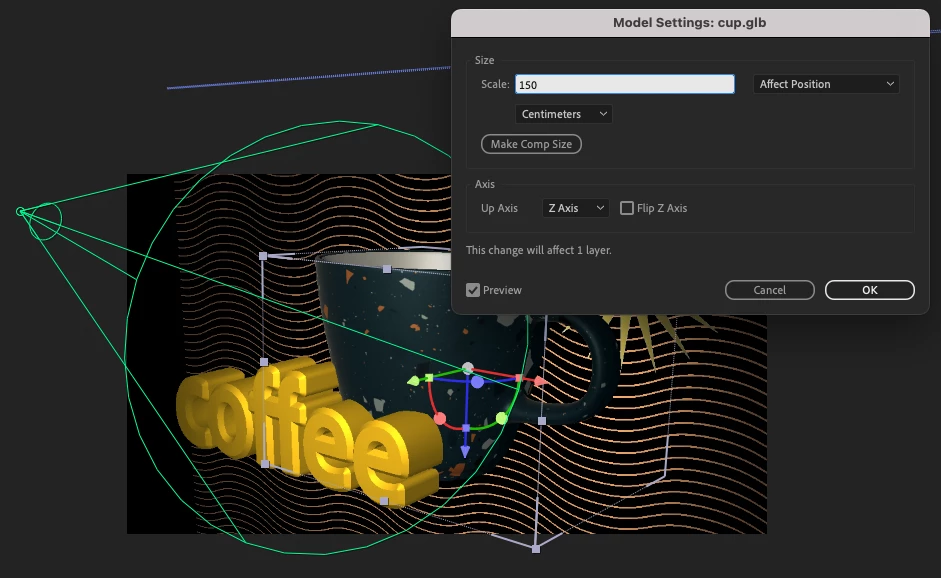


With this first build, the models will import with any materials already attached, into your composition – alongside other 2D or 3D layers. In the same way that there is now a default 3D camera until you choose to add your own, there is a default light which will be disabled when you add new lights to the scene. 


Rendering-wise, we are starting from the ground up. When you add a model to your comp, your 3D renderer will change to the new ‘Mercury 3D’. Turn on Draft 3D to use the ground plane or extended viewer, as well as faster previews once your composite gets busy. Work on the render engine has been focused on basic functionality, and there are plenty of features not present yet, such as shadows or material modifications. We look forward to learning more about what you need here specifically. 


We’ve created this FAQ with answers to the first set of questions we anticipate, as well as Known Issues in this build. We will add on to this as we go along.  


We hope you are as excited as we are, and we can’t wait to see what you create. ENJOY! 


27 replies

hellopaul4
Inspiring
April 29, 2024

Does AE (I'm on Beta 24.5.0 Build 21) support animated GLB files? I have an animated GLB file (all animation is baked etc) which plays fine if I import it (the GLB file) into Blender or an online viewer, but when I import it into AE, I see the Animation Options, but regardless of which one I select, there is no animation (yes, I have the comp set to Advanced 3D Renderer).

Interestingly, if I import that same model into the public release version of AE (24.3.0 Build 50), there are no "Animation Options" at all - just the Transform and Compositing Options (and the comp's set to Advanced 3d).


Any thoughts?

Thanks in advance for any help!

~ Paul

Volition74au
Inspiring
March 25, 2024

I've predominantly spent time in the 2d world and dabble in incorporating 3d in my work. 

One thing I'd love some help with is scale. When I create objects in 3d software and bring them into AE they are tiny or huge I just have no idea about scaling when it comyto importing.

Does anyone have like a rule of thumb for scaling objects in 3d into AE. How many metres is a HD comp for example. In a typical view.

AndrewTheGreat
Known Participant
March 25, 2024

There's button on import - make comp size. Stick to it

Shebbe
Community Expert
Community Expert
March 25, 2024

Make comp size may work for a project with just a singular object but falls apart if multiple need to be imported at their respective scale but within a sensible rescale within the new 3d application. AE's problem is that this seems to be completely arbitrary without any means of conversion ratios/tables. This is actually problematic with more advanced renderers because things like ambient occlusion, shadows and other rendering techniques may be impacted by scene size.

Participating Frequently
December 4, 2023

No you can't.  I have the latest AE and I can't import any 3D models...was this feature removed in v24 !?

New Participant
November 8, 2023

I did the same thing you did, but the file format does not appear when I want to transfer the file. When I try to put it in a folder and try, it says the file format cannot be read this time, what should I do?

New Participant
October 28, 2023

I'm on AE version 24.0.0 and it won't let me import ANY 3D object. I tried .obj, .glb, and it just doesn't accept it. Why?!

AndrewTheGreat
Known Participant
October 6, 2023

Isn't AE 2024 still not able to import 3d objects and only the 2023 beta is?

JDK - Multimedia
New Participant
August 24, 2023

Is there a minimum hardware spec for this funtionality? I can import a glb but when placed in a composition all I can see is a bounding box, not the object itself.


AndrewTheGreat
Known Participant
November 5, 2023

Seems like it does not have embeded textures. What format is that?

New Participant
June 19, 2023
  • It'd be great if you can rough out a scene with 3d models and the 2D elements and then send that information (boxes for text, boxes for shapes, model and camera properties) to Cinema 4d.
New Participant
June 19, 2023

Also a nice toon render would be awesome to blend with shape layers!

New Participant
April 5, 2023

The main thing I find sorely missing from After Effects' toolset is 3D projection mapping capability. Currently you can project onto planes in a very crude way but it would be great to be able to do basic 3D modelling possibly encorporating the 3D camera tracker to block out a scene and then project the clip onto the basic geometry. I feel like this is a big thing that is missing compared to other compositing software like Nuke or BM Fusion. Thanks

New Participant
March 9, 2023

I have a motion graphics project and have some 3D models I would like to integrate into it, so I made sure I was up to date on After Effects (23.2.1 Build 3) and attempted to import an obj file. However, the file is greyed out on the import dialogue screen, and if I drag the folder with the obj, mtl and skin folder, the only thing that gets imported is the flat jpg skin. I was able to successfully open this same obj file in Photoshop, so if the file type is supported, I'm not sure how to activate it.


Is there a step I'm missing? Thanks!

TimKurkoski
Community Manager
Community Manager
March 9, 2023

Hi @jeremymathewsnsps,


3D model import is currently only available in After Effects Beta. The current beta version of After Effects Beta is 23.3 build 46.


It sounds to me like you're looking in the public release build of After Effects, which is version 23.2.


You can install After Effects Beta, or update to the latest version, via the Creative Cloud desktop app. More information about Beta apps is available here:
https://helpx.adobe.com/x-productkb/global/creative-cloud-beta.html

New Participant
March 9, 2023

Ah, that would be the issue — thanks, I'll install it!