Participant
August 4, 2023

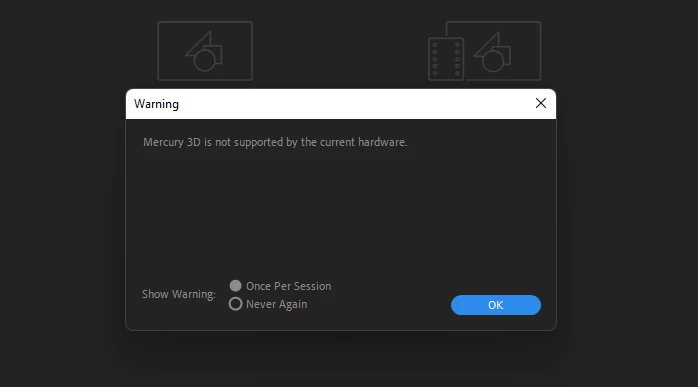
After Effects 2023 Error Message "Mercury 3D is not supported by the current hardware"

  • August 4, 2023
  • 21 replies
  • 25098 views

I have uploaded the error message.
Please advise us on which type of hardware we have to update.
21 replies

Jenkmeister
September 6, 2023

I think the GPU should be ok, but if it is crashing After Effects, I'd start with making sure your video drivers are up to date. 

Participant
September 6, 2023

I am getting this same error, and AE crashes each time I open it in Windows 10.  I am not using any 3d functionality.
Intel(R) Core(TM) i7-10510U CPU @ 1.80GHz 2.30 GHz,  32 gigs of RAM, NVIDIA GeForce MX250.  Is my video card no longer sufficient for AE?

Jenkmeister
September 5, 2023

@War Unicorn The Mercury 3D engine is not the same thing as OpenCL. OpenCL is the display/effects compute technology. Mercury 3D is a new rendering engine specifically for 3D object import and rendering.

Jenkmeister
September 5, 2023

It is expected in AE Beta builds but not in the non-Beta builds. We are going to fix that with the next release. We are also going to improve the error message so you know if it's due to the generation of GPU card in use, or the amount of GPU VRAM, etc., so you will know what action to take. 

War Unicorn
Community Expert
Community Expert
September 1, 2023

Umm...

Anyhoo, it's not that much an issue, because Mercury 3D is trash. OpenCL works better on both my systems. (Also: LOL on "Mercury 3D composition renderer is a high-quality, performance-oriented 3D renderer.") Now if I can just figure out why the Cinema 4D renderer is suddenly causing me issues, we might get somewhere.


(It figures that just as I'm getting to know After Effects is when things go kablooey for unexplained reasons, as just a version ago it was working fine.)

Known Participant
August 31, 2023

Did you see the post of your colleagueTom Olsen ?

Just one day after your post

You say - This is unexpected behavior

He says - This is expected behavior

Tom Olsen
Community Manager
Community Manager
August 17, 2023

This error message leaked from beta into the 23.x release builds. It should not have appeared. 

If you are running a 24.0 beta build and you see this message, then your video hardware (NVIDIA QUADRO K620 -- 2GB VRAM) does not meet the minimum requirements for "Advanced 3D" (4GB). This has nothing to do with CPU or system RAM.

See this post:
https://community.adobe.com/t5/after-effects-beta-discussions/3d-model-import-new-v2-faq-and-documentation/td-p/13997714


  • System Requirements
  • The Mercury 3D renderer requires a GPU with at least 4GB of VRAM. On Windows, the GPU must support Direct 3D feature level 11.1 or higher.
nishu_kush
Community Manager
Community Manager
August 16, 2023

Hi all,


This is unexpected behavior and has been reported. It'll not affect the After Effects functionally, and you can choose Never Again in the dialogue box to stop seeing it at every launch.

Hope it helps.


Thanks,

Nishu

War Unicorn
Community Expert
Community Expert
August 13, 2023

I just recently updated to v. 23.6 myself and get this same exact warning, which is strange, since the version before it (23.5) was just fine (though it did things like "draft 3D"...poorly; pretty sure I'd prefer OpenCL anyway, since that's much faster). I confirmed this once more by going back to 23.5 briefly; I do not get the error. But once I update to 23.6 once more, the warning pops up once again.


This is on my rather meager laptop; haven't tried on my main system yet, but they both use Intel GPUs. (The laptop uses Xe; the desktop uses Arc.)


EDITED TO ADD: I've also tried different drivers from Intel; the latest (4577) to the version before it.(4575).

ToolfarmJP
Community Expert
Community Expert
August 4, 2023

Is your graphic card driver the latest?


Participant
August 4, 2023

Processor: 11th Gen Intel(R) Core(TM) i7-11700K @ 3.60GHz 3.60 GHz

Installed RAM: 64.0 GB (63.9 GB usable)

Display Adapter: NVIDIA QUADRO K620
